Basic concepts
Understand the basic concepts of Vivox Core.
Read time 2 minutesLast updated 9 months ago
The following diagram details the various components of the Vivox integration:
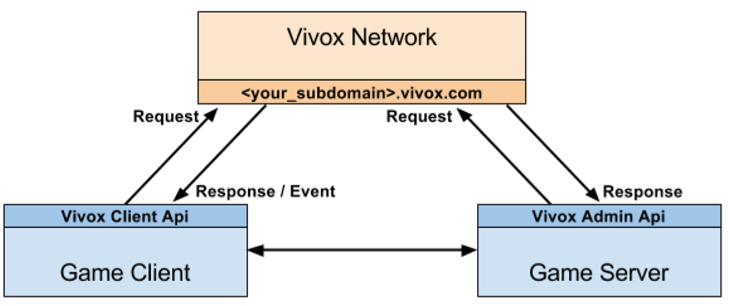
The Vivox integration includes the following elements:
Core elements
- Vivox network: Consists of Vivox-deployed and operated servers. Responsible for providing all voice and related services to clients.
- SIP URI: Identifies a user or channel on a Vivox network by using either SIP or XMPP protocols. Takes the form: .
sip:\<destination>@\<domainName> - Vivox Server to Server Web API: A web-based API that allows game servers to communicate with the Vivox network.
- Vivox Client API: An API that is provided by the Vivox SDK libraries that enables communication between a client and the Vivox network.
Game server elements
- Account and channel management: Game-specific logic that identifies users and channels within the Vivox network and manages their relationships within the game's systems.
- Access token management: Logic that manages Vivox access token keys and issues access tokens to authorize individual requests.For more information, refer to the Access Token Developer Guide.
- Third-party call control - Logic that allows game servers to manage users in channels (for example, kick a user or mute a user).
Game client elements
- Login management: Logic that determines when to connect the user to the Vivox network to enable voice communication for a user.
- Channel management: Logic that determines which channel to use and when to join and leave that channel.
- User interface controls: Logic to manage user feedback (for example, connection, speaking, and volume) during the voice session, and voice-related control over a local user and that user's audio experience.
- Error handling: Logic to handle unexpected events, such as a sudden disconnection from the network.