Volume differences
Learn about voice channels in Vivox Core.
Read time 2 minutesLast updated 9 months ago
Positional channels have lower default volume settings than 2D channels. 3D channels are a third quieter than 2D channels.
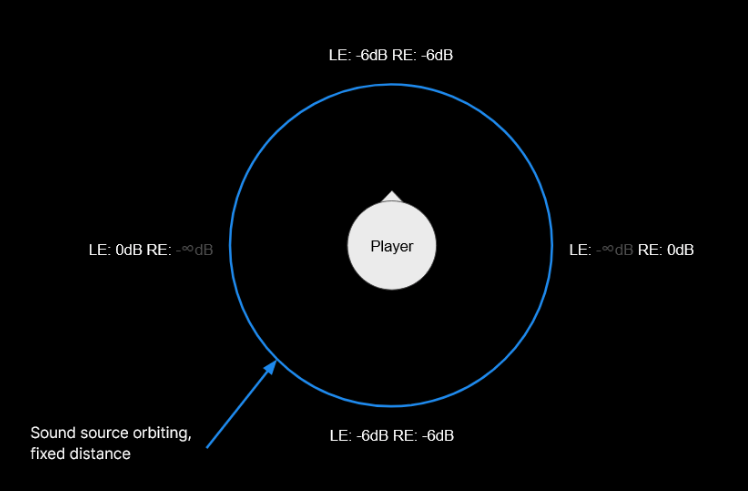
This difference is by design. Positional channels need more headroom for sound to be stereo panned, so they initialize with a lower level.
Positional channels are set to -6dB. This allows positional channels to adjust when panned hard left or right while maintaining volume dynamically.
For context on decibel levels, -10dB is what most listeners perceive as “half as loud”.
Equalizing channels
It’s possible to match channel loudness by lowering the loudness in 2D channels to the base level of 3D channels. It’s important to note that each 2D channel needs to be lowered individually every time they’re joined or re-joined. There isn’t a universal setting to manage all 2D channels at once.
Another approach is to raise the audio in the 3D channel by 6dB to match the volume of 2D channels.
If you choose to equalize the volumes between channel types, the main thing to keep in mind with these volume changes is that you need to manage individual volume boosting as the changes made are increasing the channel-wide volumes already. It’s best to not allow users to increase the volume to a level that could be harmful.
To set the volume level of an entire individual channel, use . If you choose to raise the level of 3D channels set them to 56. If you choose to lower 2D channels to match the default 3D channel volume instead, set 2D channels to 44.
vx_req_session_set_local_render_volumeFor more information on managing local volume settings, refer to In-game control of audio levels.