Documentation

​
​

Development

User Acquisition

Monetization

Industry

Vivox Core SDK

Vivox Core SDK

Vivox
​
​
Vivox Core SDK
  • Overview
  • Before you begin
  • Get started
    • Integration guide
    • Quick start guide
      • Initializing Vivox
      • Logging in
      • Assign a unique username
      • Generate a login access token
      • Submit a login request
      • Joining and leaving channels
      • Generate and submit a join token
      • Process join responses and events
      • Handle join errors
  • Release notes
  • Developer Guide
  • Reference
  • Privacy overview
  1. Vivox Core SDK documentation

Logging in

Overview of the Vivox login workflow
Read time 1 minute
Last updated 8 months ago

One of the most important steps in utilizing Vivox is to log a user into the Vivox service. Before you begin, decide on when in the game flow the user will be logged in
The following image shows the login workflow:
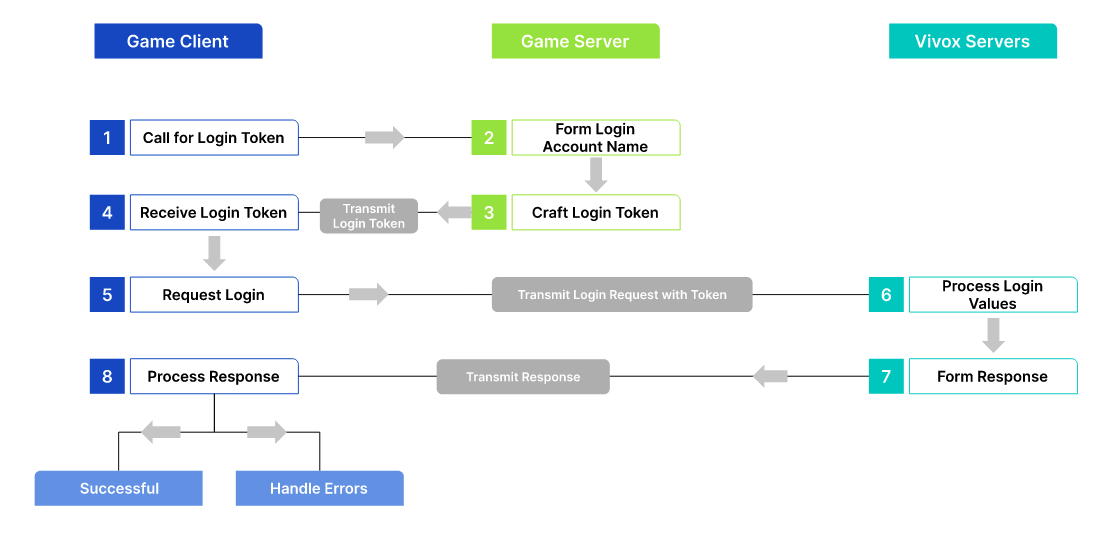
A diagram showing how the Game Client, Game Server, and Vivox Servers interact.
Before you can log a user into the Vivox service you need to:
  1. Assign them a unique username.
  2. Generate a login access token.
  3. Submit a login request.
  4. Prepare for handling responses and events.

Copyright © 2026 Unity Technologies
LegalPrivacy PolicyCookiesDocumentation Terms of UseDo Not Sell or Share My Personal InformationYour Privacy Choices (Cookie Settings)

"Unity", Unity logos, and other Unity trademarks are trademarks or registered trademarks of Unity Technologies or its affiliates in the U.S and elsewhere (more info here). Other names or brands are trademarks of their respective owners.

Some pages are machine-translated for convenience, and may contain inaccuracies. In the event of conflicting information, the English version is authoritative.


    Report a problem with this page