Access Token Developer Guide
Navigate access token topics to learn generation, format, and management.
Read time 1 minuteLast updated 8 months ago
Player access to Vivox resources is controlled through Vivox access tokens. Vivox access tokens contain a payload that defines the privileged operation, are signed by the game server by using a token signing key, and are delivered by the client to the Vivox system when the player wants to perform a privileged operation. A Vivox access token is similar to a JSON Web Token, but instead has an empty access token header.
Access tokens have the following characteristics:
-
You can only use atoken once. After you use a token for the privileged operation, it cannot be reused.
-
Tokens expire even if they are never used. You cannot use a token after the expiration time that is set by the token issuer.
Game clients require access tokens to perform operations in the Vivox system.
- Game client-generated tokens - use for prototyping or testing purposes
- Secure game server-generated tokens - use for the secure deployment of a production game and to avoid token errors due to user time settings
Note that before either a client or a server can generate a token, you need a token issuer and a token signing key.
For more information, refer to Where do I find my custom application credentials? in the Unity Support knowledge base.
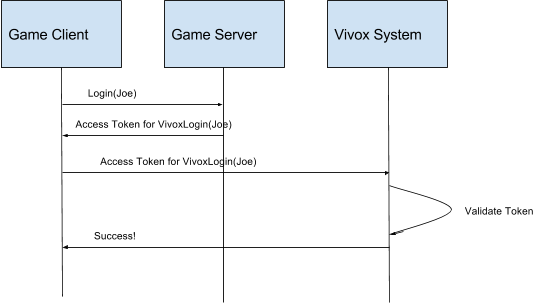
The following diagram displays a typical interaction between a game client, the game server, and the Vivox system: