Vivox アクセストークンと UAS の併用
Follow this workflow to use Vivox Access Tokens together with Unity Authentication Services.
読み終わるまでの所要時間 2 分最終更新 6ヶ月前
どのプレイヤーがどのチャンネルにアクセスできるかを完全に制御するために、自分のバックエンドで Vivox アクセストークン (VAT) を作成できます。
前提条件:
- Unity Cloud プロジェクトを設定する
- プロジェクト ID、環境 ID、環境名を確認してください。
- UAS カスタム ID プロバイダーを有効にする
- この設定のサービスアカウントの認証情報が手元にあることを確認してください。
以下の図は、この設定の全体的なフローを示しています。
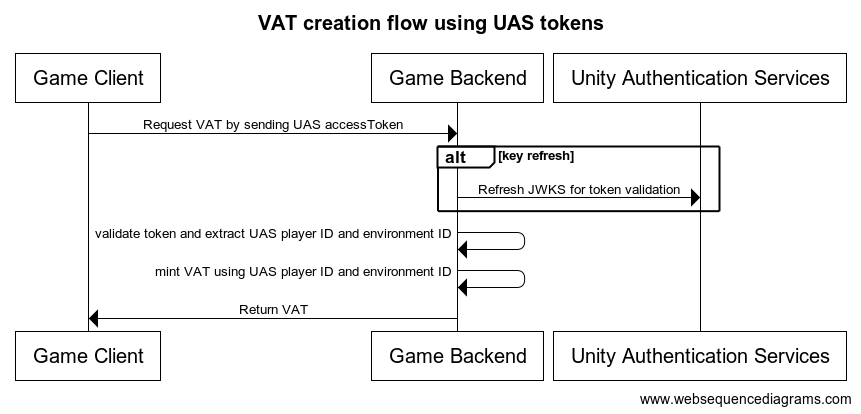
VAT の作成
- Vivox SDK は、カスタムプロバイダー実装を使用する際に VAT が必要な場合にバックエンドに VAT をリクエストします。
- メソッド内で VAT をリクエストするときに、
GetTokenAsyncをバックエンドへのリクエストに追加します。accessToken - バックエンドで、トークンから必要な情報を検証して抽出し、Vivox アクセストークンを作成してそれをクライアントに送り返します。
クライアント側の設定
ゲームクライアントでは、Vivox SDK の インターフェースを実装するクラスを作成し、それを VivoxService に登録します。
IVivoxTokenProviderIVivoxTokenProvider の実装を を呼び出すことで登録すると、Vivox はトークンが必要なアクション (サインインなど) で常にその実装の メソッドを呼び出します。
VivoxService.Instance.SetTokenProviderIVivoxTokenProvider.GetTokenAsyncペイロードを作成するのに必要な情報が、オーバーライドされた メソッドの入力として提供されます。この情報は、VAT を作成するときに使用されます。
IVivoxTokenProvider.GetTokenAsyncその場合でも、サーバー側トークンベンディングを設定し、オーバーライドされた メソッド内でそのトークンをフェッチする必要があります。
IVivoxTokenProvider.GetTokenAsyncサブスクライブするには
プレイヤーをサインインする前に、以下を使用して の実装を登録する必要があります。
IVivoxTokenProviderVivoxService.Instance.SetTokenProvider(new CustomTokenProvider());
トークンをフェッチする
オーバーライドされたメソッドで提供されているすべてのパラメーター (一部は空の場合あり) を使用してペイロードを作成し、安全なサーバーに送信して、Vivox アクセストークンを作成します。
すべてのパラメーターを送信することをお勧めします。ペイロードで必要なもののみが返されます。そのペイロードを メソッドの入力として使用します。
GetTokenAsyncさらに、リクエストのペイロード内の UAS accessToken を送信して、サーバーがそれを検証してそこから Vivox アクセストークンを生成できるようにする必要があります。
トークンによって、空になるパラメーターが異なります。例えば、サインイントークンでは と が空になります。これは想定されている動作です。
targetUserUrichannelUriトークン生成の例を以下に示します。
public class VoiceManager : MonoBehaviour{ async void Start() { // Must be done before any other Vivox action otherwise tokens will not be generated properly. VivoxService.Instance.SetTokenProvider(new VivoxTokenProvider()); await UnityServices.InitializeAsync(); await VivoxService.Instance.InitializeAsync(); }}class VivoxTokenProvider : IVivoxTokenProvider{ public Task<string> GetTokenAsync(string issuer = null, TimeSpan? expiration = null, string targetUserUri = null, string action = null, string channelUri = null, string fromUserUri = null, string realm = null) { if (!AuthenticationService.Instance.SessionTokenExists) { // Player not logged in! } var accessToken = AuthenticationService.Instance.AccessToken // Implement token fetching logic here. // The method parameters together with the accessToken from the AuthenticationService contain the necessary information for crafting the request payload. // This will be called whenever a token is needed for a Vivox action }}
サーバー側の設定
バックエンドサービスは、クライアントが必要なときに VAT を受け取るために 上記 の 関数内で呼び出すことができる API 関数を公開する必要があります。
GetTokenAsyncVAT の作成方法に関する実装の詳細については、安全なサーバー上でのトークンの生成 を参照してください。
トークンのペイロードの詳細については、アクセストークンのペイロード を参照してください。
VAT を作成するときは、以下のユーザー SIP URI を subject として使用する必要があります。
sip:.issuer.unity_player_id.unity_environment_id.@domain.vivox.com
issuerunity_player_idunity_environment_idこれらの値はいずれも、 メソッド内でクライアントからバックエンドへ送信される accessToken から抽出できます。
GetTokenAsyncその後、 は トークン ID の検証 で説明されている手順に従って検証されます。
accessTokenトークンの クレームには、UAS プレイヤー ID が含まれています。トークンの クレームには、環境 ID が含まれています。 値は大文字小文字が区別される文字列の配列で、それぞれ StringOrURI 値が含まれています。
subaudaud{ "header": { "alg": "RS256", "kid": "<id>", "typ": "JWT" }, "payload": { "aud": [ "upid:{{unity_project_id}}", "envName:{{environment_name}}", "envId:{{unity_environment_id}}" // unity environment id ], "exp": 1617677595, // expires at "iat": 1617673872, // issued at "nbf": 1617673872, // not valid before "sub": "{{unity_player_id}}", // UAS player ID "project_id": "{{unity_project_id}}" // unity project id }}
それを使用して VAT を作成し、クライアントに送り返すことができます。