オーディオデバイスの管理
Allow players to select audio input and output devices.
読み終わるまでの所要時間 6 分最終更新 9ヶ月前
Vivox SDK では、システムのデフォルトのオーディオ入出力デバイスが自動的に使用されます。この動作をオーバーライドして、グループ音声チャットに使用するオーディオデバイスを、ゲームで使用されるオーディオデバイスとは別にユーザーが選択できるようにすることができます。
このオーバーライドを実行するには、利用可能なデバイスのリストをユーザーに表示するユーザーインターフェースをそのゲームにビルドし、ユーザーがそこからデバイスを選択できるようにします。このユーザーインターフェースを InputDevices と OutputDevices 用にビルドし、 と を利用して または のどちらかの ReadOnlyCollection を返し、UI にこれらのデバイスの名前を設定します。
VivoxService.Instance.AvailableInputDevicesVivoxService.Instance.AvailableOutputDevicesVivoxInputDevicesVivoxOutputDevicesこのユーザーインターフェースを および アクションにサブスクライブし、 および からの新しいリストでこの UI を更新して、AudioDevices のリストから追加または削除をキャッチする必要があります。
VivoxService.Instance.AvailableInputDevicesChangedVivoxService.Instance.AvailableOutputDevicesChangedVivoxService.Instance.AvailableInputDevicesVivoxService.Instance.AvailableOutputDevicesユーザーがリストからデバイスを選択したら、V を使用して入力デバイスを設定するか、 を使用して出力デバイスを設定します。
ivoxService.Instance.SetActiveInputDeviceAsync(VivoxInputDevice device)VivoxService.Instance.SetActiveOutputDeviceAsync(VivoxOutputDevice device)以下の例は、リストから選択された後のオーディオデバイスをどのように設定する必要があるかを示しています。これには、オーディオデバイスがまだデバイスのリスト上にあることを確認して、ユーザーインターフェースのロード中にオーディオデバイスに変更がなかったことを確認するためのチェックも含まれています。
async void SetVivoxInputDeviceAsync(VivoxInputDevice device){ if(VivoxService.Instance.AvailableInputDevices.Contains(device)) { await VivoxService.Instance.SetActiveInputDeviceAsync(device); }}await void SetVivoxOutputDeviceAsync(VivoxInputDevice device){ if(VivoxService.Instance.AvailableOutputDevices.Contains(device)) { await VivoxService.Instance.SetActiveOutputDeviceAsync(device); }}
ChatChannelSample には、 内の AudioDevice リストを制御する UI オブジェクトの例があります。
AudioDeviceSettings.cs有効なデバイスを識別する
参加者は、音声チャットを使用するときにアクティブなデバイスとして や のような仮想デバイスを使用できます。場合によっては、例えばデバイス固有のバグをトラブルシューティングしようとするときなど、仮想デバイスが表す物理デバイスの情報が必要になります。
Default System DeviceDefault Communication Device物理デバイスは Vivox SDK 内で有効なデバイスとして認識されます。
Vivox SDK に含まれるプロパティとイベントが、有効な入力および出力デバイスをチェックし、それらの変更をサブスクライブします。
VivoxService.Instance.EffectiveInputDeviceChanged;VivoxService.Instance.EffectiveOutputDeviceChanged;VivoxService.Instance.EffectiveInputDevice;VivoxService.Instance.EffectiveOutputDevice;
例えば、プレイヤーが をゲーム内入力デバイスとして選択すると、システム設定内で として設定されている基礎となるマイクが、実際に使用されるデバイスになります。この状況で、 は、使用されている実際の入力デバイスを表すオブジェクトを返します。図は、Chat Channel Sample でのしくみを示しています。
Default System DeviceDefault System DeviceVivoxService.Instance.EffectiveInputDevice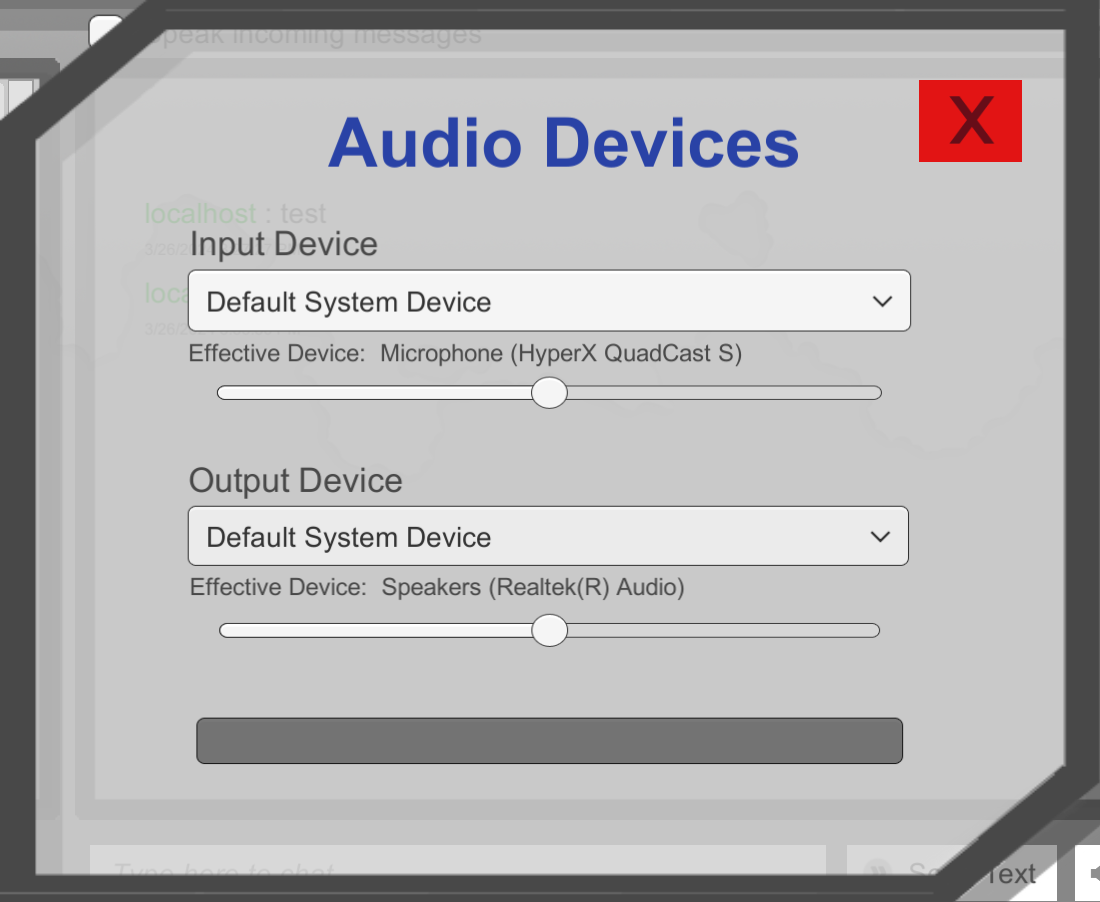
Effective Device が表示されている Chat Channel Sample のオーディオデバイス選択メニューのスクリーンショット。
使用可能なデバイスリストまたはアクティブなデバイスが変わらない場合でも、有効なデバイスは変わる可能性があります。例えば、ユーザーが を Windows マシンの System Settings (システム設定) で調整する場合です。このケースでは、使用可能なデバイスリストもアクティブなデバイスも変わりませんが、有効なデバイスは変わります。 によって使用される実際のデバイスが変わるためです。
Default System DeviceDefault System Device