V1 to V2 Migration Guide
Migrate from Vivox server-side recording version 1 to version 2.
Read time 2 minutesLast updated 3 months ago
Follow this guide if you're upgrading from version 1 of the server-side recording API.
Key changes
The V2 API introduces the following changes:
- TTL is no longer a valid option, you must use history for all requests.
- The API now supports GCP buckets for storage.
- The API has been redesigned to be more restful:
- Status complete files are now replaced with a callback server.
- SSR now requires the use of service accounts from a Unity organization.
- Deduplication has been removed as a feature. You will no longer see error codes for duplicate requests.
409 - Auto end has been removed a feature. Requests will always run for the full duration of the history request.
- You no longer need to make a request to decode audio. Vivox will manage the state for you and the final product will be one .WAV file per speaker in the channel.
Authentication changes
-
SSR now requires the use of Unity Authentication for all requests.
- If you have not created an organization or project, create one. Refer to How to create a project for more information.
-
Once you have your project and organization you need to share the details with your account manager. Your account manager will enable SSR for your organization.
-
Once SSR is enabled you need to create a service account to authenticate with the API. Refer to How to create a service account.
-
On the service account page, assign permissions to the service account. Select Manage organization permissions and assign the. This enables this service account to access the SSR API.
Server Side Recording Processor Role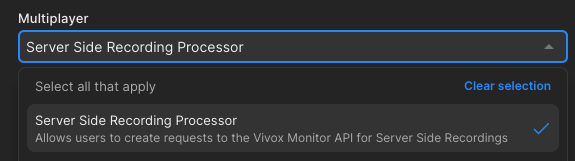
-
To use this service account refer to How to authenticate with a service account.
API Changes
Request changes
The V2 API removes query parameters for passing request fields. All fields are now passed in the request body as JSON. The following is a list of fields that no longer exist.
- are now contained within
destination_credentials. To use AWS in the same way as the V1 API you need to replace a specific code segment.storageOptions
Replace this code | With this code |
|---|---|
|
|
-
Remove thefield. The V2 API only supports channel subscriptions.
target_type -
Thefield has been removed. Use the
ttlfield to specify the duration of the recording.history
SSR Decoder
The SSR decoder is no longer a separate request. The final product of the request will be one .WAV file per speaker in the channel and you can remove the tracking of job state from your infrastructure.
Callback server
With the removal of the and , a mechanism was added to notify you when a job is complete. This is done through a callback server. Refer to the callback server documentation for more information.
status_completestatus_decodedThis feature is completely optional, but it is the only way to know when a job is complete or why your audio is missing.