Integrate an existing project using VATs with Unity Authentication
Integrate Unity Authentication to an existing Vivox project that's already using Vivox Access Token.
Read time 2 minutesLast updated 9 months ago
If you already have a Vivox integration that's using VATs for players to join channels and interact with Vivox, you can use this guide
to integrate with UAS to access the full suite of services Unity provides.
You will have to make some changes to the player sign-in flow and the VAT creation flow.
Overall, the two flows will work like this:
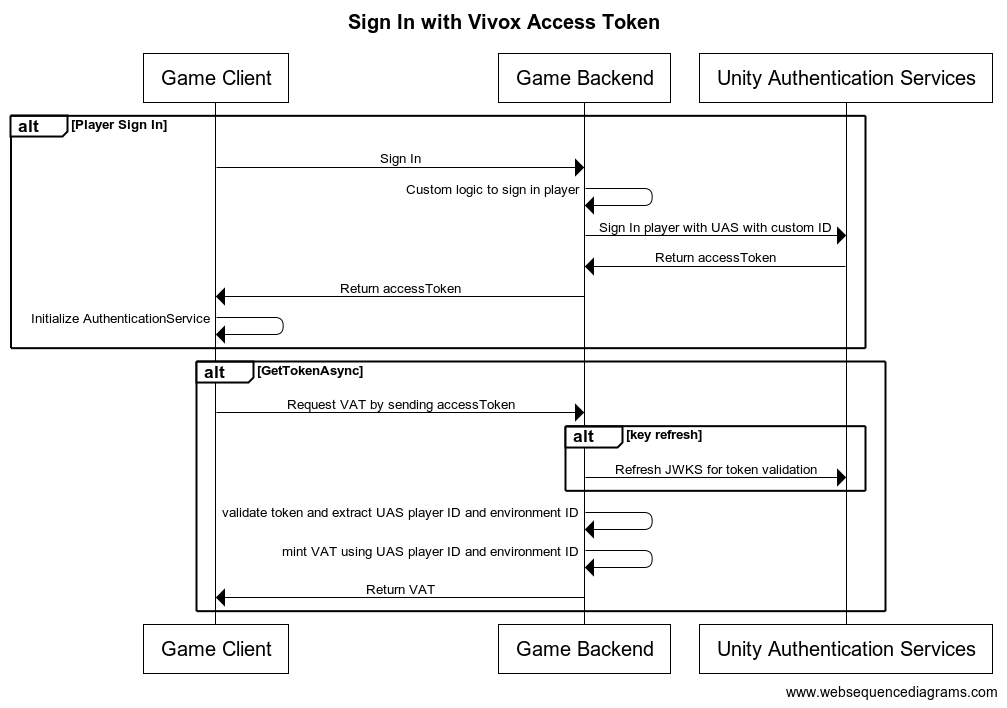
Sign In
- Register all users with the UAS custom ID provider on sign-in and retrieve and
accessTokenfor players.sessionTokens - Set up the AuthenticationService in the client using the and
accessTokensessionToken
Creating VATs
- The Vivox SDK will request a VAT from the backend whenever one is needed using a custom token provider implementation.
- Add the to the request to the backend when requesting VATs within the
accessTokenmethod.GetTokenAsync - Validate and extract the needed information from the token in the backend and create the Vivox Access Token to send it back to the client.
Steps
Follow these tutorials to update your sign-in and VAT creation flows.
1. Update sign-In flow
To set up the custom ID sign-in, follow the steps in Sign-in with Custom IDs.
2. Update VAT creation flow
To adapt your VAT creation flow to integrate with UAS, follow the steps in Using Vivox Access Tokens together with UAS.
With all of this done, you are now ready to use any of the Unity Gaming Services, including the Vivox Moderation Platform.