Audio Taps component parameters
Understand the different Audio Taps component parameters.
Read time 2 minutesLast updated 9 months ago
The Audio Tap components have parameters that can control the tap or provide helpful information. Not all parameters are relevant to all types of Audio Tap. All of the parameter values can be updated through C# scripts using the various setters that exist on Audio Taps. Any changes to the parameters, either from the Inspector view or from scripts will be applied automatically.
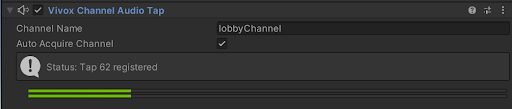
A screenshot of the Vivox Channel Audio Tap from within the Inspector window.
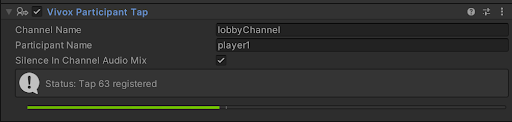
A screenshot of the Vivox Participant Tap from within the Inspector window.
Auto Acquire Channel: When enabled, the taps always register to the latest available channel, and display the channel in the Channel Name field. If no channels are available, the tap will wait for one. If this field is disabled, the tap will use the Channel Name supplied via the Channel Name field.
Channel Name: This field displays or sets the tap's channel. If Auto Acquire Channel is enabled, this field is populated with the channel uri that was automatically acquired. If Auto Acquire Channel is disabled, the channel uri set in this field is used.
Participant Name: The Participant Name that the Participant Tap uses or will use if the tap still needs to be enabled. This field expects a PlayerId, not a DisplayName. Available only for a Participant Tap.
Silence In Channel Audio Mix: Silences the participant's audio in the channel audio mix. Audio will only come from the Audio Source when checked so that you only hear your modified audio. Available only for a Participant Tap.
Status: Display the tap's current status, registered or unregistered, with the ID of the tap. This field also indicates error situations, including a relevant error code. Error details are in the application log.