Documentation

​
​

Development

User Acquisition

Monetization

Industry

Asset Transformer Studio

2026.5.0

Supported
​

User Manual

Python API

Changelog

Asset Transformer Studio

2026.5.0

Supported
​

​
​
Get started
  • About Asset Transformer Studio
  • Getting started
  • Additional Resources
User Interface
  • Overview
  • Menu Bar
    • File Menu
    • Edit Menu
    • Create Menu
    • Selection Menu
    • Scene Menu
    • Materials Menu
    • CAD Menu
    • Mesh Menu
    • Optimize Mesh Menu
    • Point Cloud Menu
    • UVs Menu
      • Generate UV By Projection
    • Window Menu
    • Plugins Menu
    • Help Menu
  • Toolbars
  • Window
  • Customizing the User Interface
Data Preparation Fundamentals
  • Overview
  • General Information
  • Typical Data Preparation Workflow
  • About 3D Models Types
  • About the Product Structure (Tree)
  • About Occurrences
  • About Instances & Prototypes
  • About Face and Vertex Normals
  • About UVs
  • About Tessellation
  • About Decimation
  • About Animation
  • Glossary
Working With Asset Transformer Studio
  • Overview
  • Videos and Tutorials
  • Supported File Formats
  • Importing Files
  • Exporting Files
  • Scripting With the Python API
  • Interrupting a Process
  • Plugins
  • Errors in Asset Transformer Studio
Python API Reference
  • Overview
Changelog
  • Changelog
  1. Asset Transformer Studio
  2. User Interface
  3. Menu Bar

UVs Menu

Asset Transformer Studio UVs menu reference
Read time 1 minute
Last updated 9 hours ago

UVs Menu
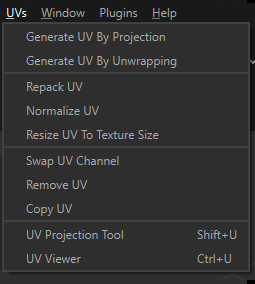
The UV menu contains functions for UVs creation and management.
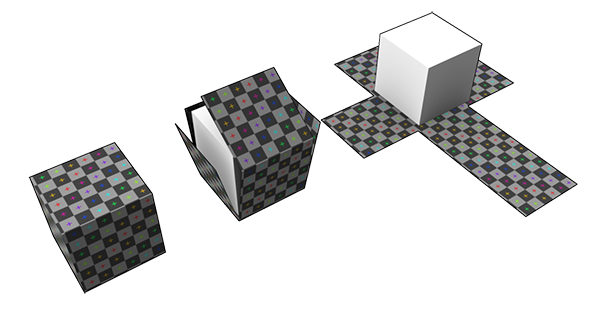
UVs overview
UVs (texture coordinates) is information included in meshes that are used to properly display texture maps over these meshes.
Note
See also the page About UVs to learn more about UVs.

Menu option

Description

Keyboard Shortcut

Generate UV by ProjectionGenerates UVs using a projection on the axis-aligned bounding box (AABB) of the selection
Generate UV by UnwrappingGenerates UV fit by automatically cutting and unwrapping meshes
Repack UVAutomatically packs all UV islands in the [0,1] UV space
Normalize UVAutomatically scales UVs to the [0,1] UV space
Resize UV To Texture SizeResizes the UVs existing on a mesh, so they can be used to display a texture with a specific size in "real world" (scanned textures have a real-world size, expressed in real-size units, not pixels). Give a texture target size (in millimeters), and UVs are automatically resized.
This is particularly useful when UVs have been automatically generated (see Continuous UVs from CAD Models).
Swap UV ChannelInverts UVs from 1 UV channel to another, when multiple UV channels exist on the selected Parts
Remove UVCleans UVs from the selected channel on the selected Parts
Copy UVCopies UVs from 1 UV channel to another, when multiple UV channels exist on the selected Parts
UV Projection ToolActivates the UV Projection Tool, composed of a 3D manipulator & a control panel to add UVs to a selection of parts, using basic UV projections (Box, Plane, Cylinder…)SHIFT + U
UV ViewerOpens a UV 2D representationCTRL + U

Copyright © 2026 Unity Technologies
LegalPrivacy PolicyCookiesDocumentation Terms of UseDo Not Sell or Share My Personal InformationYour Privacy Choices (Cookie Settings)

"Unity", Unity logos, and other Unity trademarks are trademarks or registered trademarks of Unity Technologies or its affiliates in the U.S and elsewhere (more info here). Other names or brands are trademarks of their respective owners.

Some pages are machine-translated for convenience, and may contain inaccuracies. In the event of conflicting information, the English version is authoritative.