Materials Menu
Asset Transformer Studio Materials menu reference
Read time 1 minuteLast updated 9 hours ago
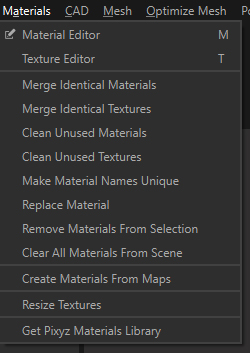
The Materials menu allows you to manage the materials contained in the scene/project: creation, update, clean…
Menu option | Description | Keyboard Shortcut |
|---|---|---|
| Material Editor | Opens the Material Editor, containing all materials available in the current project | M |
| Texture Editor | Opens the Texture Library, containing all textures available in the current project | T |
| Merge Identical Materials | Merges all equivalent materials (i.e. with same visual appearance). To be merged, materials need to be of the same material type (amongst | |
| Merge Identical Textures | Merges all equivalent textures (i.e. with identical pixels) | |
| Clean Unused Materials | Removes unused materials in the scene and in the Material Editor | |
| Clean Unused Textures | Removes unused textures in the scene and in the Texture Editor | |
| Make Materials Names Unique | Automatically renames materials with identical names to make each scene material name unique | |
| Replace Material | Used to replace a material with another everywhere it is used in the scene | |
| Remove Materials From Selection | Removes all materials applied to a selection at once | |
| Clear All Materials From Scene | Removes all materials present in the scene and in the Material Editor | |
| Create Materials From Maps | Automatically creates PBR materials, from texture maps exported from texturing solutions like Substance | |
| Resize Textures | Automatically resizes all texture maps applied to a selection of parts | |
| Get Asset Transformer Materials Library | Link to access a ready-to-use Material Library made of a variety of PBR materials (wood, paint, metal…) |