Documentation

​
​

Development

User Acquisition

Monetization

Industry

Asset Transformer Studio

2026.5.0

Supported
​

User Manual

Python API

Changelog

Asset Transformer Studio

2026.5.0

Supported
​

​
​
Get started
  • About Asset Transformer Studio
  • Getting started
  • Additional Resources
User Interface
  • Overview
  • Menu Bar
  • Toolbars
  • Window
  • Customizing the User Interface
Data Preparation Fundamentals
  • Overview
  • General Information
    • About Asset Transformer Studio and Selections
  • Typical Data Preparation Workflow
  • About 3D Models Types
  • About the Product Structure (Tree)
  • About Occurrences
  • About Instances & Prototypes
  • About Face and Vertex Normals
  • About UVs
  • About Tessellation
  • About Decimation
  • About Animation
  • Glossary
Working With Asset Transformer Studio
  • Overview
  • Videos and Tutorials
  • Supported File Formats
  • Importing Files
  • Exporting Files
  • Scripting With the Python API
  • Interrupting a Process
  • Plugins
  • Errors in Asset Transformer Studio
Python API Reference
  • Overview
Changelog
  • Changelog
  1. Asset Transformer Studio
  2. Data Preparation Fundamentals

General Information

Important information about Asset Transformer Studio's core technology and general behavior
Read time 2 minutes
Last updated 9 hours ago

Find below important information about Asset Transformer Studio core technology and its general behavior.
For definitions of important terms, see the Glossary, and other sections in the Data Preparation Fundamentals section.

Coordinate system

Asset Transformer Studio uses a right-handed coordinate system, it defines +Y as up, +Z as forward, and -X as right. The front faces +Z.
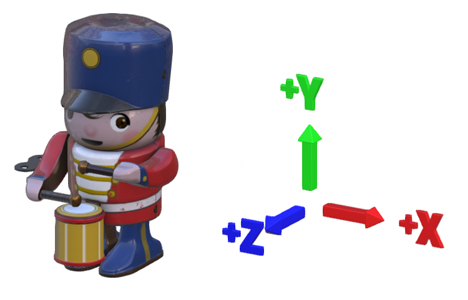
Coordinate system

Units

The units for all linear distances are millimeters.
The unit for angles is degrees.

Functions behavior

Many functions require entities as input to work, whether it is a list of one or more occurrences, materials, components, images, etc.
For example, the Tessellate function requires a list of occurrences to process: all BRep geometries contained in that list will be tessellated.
For functions that require a list of occurrences or a root occurrence, the user can define the
Root
node of the scene as the input for these functions.
In that case, all the occurrences of the scene will be processed, whether they are visible or not (the full hierarchy is parsed).
Warning
In Asset Transformer Studio specifically, if a selection is empty when executing a function that requires a list of occurrences to be processed, the whole scene will be processed! Find more information about this specific selection behavior in: About Asset Transformer Studio and Selections

Export

Asset Transformer Studio can export 3D models (and textures) in many 3D file formats (see the whole list in Supported File Formats).
More information in the page Exporting Files.

Textures

When textures/images are imported in Asset Transformer Studio (through the import of a 3D model, or directly importing an image file in the Texture Editor), they are actually imported and stored as a raw image (which can cause the .pxz scene file to be heavy).
More information in the page Exporting Textures.

Materials and textures deletion

When deleting a model from the scene using the Viewer or the Product Structure (Tree), materials and textures are not deleted along with it.
They need to be manually deleted using the Material Editor and the Texture Editor, or using functions like Clear Unused Materials and Clear Unused Textures.

Copyright © 2026 Unity Technologies
LegalPrivacy PolicyCookiesDocumentation Terms of UseDo Not Sell or Share My Personal InformationYour Privacy Choices (Cookie Settings)

"Unity", Unity logos, and other Unity trademarks are trademarks or registered trademarks of Unity Technologies or its affiliates in the U.S and elsewhere (more info here). Other names or brands are trademarks of their respective owners.

Some pages are machine-translated for convenience, and may contain inaccuracies. In the event of conflicting information, the English version is authoritative.

  • On this page
    • Coordinate system

    • Units

    • Functions behavior

    • Export

    • Textures

    • Materials and textures deletion