Glossary
Definitions of key terms used in Asset Transformer Studio
Read time 3 minutesLast updated 9 hours ago
Item | Description |
|---|---|
| Entity | An entity is the base object in the API. All objects manipulated are derived from Entity (a part, a material, a texture… is an entity). See Scripting With the Python API. |
| Product structure (tree) | The Product Structure designates the scene tree, or scene hierarchy. |
| Tree level | The tree level (used in functions Merge Final Level and Merge By Tree Level) designates the level at which an occurrence is positioned in the Product Structure. The 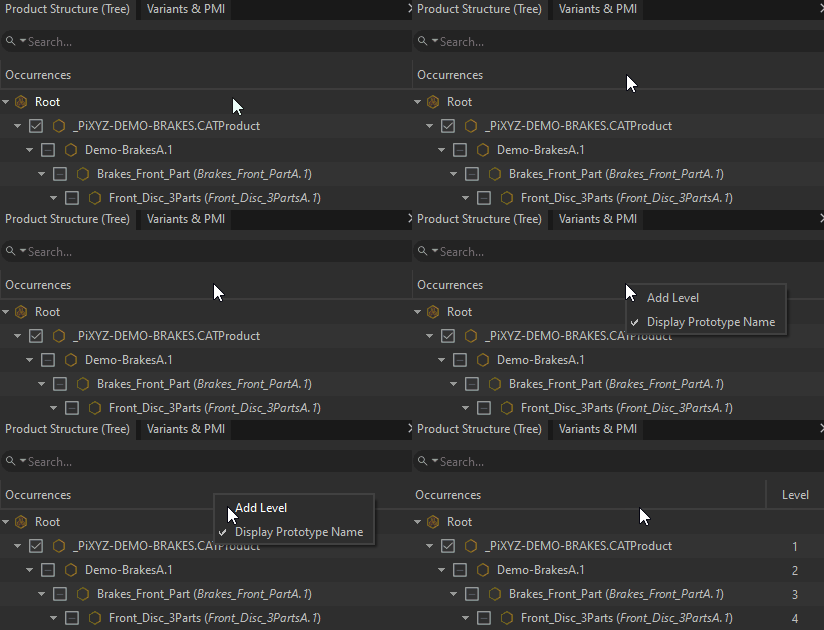 |
| Final level | In Asset Transformer Studio, a final level (used in function Merge Final Level) designates an 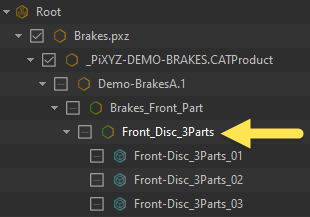 |
| Node | A node is a single element of the Product Structure, more commonly called an occurrence. |
| Occurrence | An occurrence is the fundamental object of a scene's Product Structure, similar to the GameObject concept in Unity. Each node of the Tree is an occurrence. See About the Product Structure (Tree). |
| Part occurrence | An occurrence with a part component is a part occurrence, more commonly called part. Basically, a part is any object containing geometry that can be selected individually in a scene. See Occurrence Types. |
| Part | A part commonly designates a part occurrence. It can also designate a part component in the Python API. |
| Assembly | An occurrence with no part component, and having other occurrences as children, is called an See Occurrence Types. |
| Instance | An instance is an occurrence that is duplicated multiple times across a scene. In Asset Transformer Studio, instantiation is managed through a concept called prototype. See About Instances & Prototypes. |
| Component | An occurrence can receive components to modulate its behavior (just like in Unity). See Occurrence Components. |
| Prototype | A prototype is an occurrence that can be referenced by other occurrences, allowing to create instantiation behavior. Occurrences pointing to a prototype are instances. See About Instances & Prototypes. |
| Empty | The term empty (used for example in the function Delete Empty Occurrences) is associated with an occurrence containing no geometry (no part component or a part component containing no geometry), no light (no Light component) and having no children. |
| Metadata | Metadata is non-geometric data that can be carried by a Product Structure occurrence, which was added by engineering for multiple possible reasons: design information, manufacturing information, logistic information… |
| Geometry | A geometry is a collection of shapes. It can either be a CAD geometry (BRep shapes) or a Mesh geometry (Tessellated shapes). See About 3D Models Types. |
| BRep | BRep is the kind of geometry retrieved when importing a native CAD file. It is also called CAD geometry or precise geometry. See definition on Wikipedia. |
| BRep shape | In Asset Transformer Studio, a BRep shape contains BRep geometrical information like surfaces (or volumes), curves and points (themselves defined by faces, edges and vertices). |
| Patch | A patch is a CAD face or surface limited by spline curves. |
| Patch boundary | A patch boundary (or patch border) is a non-discontinuous patch border or edge.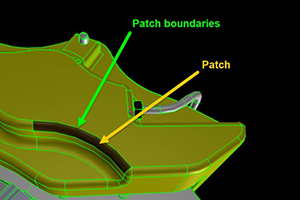 |
| Mesh | See definition on Wikipedia. |
| Connected mesh | A connected mesh is a separate mesh element within a Part. Think about 2 cubes merged together in one Part: each separate cube is a connected mesh. |
| Tessellation | Tessellation is the method used to represent 3D objects as a collection of triangles or other polygons. The more triangles used to represent a surface, the more realistic the rendering, but the more computation is required. See About Tessellation. |
| Tessellated shape | A tessellated shape can contain meshes, free edges (a collection of connected free edges define a polyline, or curve) and free vertices. |
| Bounding box (BBox) | See definition on Wikipedia. |
| Axis-aligned bounding box (AABB) | See definition on Wikipedia. |
| Oriented bounding box (OBB) | See definition on Wikipedia. |
| Minimum bounding box (MBB) | See definition on Wikipedia. |