Documentation

​
​

Development

User Acquisition

Monetization

Industry

Asset Transformer Studio

2026.5.0

Supported
​

User Manual

Python API

Changelog

Asset Transformer Studio

2026.5.0

Supported
​

​
​
Get started
  • About Asset Transformer Studio
  • Getting started
  • Additional Resources
User Interface
  • Overview
  • Menu Bar
  • Toolbars
  • Window
  • Customizing the User Interface
Data Preparation Fundamentals
  • Overview
  • General Information
  • Typical Data Preparation Workflow
  • About 3D Models Types
  • About the Product Structure (Tree)
  • About Occurrences
    • Occurrence Id
    • Occurrence Types
    • Occurrence Properties
    • Occurrence Components
  • About Instances & Prototypes
  • About Face and Vertex Normals
  • About UVs
  • About Tessellation
  • About Decimation
  • About Animation
  • Glossary
Working With Asset Transformer Studio
  • Overview
  • Videos and Tutorials
  • Supported File Formats
  • Importing Files
  • Exporting Files
  • Scripting With the Python API
  • Interrupting a Process
  • Plugins
  • Errors in Asset Transformer Studio
Python API Reference
  • Overview
Changelog
  • Changelog
  1. Asset Transformer Studio
  2. Data Preparation Fundamentals
  3. About Occurrences

Occurrence Types

The different types of occurrences in Asset Transformer Studio
Read time 2 minutes
Last updated 9 hours ago

Depending on the components it carries, an occurrence is designated by a different name in Asset Transformer Studio's user interface, API and documentation:

Occurrence type

Description

Common Name

Icon

Part occurrenceAn occurrence with a Part component is a
Part occurrence
, more commonly called
Part
. For example, the function
Merge Parts
merges together several Part occurrences in one resulting Part occurrence, and combines their geometries in its
Part component
.
Part
Part icon
Assembly occurrenceAn occurrence with no Part component, and having other occurrences as children, is called an
Assembly occurrence
, or
Assembly
. An Assembly is basically a node used to store other nodes, like a group or a folder. For example, the function Merge Parts By Assemblies finds all the Assembly occurrences in the Tree and merges their Part occurrences children as one resulting Part occurrence.
Assembly
Assembly icon
Empty occurrenceAn occurrence containing no geometry (no Part component or a Part component containing no geometry), no light (no Light component) and having no children, is called an empty occurrence. For example, the function Delete Empty Occurrences finds all the Empty occurrences in the Tree and deletes them.Empty occurrence
Empty icon
Light OccurrenceAn occurrence with a Light component is a
light occurrence
, or
light
.
Light
Light icon
In the Product Structure, each occurrence type displays a different icon before its name:
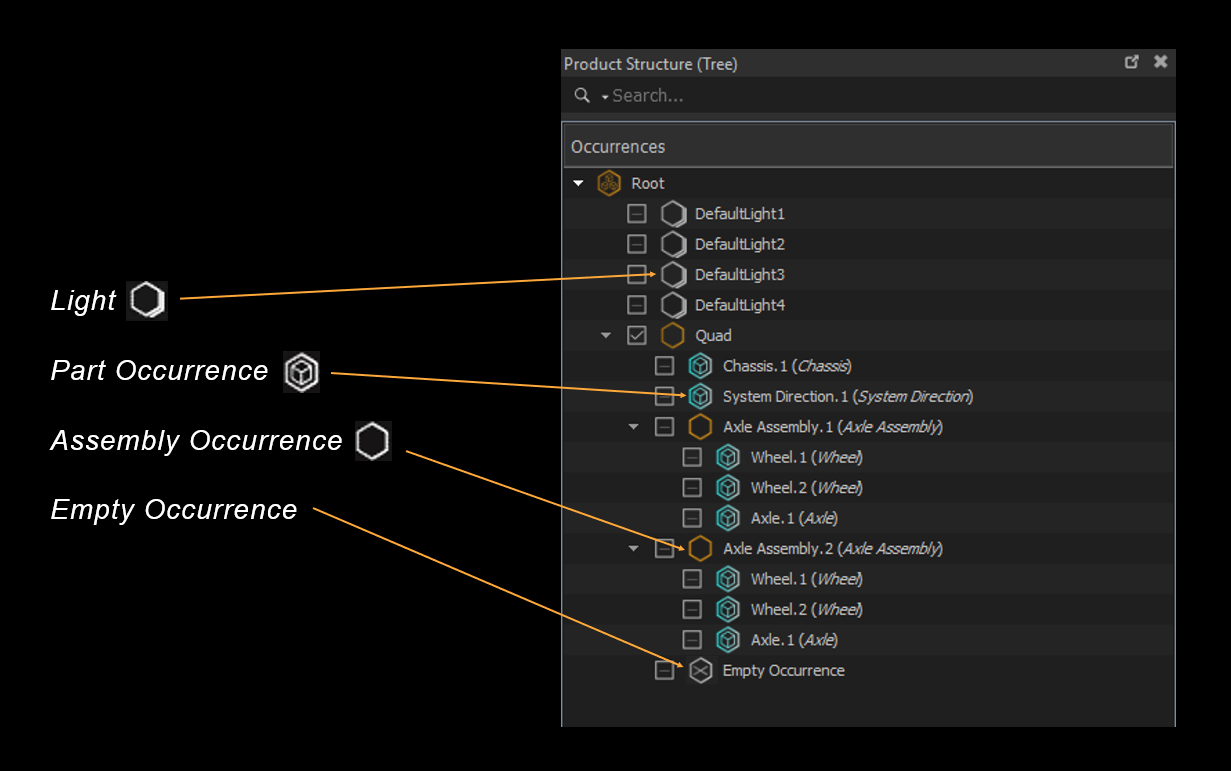
Occurrence icons

About Icon color

Depending on its status, an occurrence's icon will be displayed in the Product Structure with a dedicated color:
  • A cyan icon corresponds to an occurrence owning a prototype, and not expanded in the tree.
  • An orange icon corresponds to an occurrence having children, and expanded in the tree.
  • A gray icon corresponds to an occurrence not owning a prototype, and not expanded in the tree.

Related Topics

  • Occurrence Components

Copyright © 2026 Unity Technologies
LegalPrivacy PolicyCookiesDocumentation Terms of UseDo Not Sell or Share My Personal InformationYour Privacy Choices (Cookie Settings)

"Unity", Unity logos, and other Unity trademarks are trademarks or registered trademarks of Unity Technologies or its affiliates in the U.S and elsewhere (more info here). Other names or brands are trademarks of their respective owners.

Some pages are machine-translated for convenience, and may contain inaccuracies. In the event of conflicting information, the English version is authoritative.

  • On this page
    • About Icon color

    • Related Topics