Documentation

​
​

Development

User Acquisition

Monetization

Industry

Asset Transformer Studio

2026.5.0

Supported
​

User Manual

Python API

Changelog

Asset Transformer Studio

2026.5.0

Supported
​

​
​
Get started
  • About Asset Transformer Studio
  • Getting started
  • Additional Resources
User Interface
  • Overview
  • Menu Bar
    • File Menu
    • Edit Menu
    • Create Menu
      • Create Light
      • Create Primitive
    • Selection Menu
    • Scene Menu
    • Materials Menu
    • CAD Menu
    • Mesh Menu
    • Optimize Mesh Menu
    • Point Cloud Menu
    • UVs Menu
    • Window Menu
    • Plugins Menu
    • Help Menu
  • Toolbars
  • Window
  • Customizing the User Interface
Data Preparation Fundamentals
  • Overview
  • General Information
  • Typical Data Preparation Workflow
  • About 3D Models Types
  • About the Product Structure (Tree)
  • About Occurrences
  • About Instances & Prototypes
  • About Face and Vertex Normals
  • About UVs
  • About Tessellation
  • About Decimation
  • About Animation
  • Glossary
Working With Asset Transformer Studio
  • Overview
  • Videos and Tutorials
  • Supported File Formats
  • Importing Files
  • Exporting Files
  • Scripting With the Python API
  • Interrupting a Process
  • Plugins
  • Errors in Asset Transformer Studio
Python API Reference
  • Overview
Changelog
  • Changelog
  1. Asset Transformer Studio
  2. User Interface
  3. Menu Bar

Create Menu

Asset Transformer Studio Create menu reference
Read time 1 minute
Last updated a day ago

Create Menu
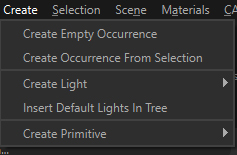
The Create menu contains the actions for adding new objects into the scene:

Menu option

Description

Keyboard Shortcut

Create Empty OccurrenceCreates one empty occurrence with the name and position defined in the dialog box parameter.
NOTE: This functionality works for only one selected occurrence. If multiple occurrences are selected prior to executing the functionality, only one empty occurrence will be created, child to the first occurrence found in the current selection.
Create Occurrence From SelectionCreates a new occurrence parenting the occurrences being selected, in order to group them.
Create LightActions to add a new Light (or Light occurrence) of different type to the Product Structure.
Insert Default Lights In TreeAdds the 4 Default Lights, used to light the scene when the lighting mode using the Environment Map is disabled, in the Product Structure, allowing to tune them.
Deleting these 4 Default Lights will recreate them out of the Product Structure with their default values.
Create PrimitiveActions to insert simple primitives in the scene (visible in the Viewer and listed in the Product Structure).

Copyright © 2026 Unity Technologies
LegalPrivacy PolicyCookiesDocumentation Terms of UseDo Not Sell or Share My Personal InformationYour Privacy Choices (Cookie Settings)

"Unity", Unity logos, and other Unity trademarks are trademarks or registered trademarks of Unity Technologies or its affiliates in the U.S and elsewhere (more info here). Other names or brands are trademarks of their respective owners.

Some pages are machine-translated for convenience, and may contain inaccuracies. In the event of conflicting information, the English version is authoritative.