Plugins Menu
Asset Transformer Studio Plugins menu reference
Read time 1 minuteLast updated a day ago
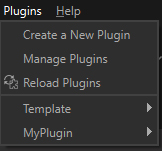
The Plugins menu allows you to install and run custom plugins (based on Python scripts) in Asset Transformer Studio.
Menu option | Description |
|---|---|
| Create a New Plugin | Creates a new plugin, made of a Python script (including a main function that needs to be edited according to the user's data preparation scenario), and an XML file |
| Manage Plugins | Opens the |
| Reload Plugins | Reloads all plugins to save potential changes. See below. |
| Installed Plugins | The last section of the menu lists all the plugins installed on the PC that were found and loaded by Asset Transformer Studio. NOTE: By default, one plugin is installed with Asset Transformer Studio, and is located in the |
Refer to the following topics to learn more about plugins in Asset Transformer Studio:
Reloading a plugin
A modified plugin needs to be reloaded in Asset Transformer Studio in order to be fully updated and run.