Help Menu
Asset Transformer Studio Help menu options
Read time 1 minuteLast updated 9 hours ago
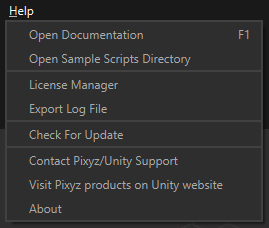
The Help menu gives access to documentation, samples, manage Asset Transformer Studio's license and contact the Unity team:
Menu option | Description | Keyboard Shortcut |
|---|---|---|
| Open Documentation | You are there! | F1 |
| Open Sample Scripts Directory | Opens the | |
| License Manager | Manage your license: license request, license installation, connection to your Asset Transformer account… | |
| Export log file | Access the log file automatically saved for each session of Asset Transformer Studio launched. The log file is saved here: | |
| Check For Update | Automatically checks available updates for Asset Transformer Studio. Prompts a message when a new version is available | |
| Contact Unity Support | Send the Unity team a message here, to report a bug or request support | |
| Visit Asset Transformer products on Unity website | Visit Asset Transformer products on Unity.com | |
| About | Gives the |