Remove Z-fighting
How to remove Z-fighting (surface overlapping) in Asset Transformer Studio
Read time 1 minuteLast updated 10 hours ago
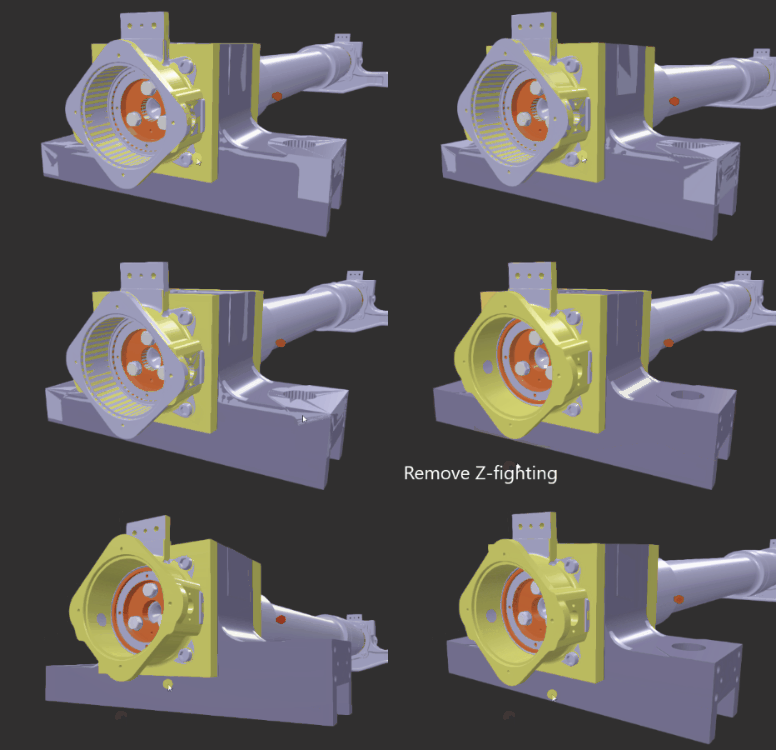
Asset Transformer Studio includes a function to help remove Z-fighting (surfaces overlapping).
The Remove Z-fighting function is a semi-automatic process, which requires selecting meshes that show Z-fighting first, before running the function on the selection to remove this visual artifact.
Selected surfaces are automatically and slightly shrunk (mesh vertices are negatively offset by a value calculated automatically), to remove the overlapping.
How To
- Select one of the meshes whose surfaces are overlapping with other meshes (the one that will be shrunk, thus disappearing behind the other overlapping meshes).
- From the Mesh menu, choose .
Remove Z-fighting