Bake materials
Use this feature as part of your mesh optimization process to transfer mesh and materials information to texture maps.
Read time 14 minutesLast updated 9 months ago
- algo.beginBakingSession
- algo.beginVertexBakingSession
- algo.endBakingSession
- algo.setBakingSessionPadding
- algo.bakeAOMap
- algo.bakeDepthMap
- algo.bakeDiffuseMap
- algo.bakeDisplacementMap
- algo.bakeEmissiveMap
- algo.bakeFeatureMap
- algo.bakeMaterialAOMap
- algo.bakeMaterialIdMap
- algo.bakeMaterialPropertyMap
- algo.bakeMetallicMap
- algo.bakeNormalMap
- algo.bakeOccurrencePropertyMap
- algo.bakeOpacityMap
- algo.bakePartIdMap
- algo.bakePositionMap
- algo.bakeRoughnessMap
- algo.bakeSpecularMap
- algo.bakeUVMap
- algo.bakeValidityMap
- algo.bakeVertexColorMap
- algo.getMeshVertexColors
- algo.setMeshVertexColors
- material.fillUnusedPixels
Principle
The idea of baking is to find a mapping between two objects in order to transfer attributes from one (the source) to the other (the destination).
This is done by shooting rays from the destination surface along the normal directions and by recovering their corresponding intersection points on the source.
Use this feature as part of your mesh optimization process to transfer mesh and materials information to texture maps.
Usecase
Usually, you would use this set of functions in two scenarios:
- Auto baking: optimize a set of meshes with different materials into one or multiple meshes with one material (see algo.combineMaterials)
- Create UVs, tangents and normals (optional if they already exist)
- Repack UVs
- Normalize UVs
- Bake maps
- Create a material with generated textures
- Merge meshes (optional)
- Assign the created material
- LOD baking: bake mesh and material information from a high detailed LOD and assign created textures to a low detailed LOD.
- Duplicate LOD0 occurrences
- Generate LOD1 (decimation, proxy mesh, ...)
- Create tangents on LOD0 (optional if they already exist)
- Create UVs, tangents and normals on LOD1 (optional if they already exist)
- Repack UVs (LOD1)
- Bake maps (source: LOD0, destination: LOD1)
- Create a material with generated textures
- Assign the created material to LOD1
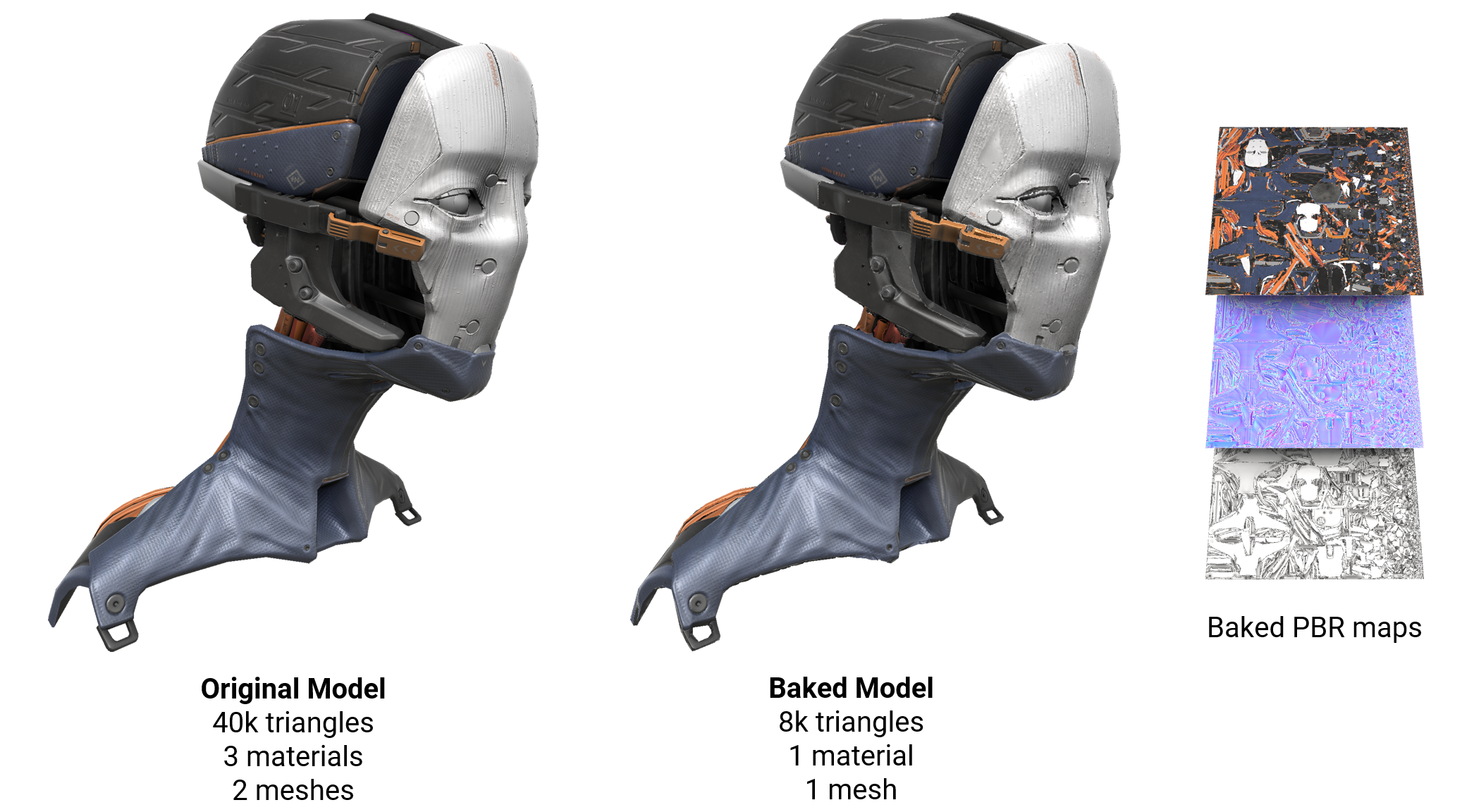
This example shows a model with many curved surfaces. After baking, the triangle count is reduced from 40,000 to 8,000:
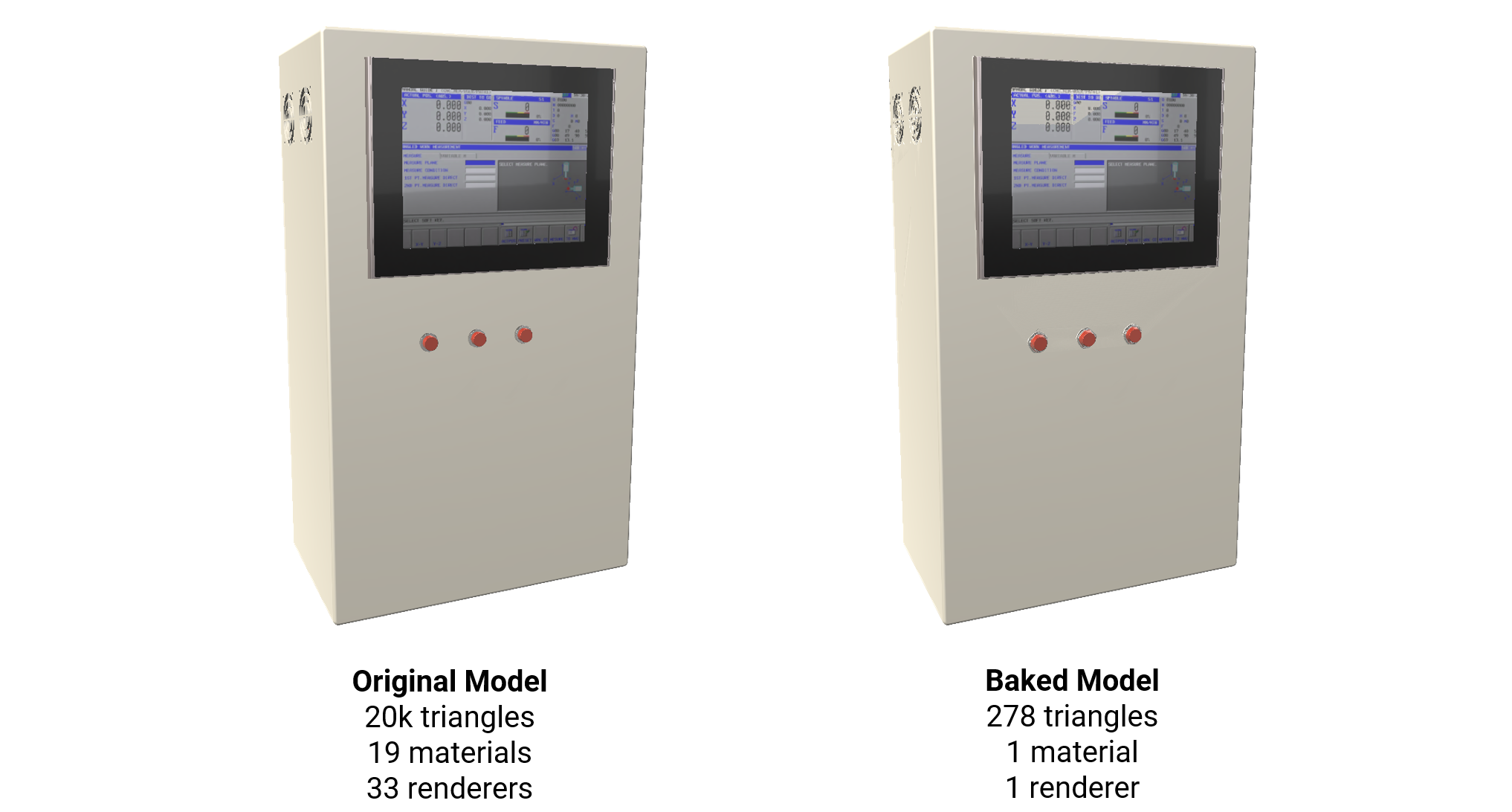
This example shows a model with many flat surfaces. After baking, the triangle count is reduced from 20,000 to 278:
Subsequently, you can use these maps to transfer information back to optimized assets.
Baking API usage
Sessions
The baking API is based on the concept of sessions. A session does not perform any map baking by itself, but enables the user to set up the baking parameters (map resolution, UV channel to use, etc.) according to her/his needs, and computes the mapping between sources and destinations. A session must be created prior to any call to a map baking function. This can be done by calling algo.beginBakingSession. Similarly, an existing session can be deleted by calling algo.endBakingSession.
The begin/end block thus defines the session lifecycle, during which any map baking operation can be carried out, driven by the session settings.
Here is an example of a session creation/deletion. and are two lists of occurrences, describing those from which data are fetched and those to which they are baked, respectively. UV channel 0 is selected as the destination layout and baked map resolution is set to 1024:
sourcesdestinationssources = [ ... ]destinations = [ ... ]sessionId = algo.beginBakingSession(destinations, sources, 0, 1024)# ---> Bake stuff here !algo.endBakingSession(sessionId)
Note that multiple sessions can exist at the same time. As can be seen in the example above, algo.beginBakingSession returns a session ID, which can be used in that case to specity the current session.
Map baking
Once a session is created, maps can be baked by calling the corresponding functions within the begin/end block:
sessionId = algo.beginBakingSession(destinations, sources, 0, 1024)diffuseMaps = algo.bakeDiffuseMap(sessionId, defaultColor = core.ColorAlpha(0., 0., 0., 1.))opacityMaps = algo.bakeOpacityMap(sessionId)...algo.endBakingSession(sessionId)
Each of the baking functions returns a list of images. If the session has been created with parameter , this list is made of a single image, whose UV layout is shared between all destination occurrences. Otherwise, one map per destination is returned, in an order consistent with the input occurrence list (eg. relates to , to , and so on). In case of failure, the returned list is empty.
shareMaps = TruediffuseMaps[0]destinations[0]diffuseMaps[1]destinations[1]Back-ends
Baking can be run on two different back-ends: CPU or GPU. The GPU back-end is much faster, which is particularly useful for very time consumming tasks like baking huge maps or ambient occlusion (see Bake ambient occlusion), but it requires a graphics card with sufficient capabilities. It can be enabled by setting the property algo.DisableGPUAlgorithms to :
Falsecore.setModuleProperty("Algo", "DisableGPUAlgorithms", "False")
If no supported hardward is available, the CPU back-end is used as fallback.
To be effective, the back-end selection must be done prior to the call to algo.beginBakingSession.
Padding
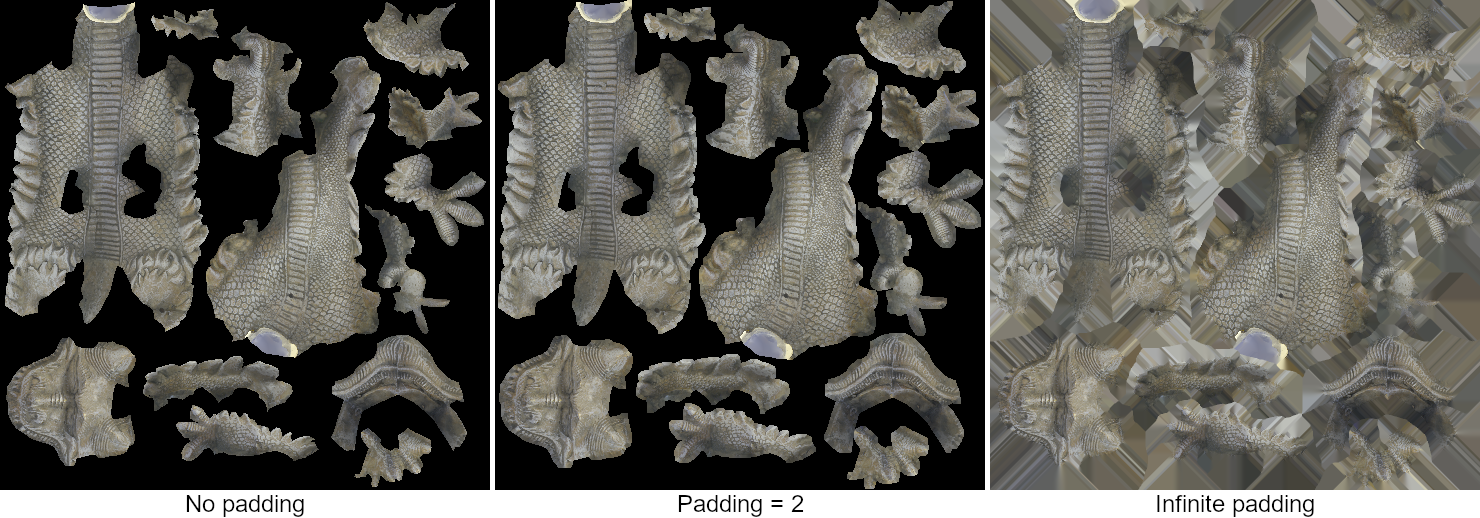
Padding is the process of expanding the baked areas in texture space by propagating valid pixel values to undefined ones. This is particularly useful to avoid visible seams during rendering due to bilinear interpolation or mip-mapping. It is defined by a number of pixels, which corresponds to the width of the dilation to apply. The following example shows the same map baked with different padding values:
The padding is the only parameter that is not defined at session creation. Instead, its value can be changed on-the-fly during the session lifecycle by calling algo.setBakingSessionPadding. This gives the possibility to apply a different padding to each map depending on the needs, as illustrated in the following example:
sessionId = algo.beginBakingSession(destinations, sources, 0, 1024)algo.setBakingSessionPadding(sessionId, 2)diffuseMaps = algo.bakeDiffuseMap(sessionId, defaultColor = core.ColorAlpha(0., 0., 0., 1.))opacityMaps = algo.bakeOpacityMap(sessionId)algo.setBakingSessionPadding(sessionId, -1) # infinite paddingnormalMaps = algo.bakeNormalMap(sessionId)algo.endBakingSession(sessionId)
Note that setting the padding value does not only affect the next baking function call: it remains active until it is changed by another call to algo.setBakingSessionPadding. In the example above, and are then both baked with a padding of 2.
diffuseMapsopacityMapsPadding can be disabled by setting it to 0. Setting a negative value leads to an infinite padding (all undefined pixels are filled).
If you need to apply padding not during the baking phase but afterwards, consider material.fillUnusedPixels.
Self-baking
Sometimes, it is useful to bake data from a set of occurrences onto itself, for example to pack all materials into a single texture. This is what we call self-baking. This process is much faster than a standard baking, since there is no need to compute a mapping between different objects.
To trigger self-baking, you can simply specify the same list of occurrences for sources and destinations when creating a session:
sessionId = algo.beginBakingSession(destinations, destinations, 0, 1024)
or just let the source list empty:
sessionId = algo.beginBakingSession(destinations, [], 0, 1024)
Baking from point clouds
In the field of 3D scanning, for instance, devices provide measured data as point clouds. It's often desired to extract a mesh from these points, and to transfer attributes (color, normals, ...) between both. This specific type of baking can be handled by creating a dedicated session, by calling algo.beginBakingSession with parameter set to :
sourceElementsalgo.ElementFilter.PointssessionId = algo.beginBakingSession(myMeshes, myPointClouds, 0, 1024, sourceElements = algo.ElementFilter.Points)diffuseMaps = algo.bakeDiffuseMap(sessionId, defaultColor = core.ColorAlpha(0., 0., 0., 1.))algo.endBakingSession(sessionId)
In this case, the mapping is computed in a slightly different way: instead of casting rays, a nearest neighbor search is performed to find for each destination map pixel the closest point in the source clouds.
It's important to keep in mind that:
- at the moment, point cloud baking is only supported by the CPU back-end (if GPU back-end is enabled, it is simply ignored).
- only a limited set of map baking functions is accepted for point clouds: algo.bakeDiffuseMap, algo.bakeNormalMap and algo.bakePartIdMap.
Baking to mesh vertices
Depending on the usecase, one may want to bake data not into textures but directly onto mesh vertices. This could be useful for very low-end devices, or if, for some reasons, it's preferable to get rid of texture or UV coordinates. The baking API allows this as well.
The way baking is triggered is quite similar to the case where textures are used as storage, except that instead of calling algo.beginBakingSession to create the session, algo.beginVertexBakingSession is used:
sessionId = algo.beginVertexBakingSession(destinations, sources) # no need for UVs !algo.bakeDiffuseMap(sessionId, defaultColor = core.ColorAlpha(0., 0., 0., 1.))algo.endBakingSession(sessionId)
Any map baking function can be called during the session lifecycle, in the same way as for the standard case. It only differs in the way results are recovered. For a vertex baking session, map baking functions always return an empty list of maps. Instead, the baked values are stored on mesh vertex colors, which can be read back thanks to the algo.getMeshVertexColors function.
Note however that each time a map baking function is called, vertex colors are overwritten with the newly baked values. This means that if you need to bake several types of data onto the same mesh vertices, you'll have to read back vertex color values after each call to a baking function. For instance, consider the following case where one wants to bake albedo and ambient occlusion to some mesh vertices:
sessionId = algo.beginVertexBakingSession([destination], sources) # no need for UVs !algo.bakeDiffuseMap(sessionId, defaultColor = core.ColorAlpha(0., 0., 0., 1.))albedoValues = algo.getMeshVertexColors(scene.getPartOccurrences(destination))algo.bakeAOMap(sessionId, samples = 64)aoValues = algo.getMeshVertexColors(scene.getPartOccurrences(destination))algo.endBakingSession(sessionId)
A specific behavior has to be mentionned for the algo.bakeAOMap function (please, read the related page first): if argument is , vertex colors contain the bent normal vectors. Conversely, if it's set to , vertex colors contain the ambient occlusion values. If you need both, two calls to the function will be needed, with a read-back of vertex colors inbetween:
bentNormalsTrueFalsesessionId = algo.beginVertexBakingSession([destination], sources)algo.bakeAOMap(sessionId, bentNormals = False, samples = 64)aoValues = algo.getMeshVertexColors(scene.getPartOccurrences(destination))algo.bakeAOMap(sessionId, bentNormals = True, samples = 64)bentNorValues = algo.getMeshVertexColors(scene.getPartOccurrences(destination))algo.endBakingSession(sessionId)
Material map baking functions
The following functions provide a way to bake maps from the material properties of the source occurrences. The recovered maps can then be used to define new materials for the destinations.
-
Defines the base color of the 3D model. Also referred to as the albedo map.
-
Defines the emitted color in the case of a 3D model behaving like light source.
-
Provides information about which areas of the model should receive high or low indirect lighting. Indirect lighting comes from ambient lighting and reflections. For example, the steep concave parts of your model, such as a crack or a fold, don't realistically receive much indirect light.
- algo.bakeMaterialAOMap: just copies AO values from the sources materials.
- algo.bakeAOMap: computes ambient occlusion based on the object geometry (see Bake ambient occlusion).
-
Defines how metal-like a surface is.
-
Defines the normals at the object surface, either in tangent or object space. Pixel colors must thus be interpreted as directions.
-
Defines the transparency of the surface.
-
Defines how rough (matte) or smooth (shiny) the surface appears (PBR materials).
-
Defines the shininess intensity of the surface (non-PBR materials).
Miscellaneous map baking functions
The following functions provide a way to bake various informations from the sources.
-
Contains the distances between the destination map pixels and their corresponding point on source surfaces.
-
Contains the vectors between the destination map pixels and their corresponding point on source surfaces, in tangent space. Pixel colors must thus be interpreted as directions.
-
Allows to bake index maps for features component.
-
Returns a color map representing the IDs of source occurrences materials.
-
Uses the given property (of type,
colorortexture) from source occurrences as the color to bake.colorOrTexture -
Returns a color map representing the IDs of source occurrences parts.
-
Contains at each pixel the position found on the source occurrences, either in object or world space. Pixel colors must thus be interpreted as 3D point coordinates.
-
Contains UV coordinates at the corresponding source surfaces points.
-
This map is a grayscale image, containing only two different values: one for baked pixels and another one for unbaked pixels. This allows to know which parts of the map contain valid data for further processing.It can be provided as input parameter to the function material.fillUnusedPixels, for instance.
-
Creates a map from colors defined at vertices of the source occurrences.
Custom map baking
Alongside predefined maps, the API also provides a way to specify and to bake user defined material properties.
As an example, let's consider the following usecase: we have a model made of multiple parts stored in separate files. Each part has an image file related to it, containing a light map computed by means of an external software. We want to build a proxy mesh from all the parts and to bake all light maps into a single consolidated texture.
The following script can do that for us:
from pxz import *path = "C:/Documents/myModel/"occurrences = []# Load models and light maps.for i in range(10) : idx = str(i) # Load the current model part as well as the related light map image. occ = io.importScene(path + "part" + idx + ".fbx") lmap = material.importImage(path + "lightmap" + idx + ".png") # Get the model material, or create one if needed. mat = int(core.getProperty(occ, "Material")) if mat == 0 : mat = material.createMaterial("mat" + idx, "PBR") core.setProperty(occ, "Material", str(mat)) # Specify the loaded light map as a new custom property in the model material. core.addCustomProperty(mat, "lightmap", "TEXTURE([[1,1],[0,0]," + str(lmap) + ", 0])", core.PropertyType.COLORORTEXTURE) # Keep track of all the loaded parts. occurrences.append(occ)# Create the proxy mesh from the loaded parts.proxyMesh = algo.proxyMesh(occurrences, 50.0, algo.ElementFilter.Polygons, 0, False)# Create proxy UVs.algo.mapUvOnAABB([proxyMesh], False, 100.0)algo.repackUV(occurrences, resolution=1024, padding=2)# Bake parts light maps to a single one.bkg = algo.beginBakingSession([proxyMesh], occurrences, 0, 1024)algo.setBakingSessionPadding(bkg, 2)proxyLightmap = algo.bakeMaterialPropertyMap(bkg, "lightmap", 3, core.ColorAlpha(0, 0, 0, 1))algo.endBakingSession(bkg)# If baking succeeded, save the resulting proxy mesh and light map.if len(proxyLightmap) != 0 : io.exportScene(path + "proxy.fbx", proxyMesh) material.exportImage(proxyLightmap[0], path + "proxyLightmap.png")
Old scripts conversion
If your pipeline already contains scripts written with the previous version of the API, here is a piece of code showing the equivalence between the older and the new versions:
from pxz import *destinations = [ ... ] # list of destination occurrencessources = [ ... ] # list of source occurrencesuvChannel = 0resolution = 1024padding = 2defaultDiffuse = [1, 0, 0, 0]nAOSamples = 64# Old API:maps = []maps.append(algo.BakeMap(algo.MapType.Diffuse, [scene.PropertyValue("DefaultColor", f"{defaultDiffuse}")]))maps.append(algo.BakeMap(algo.MapType.Normal, []))maps.append(algo.BakeMap(algo.MapType.ComputeAO, [scene.PropertyValue("SamplesPerPixel", f"{nAOSamples}")]))result = algo.bakeMaps(destinations, sources, mapList, uvChannel, resolution, padding)diffuseMap = result[0]normalMap = result[1]aoMap = result[2]# New API:sessionId = algo.beginBakingSession(destinations, sources, uvChannel, resolution)algo.setBakingSessionPadding(sessionId, padding)diffuseMap = algo.bakeDiffuseMap(sessionId, defaultColor=defaultDiffuse)[0]normalMap = algo.bakeNormalMap(sessionId)[0]aoMap = algo.bakeAOMap(sessionId, samples = nAOSamples)[0]algo.endBakingSession(sessionId)