Decimate meshes to a target polygon count
Use this feature to reduce the polygon count by targeting a specific polygon count or decimation ratio.
Read time 3 minutesLast updated 8 months ago
API function: algo.decimateTarget
Use this feature to reduce the polygon count by targeting a specific polygon count or decimation ratio.
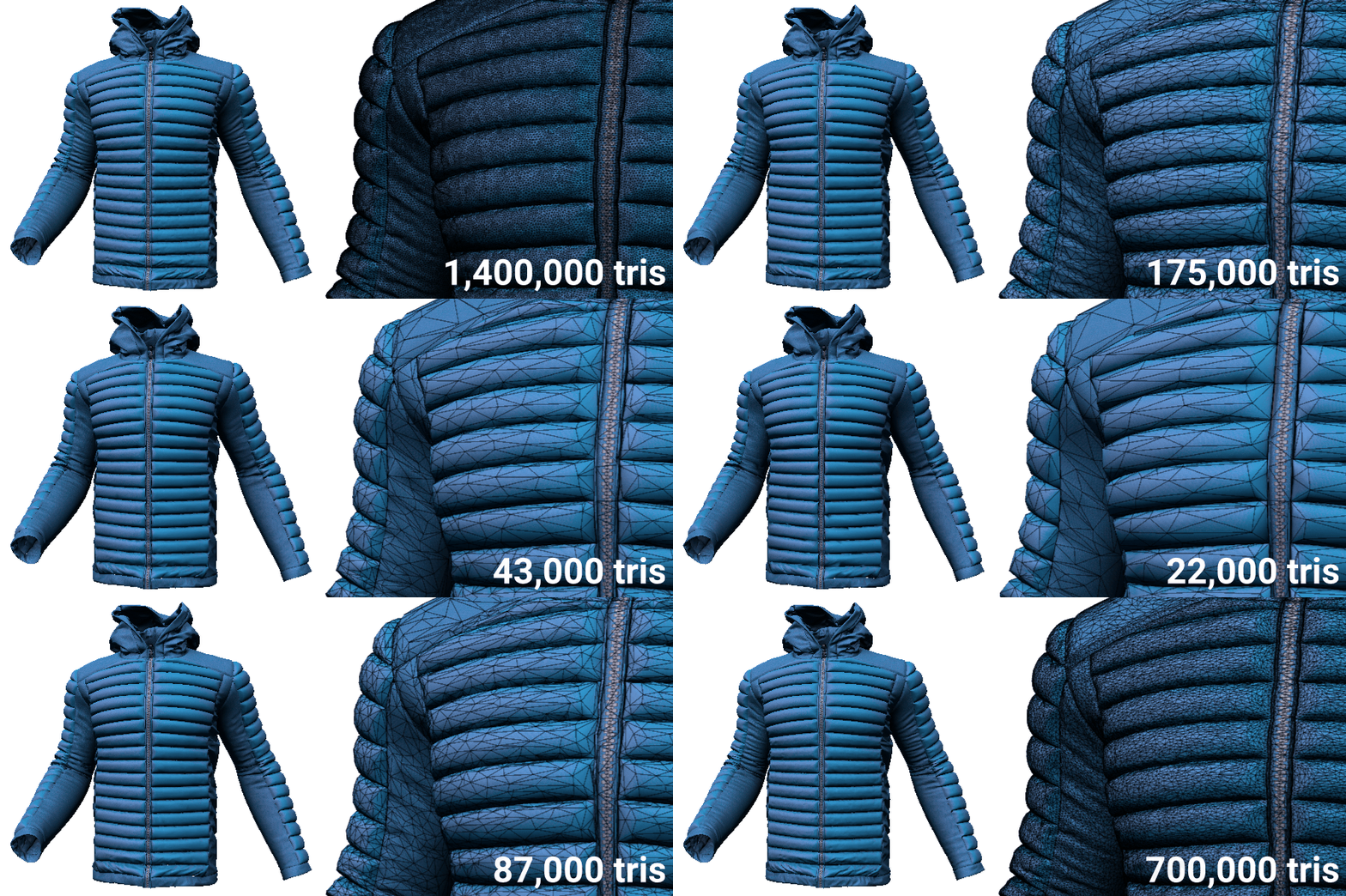
Data preparation sometimes requires a specific polygon count. An example of use is to properly display 3D models on specific devices and platforms. For the HoloLens device, a maximum of 100,000 triangles is recommended.
Data Engine offers many possibilities to reduce the polygon count, but the most direct way is to decimate meshes to a target polygon count.
This feature is iterative and uses less memory than other decimation features. To limit memory usage, set the minimum number of polygons above which to iterate.
Prerequisites
We strongly recommend that you perform these operations before decimation, to ensure the efficiency of decimation:
- Repair meshes, to avoid widening cracks or gaps in meshes. Read more.
- Remove unnecessary texture coordinates. Read more.
Parameters
Occurrences
Specify the list of occurrences to be processed.
Although the target polygon count or decimation ratio applies globally to the entire selection, decimation operates at the level of parts. For models from the automotive, engineering and construction industry (AEC), we recommend that you run decimation only once for all parts. This way, the parts that have very few polygons, such as walls, are kept intact while decimation focuses on denser meshes.
Target strategy
Specify the target polygon count or the decimation ratio.
Importance of texture coordinates
Specify how to preserve texture coordinates during the decimation process:
- Preserve texture coordinate seams from moving, and preserve UV islands and their related textures from distortion and stretching.
- Only preserve texture coordinate seams from moving.
- Ignore texture coordinates. As a result, textures coordinates and textures may stretch, move, and overlap.
We strongly recommend that you remove unnecessary texture coordinates before decimation. Decimation is more efficient with meshes that have no texture coordinates than if you ignore texture coordinates. Texture coordinates are deemed as important information to be preserved during decimation.
Protect topology
Choose whether to preserve important topological singularities from change and from becoming non-manifold.
We recommend that you protect topology if it's important. For example, you might want to preserve holes.
We recommend that you disable this parameter for complex models whose visual quality is more important than topological singularities. The overall result is better.
Iterative threshold
To limit memory usage, set the minimum polygon count above which to iterate decimation.
This parameter is particularly useful for large models that have several million polygons, such as industrial models. These models are memory-intensive and require iterative decimation.
Set this threshold according to your computer memory capacity. As a rule of thumb, count 5 GB of RAM for one million polygons.
Examples
Game model
This example shows the animated model of a panda character:
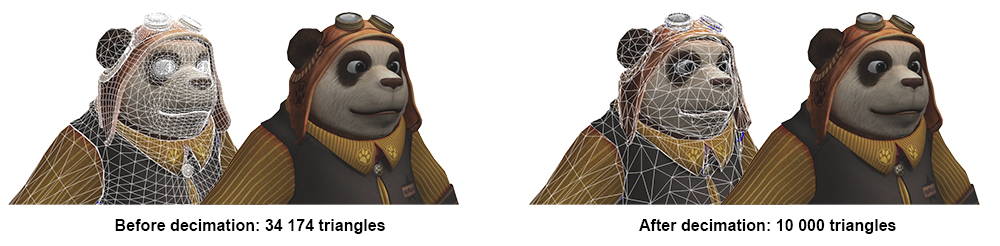
The skins, the bones, and the animation are preserved during decimation.
The repair mesh feature has been used before decimation.
These decimation parameters are used:
-
The target polygon count is set to 10,000 triangles, that is, a reduction of 30%.The polygon count is low: 35,000 triangles. The target polygon count shouldn't be too low, but mostly depends on the distance from the camera.
-
The importance of texture coordinates is set so as to preserve texture coordinate seams and to reduce deformation.Texture coordinates must be preserved, because textures are applied to the model. Textures are essential to the visual quality of this model and shouldn't be too distorted.
-
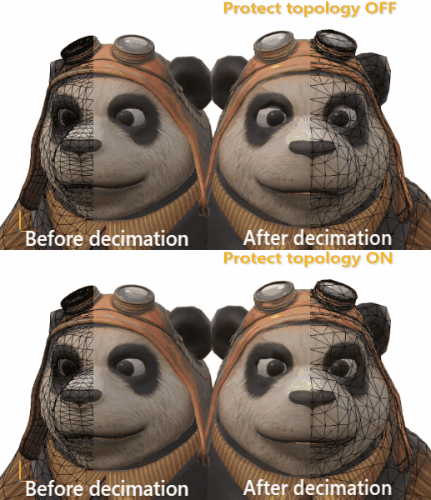
Topology protection is enabled to important protect topological singularities, such as the eye sockets.If this parameter is disabled, then concave surfaces, such as the eyes and the mouth, stretch a little:
-
The iterative threshold is disabled.The polygon count is very low. As a result, decimation isn't a memory-intensive process.
CAD model
This example shows the CAD model of a car:
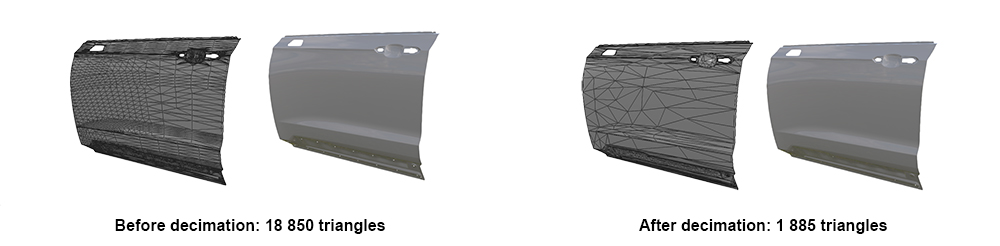
The repair mesh feature has been used before decimation.
These decimation parameters are used:
-
The target decimation ratio is set to 10%.The polygon count is high: 19,000 triangles. This number can be importantly reduced.
-
The importance of texture coordinates is set so as to ignore texture coordinates.This model, like most CAD models, has no texture coordinates at this stage.
-
Topology protection is enabled.The door body has a rather simple topology and contains topological singularities, such as small holes at the bottom, are important.
-
The iterative threshold is disabled.The polygon count is very low. As a result, decimation isn't memory-intensive.