Decimate meshes by collapsing edges
Use this feature to reduce the polygon count by collapsing polygon edges, based on quality criteria.
Read time 1 minuteLast updated 8 months ago
API function: algo.decimateEdgeCollapse
Use this feature to reduce the polygon count by collapsing polygon edges, based on quality criteria.
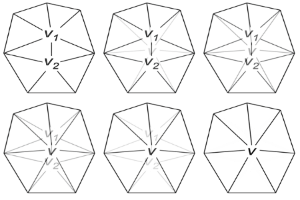
This feature is particularly suitable for models that have soft edges or smooth textured surfaces, such as game assets and 3D scans.
Use quality criteria to avoid artifacts that result from smoothing and irregularities in topology.
Prerequisites
We strongly recommend that you perform these operations before decimation, to ensure the efficiency of decimation:
- Repair meshes, to avoid widening cracks or gaps in meshes. Read more.
- Remove unnecessary texture coordinates. Read more.
Parameters
This feature performs these operations:
- Calculate the position of a new vertex.
- Compute an error score for each edge with different deviations on boundaries, normals, and texture coordinates.
- Delete the edges that have the lowest score.
Example
This table shows examples of values:
Quality | Surface tolerance | Maximum deviation of normals | Maximum deviation of texture coordinates |
|---|---|---|---|
| High quality‚ very light decimation | 0.0005 | -1 | -1 |
| Medium quality | 0.001 | -1 | -1 |
| Low quality | 0.003 | -1 | -1 |