Scene Menu
Asset Transformer Studio Scene menu reference
Read time 3 minutesLast updated 10 hours ago
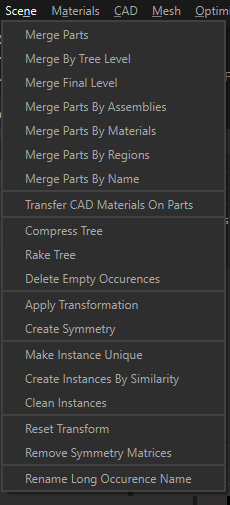
The Scene menu contains the most commonly used functions to manage the Product Structure (tree), in order to optimize it.
Menu option | Description |
|---|---|
| Merge Parts | Merges all selected Parts together, as one single Part (assembles a collection of parts into a single resulting part) |
| Merge By Tree Level | Reduces the Product Structure (Tree) depth by merging together all Parts located at the specified tree Level. The Tree Level designates the level at which an occurrence is positioned in the Tree ( |
| Merge Final Level | Converts all final Assembly nodes of the selection into parts by merging their children. A final Level designates an Assembly node whose children are exclusively part occurrences. |
| Merge Parts By Assemblies | Merges together into one Part all Parts contained under each Assembly node of the Product Structure |
| Merge Parts By Materials | For all materials, merges Parts of the selection by visible materials. The visible material is the material displayed on a polygon in the viewer (not necessarily the one set as a Material Property of the part that owns the polygon). |
| Merge Parts By Regions | Merges parts together, based on their physical proximity in the scene, meaning by region |
| Merge Parts By Name | Within a selection of Parts, merges together into one Part all Parts sharing the same name (identical Name property) |
| Transfer CAD Materials On Parts | All materials inherited from a parent node or from the CAD surfaces of a Part are transferred to the Material Property of this part. This action is executed for each Part of the hierarchy. This makes the material management easier in Asset Transformer Studio. |
| Compress Tree | Compresses a subtree of the Product Structure (Tree) by removing empty nodes, or any node containing only one subnode, and by removing useless instances |
| Rake Tree | Simplifies the Product Structure (Tree) by transferring all occurrences under the |
| Delete Empty Occurrences | Deletes Assembly nodes without children (Empty) |
| Apply Transformation | Used to change the transformation matrix of a selection |
| Create Symmetry | Creates planar symmetry from a selection |
| Make Instance Unique | Destroys connection of a selected Instance with its other instances, making it unique (also called singularize) |
| Create Instances By Similarity | Creates instances when there are similar parts. This can be used to repair instances or to simplify a model that has similar parts that could be instantiated instead to reduce the number of unique meshes (reduces draw calls, GPU memory usage and file size). Using 1.0 (100%) in all similarity criteria is non destructive. Using lower values will help finding more similar parts, even if their polycount or dimensions varies a bit. |
| Remove Useless Instances | Remove instances where they are not needed (prototype referenced once…) |
| Reset Transform | Sets all transformation matrices of the selection to identity |
| Remove Symmetry Matrices | Removes symmetry matrices, meaning negative scales, in order to avoid improper behavior in game engines for example (when applying physics, or for lightmap generation). For symmetric occurrences having negative scales, a matrix is applied directly to the geometries. Careful as the rotation of the Pivot Point might have been altered in the process. |
| Rename Long Occurrence Name | Automatically reduces the character length in Assembly and Part name attribute to the specified value |