커스텀 ID로 로그인
Sign in users to Vivox with custom identifiers.
읽는 시간 3분최근 업데이트: 8달 전
플레이어 ID를 생성하는 기존 플레이어 관리 시스템이 이미 있는 경우 커스텀 ID 제공자를 사용하여 ID를 연결할 수 있습니다.
필수 조건:
- Unity Cloud 프로젝트 설정
- 프로젝트 ID, 개발 환경 ID, 개발 환경 이름이 있어야 합니다.
- UAS 커스텀 ID 제공자 활성화 이 설정에서 서비스 계정 인증정보를 손쉽게 사용할 수 있어야 합니다.
이 설정의 전반적인 플로는 다음과 같습니다.
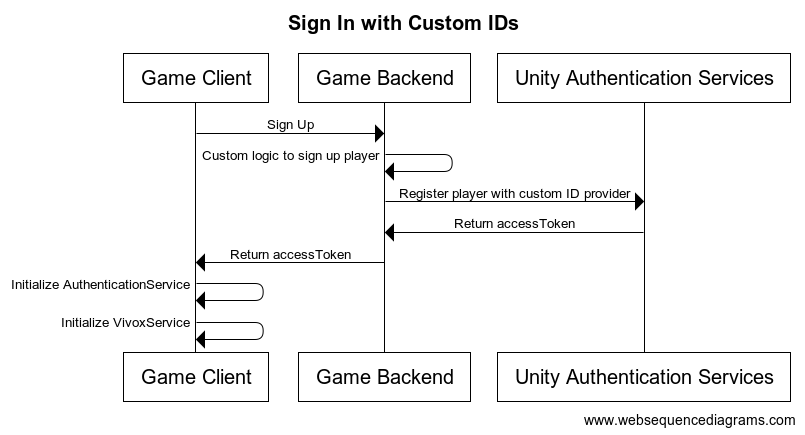
로그인
- 모든 사용자를 로그인 시 UAS 커스텀 ID 제공자에 등록하고 플레이어용 과
accessToken를 검색합니다.sessionTokens - 과
accessToken을 사용하여 클라이언트에서 AuthenticationService를 설정합니다.sessionToken
클라이언트 측 설정
아래에 추가로 설정된 서버 측 로그인과 함께 백엔드에서 액세스 토큰을 검색하여 로 처리해야 합니다.
AuthenticationServiceProcessAuthenticationTokensProcessAuthenticationTokensProcessAuthenticationTokensusing Unity.Services.Authentication;using Unity.Services.Vivox;void SignUserWithCustomTokenWithAutoRefresh(){ try { // Check if a cached player already exists by checking if the session token exists if (AuthenticationService.Instance.SessionTokenExists) { // This call will sign in the cached player. await AuthenticationService.Instance.SignInAnonymouslyAsync(); Debug.Log("Cached user sign in succeeded!"); } else { var userTokens = // Fetch the user tokens using your method calls AuthenticationService.Instance.ProcessAuthenticationTokens(userTokens.AccessToken, userTokens.SessionToken) } // Shows how to get the playerID Debug.Log($"PlayerID: {AuthenticationService.Instance.PlayerId}"); await VivoxService.Instance.InitializeAsync(); } catch (AuthenticationException ex) { // Compare error code to AuthenticationErrorCodes // Notify the player with the proper error message Debug.LogException(ex); } catch (RequestFailedException ex) { // Compare error code to CommonErrorCodes // Notify the player with the proper error message Debug.LogException(ex); } catch (Exception ex) { // Handle exceptions from your method call Debug.LogException(ex); }}
샘플 코드는 클래스가 아니라 메서드뿐임을 유의해 주십시오.
액세스 토큰은 백엔드에서 검색해야 합니다. 자세한 내용은 아래 서버 측 설정을 참고하시기 바랍니다.
서버 측 설정
플레이어가 로그인하는 동안 각 플레이어가 UAS 커스텀 ID 제공자에 등록되어 있는지 확인하고 플레이어의 과 을 검색합니다. 아직 설정하지 않았다면 UAS 커스텀 ID 제공자 활성화를 참고하여 설정합니다. 서비스 계정 인증정보를 사용하여 게임 서버에 플레이어를 등록하기 위한 요청을 보낼 수 있습니다.
accessTokensessionToken- 토큰 교환 API를 호출하여 상태 비보존 토큰을 검색합니다.
- 커스텀 ID API로 로그인을 호출합니다.
curl --location 'https://player-auth.services.api.unity.com/v1/projects/<PROJECT_ID>/authentication/server/custom-id' \--header 'Content-Type: application/json' \--header 'UnityEnvironment: <ENVIRONMENT_NAME>' \--header 'Authorization: Bearer <STATELESS_TOKEN' \--data '{ "externalId": "YOUR_CUSTOM_PLAYER_ID"}'
이 요청의 응답에는 를 초기화하기 위해 클라이언트에 반환해야 하는 과 이 포함됩니다. 이 컨텍스트에서는 을 으로 사용할 수 있습니다.
AuthenticationServiceidTokensessionTokenidTokenaccessToken선택적으로 플레이어 이름 API를 사용하여 플레이어의 이름을 설정할 수 있습니다. 이 기능은 Vivox Safety 제품을 사용하는 경우 Moderation 대시보드에서 플레이어 이름을 운영자에게 표시할 수 있으므로 유용합니다. 플레이어가 이름을 변경하는 경우 플레이어 이름을 최신 상태로 유지해야 합니다. 플레이어 이름 관리를 사용하여 클라이언트 측에서 플레이어 이름을 직접 관리할 수도 있습니다.