오디오 디바이스 관리
Allow players to select audio input and output devices.
읽는 시간 2분최근 업데이트: 9달 전
Vivox SDK는 시스템의 기본 오디오 입력 및 출력 디바이스를 자동으로 사용합니다. 게임에서는 보통 이러한 동작을 오버라이드하여 게임에 사용되는 오디오 디바이스와는 별도로 그룹 음성 채팅에 사용할 오디오 디바이스를 사용자가 선택하도록 할 수 있습니다.
이 오버라이드를 수행하려면 게임에서 사용자에게 사용 가능한 디바이스 목록을 표시하고 해당 목록에서 디바이스를 선택하도록 하는 사용자 인터페이스를 빌드합니다. InputDevices와 OutputDevices에 대한 이 사용자 인터페이스를 빌드하고 와 를 활용하여 또는 의 ReadOnlyCollection을 반환한 다음 이러한 디바이스의 이름으로 UI를 채웁니다.
VivoxService.Instance.AvailableInputDevicesVivoxService.Instance.AvailableOutputDevicesVivoxInputDevicesVivoxOutputDevices이 사용자 인터페이스는 와 액션을 구독해야 하며 와 의 새 목록으로 UI를 새로 고쳐 AudioDevices 목록에서 추가 또는 제거된 항목을 파악해야 합니다.
VivoxService.Instance.AvailableInputDevicesChangedVivoxService.Instance.AvailableOutputDevicesChangedVivoxService.Instance.AvailableInputDevicesVivoxService.Instance.AvailableOutputDevices사용자가 목록에서 디바이스를 선택한 후 V를 사용하여 입력 디바이스를 설정하거나 를 사용하여 출력 디바이스를 설정합니다.
ivoxService.Instance.SetActiveInputDeviceAsync(VivoxInputDevice device)VivoxService.Instance.SetActiveOutputDeviceAsync(VivoxOutputDevice device)다음 예에서는 목록에서 오디오 디바이스를 선택한 후 오디오 디바이스를 설정하는 방법을 다룹니다. 여기에는 사용자 인터페이스가 로드되는 동안 오디오 디바이스가 변경되지 않았는지 확인하기 위해 오디오 디바이스가 여전히 디바이스 목록에 있는지 확인하는 테스트도 포함됩니다.
async void SetVivoxInputDeviceAsync(VivoxInputDevice device){ if(VivoxService.Instance.AvailableInputDevices.Contains(device)) { await VivoxService.Instance.SetActiveInputDeviceAsync(device); }}await void SetVivoxOutputDeviceAsync(VivoxInputDevice device){ if(VivoxService.Instance.AvailableOutputDevices.Contains(device)) { await VivoxService.Instance.SetActiveOutputDeviceAsync(device); }}
AudioDeviceSettings.cs작동 중인 디바이스 식별
참가자는 음성 채팅을 사용할 때 또는 와 같은 가상 디바이스를 활성 디바이스로 사용할 수 있습니다. 디바이스 특정 버그를 해결하려고 할 때처럼 가상 디바이스가 나타내는 물리적 디바이스에 대한 정보가 필요할 수도 있습니다.
Default System DeviceDefault Communication Device물리적 디바이스는 Vivox SDK 내에서 작동 중인 디바이스라고도 합니다.
Vivox SDK에는 작동 중인 입력 및 출력 디바이스를 확인하고 해당 변경 사항을 구독할 수 있는 프로퍼티와 이벤트가 포함되어 있습니다.
VivoxService.Instance.EffectiveInputDeviceChanged;VivoxService.Instance.EffectiveOutputDeviceChanged;VivoxService.Instance.EffectiveInputDevice;VivoxService.Instance.EffectiveOutputDevice;
예를 들어, 플레이어가 게임 내 입력 디바이스로 를 선택한 경우, 시스템 설정에서 로 설정된 기본 마이크가 실제 사용되는 디바이스가 됩니다. 이 상황에서 는 사용 중인 실제 입력 디바이스를 나타내는 오브젝트를 반환합니다. 채팅 채널 샘플의 이미지는 다음과 같습니다.
Default System DeviceDefault System DeviceVivoxService.Instance.EffectiveInputDevice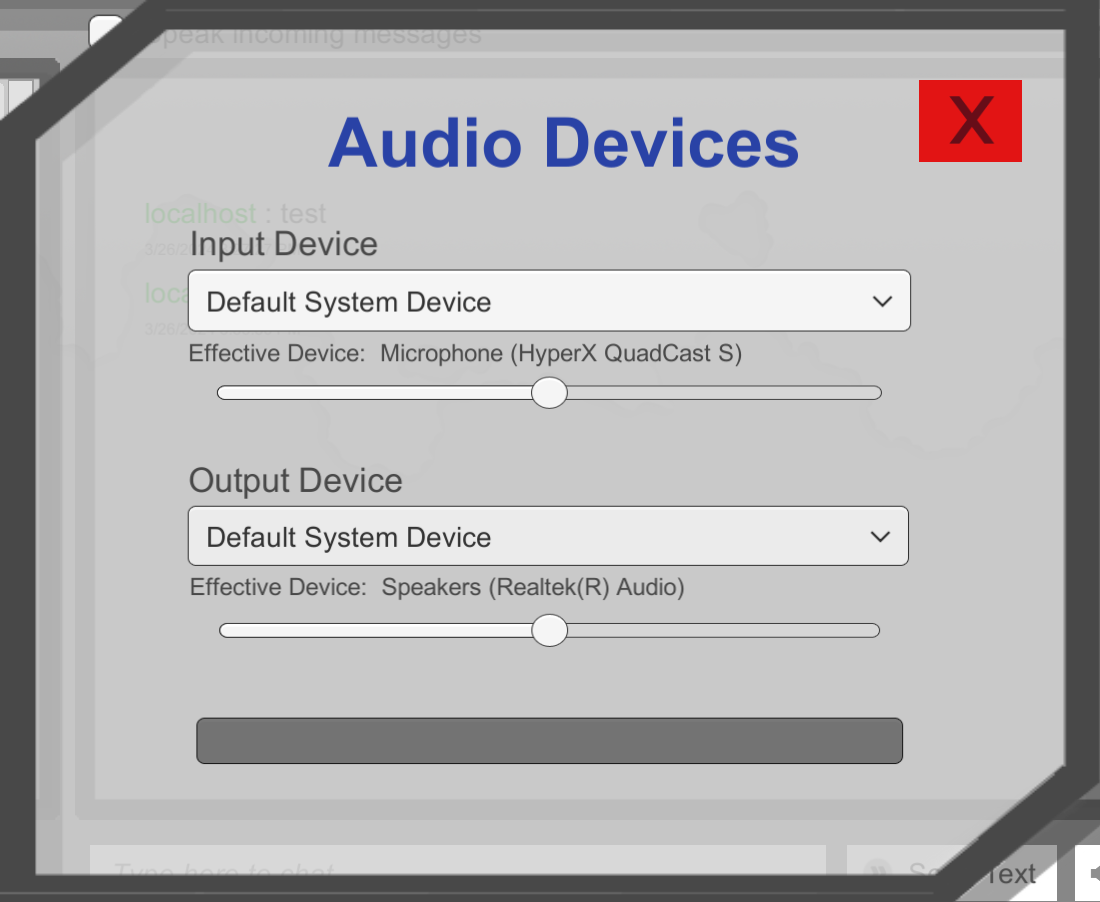
작동 중인 디바이스가 표시된 채팅 채널 샘플 오디오 디바이스 선택 메뉴의 스크린샷입니다.
사용자가 Windows 머신의 시스템 설정에서 를 조정하는 경우와 같이, 사용 가능한 디바이스 목록이나 액티브 디바이스가 변경되지 않더라도 작동 중인 디바이스는 변경될 수 있습니다. 이 경우 사용 가능한 디바이스 목록이나 액티브 디바이스는 변경되지 않지만, 가 사용하는 실제 디바이스가 변경되었기 때문에 작동 중인 디바이스가 변경됩니다.
Default System DeviceDefault System Device