Vector4Field
Make an X, Y, Z & W field for entering a Vector4.
Read time 3 minutesLast updated 4 days ago
Definition
- Type: Method
- Namespace: UnityEditor
- Assembly: UnityEditor
Vector4Field(string, Vector4, GUILayoutOption[])
Make an X, Y, Z & W field for entering a Vector4.
public static Vector4 Vector4Field(string label, Vector4 value, params GUILayoutOption[] options)
Parameters
Label to display above the field.
The value to edit.
An optional list of layout options that specify extra layout properties. Any values passed in here will override settings defined by the style.
Additional Resources: GUILayout.Width, GUILayout.Height, GUILayout.MinWidth, GUILayout.MaxWidth, GUILayout.MinHeight, GUILayout.MaxHeight, GUILayout.ExpandWidth, GUILayout.ExpandHeight.
Additional Resources: GUILayout.Width, GUILayout.Height, GUILayout.MinWidth, GUILayout.MaxWidth, GUILayout.MinHeight, GUILayout.MaxHeight, GUILayout.ExpandWidth, GUILayout.ExpandHeight.
Returns
Type | Description |
|---|---|
| Vector4 | The value entered by the user. |
Remarks
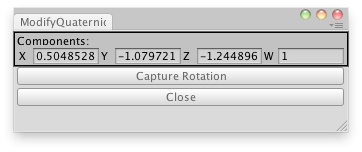
Modify X,Y,Z and W values directly of a GameObject.
Examples
using UnityEngine;using UnityEditor;public class ModifyQuaternionDirectly : UnityEditor.EditorWindow{ Quaternion quat; public Vector4 value; [MenuItem("Examples/Modify internal Quaternion")] static void Init() { ModifyQuaternionDirectly window = (ModifyQuaternionDirectly)EditorWindow.GetWindow(typeof(ModifyQuaternionDirectly), true, "My Empty Window"); window.Show(); } void OnGUI() { value = EditorGUILayout.Vector4Field("Components:", value); if (GUILayout.Button("Capture Rotation")) value = QuaternionToVector4(Selection.activeTransform.rotation); if (GUILayout.Button("Close")) this.Close(); } static Vector4 QuaternionToVector4(Quaternion rot) { return new Vector4(rot.x, rot.y, rot.z, rot.w); }}
Vector4Field(GUIContent, Vector4, GUILayoutOption[])
Make an X, Y, Z & W field for entering a Vector4.
public static Vector4 Vector4Field(GUIContent label, Vector4 value, params GUILayoutOption[] options)
Parameters
Label to display above the field.
The value to edit.
An optional list of layout options that specify extra layout properties. Any values passed in here will override settings defined by the style.
Additional Resources: GUILayout.Width, GUILayout.Height, GUILayout.MinWidth, GUILayout.MaxWidth, GUILayout.MinHeight, GUILayout.MaxHeight, GUILayout.ExpandWidth, GUILayout.ExpandHeight.
Additional Resources: GUILayout.Width, GUILayout.Height, GUILayout.MinWidth, GUILayout.MaxWidth, GUILayout.MinHeight, GUILayout.MaxHeight, GUILayout.ExpandWidth, GUILayout.ExpandHeight.
Returns
Type | Description |
|---|---|
| Vector4 | The value entered by the user. |
Remarks
Modify X,Y,Z and W values directly of a GameObject.
Examples
using UnityEngine;using UnityEditor;public class ModifyQuaternionDirectly : UnityEditor.EditorWindow{ Quaternion quat; public Vector4 value; [MenuItem("Examples/Modify internal Quaternion")] static void Init() { ModifyQuaternionDirectly window = (ModifyQuaternionDirectly)EditorWindow.GetWindow(typeof(ModifyQuaternionDirectly), true, "My Empty Window"); window.Show(); } void OnGUI() { value = EditorGUILayout.Vector4Field("Components:", value); if (GUILayout.Button("Capture Rotation")) value = QuaternionToVector4(Selection.activeTransform.rotation); if (GUILayout.Button("Close")) this.Close(); } static Vector4 QuaternionToVector4(Quaternion rot) { return new Vector4(rot.x, rot.y, rot.z, rot.w); }}