EnumFlagsField
Displays a menu with an option for every value of the enum type when clicked.
Read time 15 minutesLast updated a month ago
Definition
- Type: Method
- Namespace: UnityEditor
- Assembly: UnityEditor
EnumFlagsField(Enum, GUILayoutOption[])
Displays a menu with an option for every value of the enum type when clicked.
public static Enum EnumFlagsField(Enum enumValue, params GUILayoutOption[] options)
Parameters
Enum flags value.
An optional list of layout options that specify extra layout properties. Any values passed in here will override settings defined by the style.
Additional Resources: GUILayout.Width, GUILayout.Height, GUILayout.MinWidth, GUILayout.MaxWidth, GUILayout.MinHeight, GUILayout.MaxHeight, GUILayout.ExpandWidth, GUILayout.ExpandHeight.
Additional Resources: GUILayout.Width, GUILayout.Height, GUILayout.MinWidth, GUILayout.MaxWidth, GUILayout.MinHeight, GUILayout.MaxHeight, GUILayout.ExpandWidth, GUILayout.ExpandHeight.
Returns
Type | Description |
|---|---|
| Enum | The enum flags value modified by the user. This is a selection BitMask where each bit represents an Enum value index. (Note this returned value is not itself an Enum). |
Remarks
An option for the value with name "Nothing" and an option for the value (that is, all bits set) with the name "Everything" are always displayed at the top of the menu. The names for the values and can be overriden by defining these values in the enum type.
0~00~0Note: This method only supports enums whose underlying types are supported by Unity's serialization system (sbyte, short, int, byte, ushort, or uint). For enums backed by an unsigned type, the "Everything" option should have the value corresponding to all bits set (i.e. in an unchecked context or the constant for the type).
~0MaxValue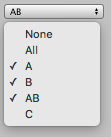
Simple editor window that shows the enum flags field.
Examples
using UnityEditor;using UnityEngine;class EnumFlagsFieldExample : EditorWindow{ enum ExampleFlagsEnum { None = 0, // Custom name for "Nothing" option A = 1 << 0, B = 1 << 1, AB = A | B, // Combination of two flags C = 1 << 2, All = ~0, // Custom name for "Everything" option } ExampleFlagsEnum m_Flags; [MenuItem("Examples/EnumFlagsField Example")] static void OpenWindow() { GetWindow<EnumFlagsFieldExample>().Show(); } void OnGUI() { m_Flags = (ExampleFlagsEnum)EditorGUILayout.EnumFlagsField(m_Flags); }}
EnumFlagsField(Enum, GUIStyle, GUILayoutOption[])
Displays a menu with an option for every value of the enum type when clicked.
public static Enum EnumFlagsField(Enum enumValue, GUIStyle style, params GUILayoutOption[] options)
Parameters
Enum flags value.
An optional list of layout options that specify extra layout properties. Any values passed in here will override settings defined by the style.
Additional Resources: GUILayout.Width, GUILayout.Height, GUILayout.MinWidth, GUILayout.MaxWidth, GUILayout.MinHeight, GUILayout.MaxHeight, GUILayout.ExpandWidth, GUILayout.ExpandHeight.
Additional Resources: GUILayout.Width, GUILayout.Height, GUILayout.MinWidth, GUILayout.MaxWidth, GUILayout.MinHeight, GUILayout.MaxHeight, GUILayout.ExpandWidth, GUILayout.ExpandHeight.
Returns
Type | Description |
|---|---|
| Enum | The enum flags value modified by the user. This is a selection BitMask where each bit represents an Enum value index. (Note this returned value is not itself an Enum). |
Remarks
An option for the value with name "Nothing" and an option for the value (that is, all bits set) with the name "Everything" are always displayed at the top of the menu. The names for the values and can be overriden by defining these values in the enum type.
0~00~0Note: This method only supports enums whose underlying types are supported by Unity's serialization system (sbyte, short, int, byte, ushort, or uint). For enums backed by an unsigned type, the "Everything" option should have the value corresponding to all bits set (i.e. in an unchecked context or the constant for the type).
~0MaxValueSimple editor window that shows the enum flags field.
Examples
using UnityEditor;using UnityEngine;class EnumFlagsFieldExample : EditorWindow{ enum ExampleFlagsEnum { None = 0, // Custom name for "Nothing" option A = 1 << 0, B = 1 << 1, AB = A | B, // Combination of two flags C = 1 << 2, All = ~0, // Custom name for "Everything" option } ExampleFlagsEnum m_Flags; [MenuItem("Examples/EnumFlagsField Example")] static void OpenWindow() { GetWindow<EnumFlagsFieldExample>().Show(); } void OnGUI() { m_Flags = (ExampleFlagsEnum)EditorGUILayout.EnumFlagsField(m_Flags); }}
EnumFlagsField(string, Enum, GUILayoutOption[])
Displays a menu with an option for every value of the enum type when clicked.
public static Enum EnumFlagsField(string label, Enum enumValue, params GUILayoutOption[] options)
Parameters
Optional label to display in front of the enum flags field.
Enum flags value.
An optional list of layout options that specify extra layout properties. Any values passed in here will override settings defined by the style.
Additional Resources: GUILayout.Width, GUILayout.Height, GUILayout.MinWidth, GUILayout.MaxWidth, GUILayout.MinHeight, GUILayout.MaxHeight, GUILayout.ExpandWidth, GUILayout.ExpandHeight.
Additional Resources: GUILayout.Width, GUILayout.Height, GUILayout.MinWidth, GUILayout.MaxWidth, GUILayout.MinHeight, GUILayout.MaxHeight, GUILayout.ExpandWidth, GUILayout.ExpandHeight.
Returns
Type | Description |
|---|---|
| Enum | The enum flags value modified by the user. This is a selection BitMask where each bit represents an Enum value index. (Note this returned value is not itself an Enum). |
Remarks
An option for the value with name "Nothing" and an option for the value (that is, all bits set) with the name "Everything" are always displayed at the top of the menu. The names for the values and can be overriden by defining these values in the enum type.
0~00~0Note: This method only supports enums whose underlying types are supported by Unity's serialization system (sbyte, short, int, byte, ushort, or uint). For enums backed by an unsigned type, the "Everything" option should have the value corresponding to all bits set (i.e. in an unchecked context or the constant for the type).
~0MaxValueSimple editor window that shows the enum flags field.
Examples
using UnityEditor;using UnityEngine;class EnumFlagsFieldExample : EditorWindow{ enum ExampleFlagsEnum { None = 0, // Custom name for "Nothing" option A = 1 << 0, B = 1 << 1, AB = A | B, // Combination of two flags C = 1 << 2, All = ~0, // Custom name for "Everything" option } ExampleFlagsEnum m_Flags; [MenuItem("Examples/EnumFlagsField Example")] static void OpenWindow() { GetWindow<EnumFlagsFieldExample>().Show(); } void OnGUI() { m_Flags = (ExampleFlagsEnum)EditorGUILayout.EnumFlagsField(m_Flags); }}
EnumFlagsField(string, Enum, GUIStyle, GUILayoutOption[])
Displays a menu with an option for every value of the enum type when clicked.
public static Enum EnumFlagsField(string label, Enum enumValue, GUIStyle style, params GUILayoutOption[] options)
Parameters
Optional label to display in front of the enum flags field.
Enum flags value.
An optional list of layout options that specify extra layout properties. Any values passed in here will override settings defined by the style.
Additional Resources: GUILayout.Width, GUILayout.Height, GUILayout.MinWidth, GUILayout.MaxWidth, GUILayout.MinHeight, GUILayout.MaxHeight, GUILayout.ExpandWidth, GUILayout.ExpandHeight.
Additional Resources: GUILayout.Width, GUILayout.Height, GUILayout.MinWidth, GUILayout.MaxWidth, GUILayout.MinHeight, GUILayout.MaxHeight, GUILayout.ExpandWidth, GUILayout.ExpandHeight.
Returns
Type | Description |
|---|---|
| Enum | The enum flags value modified by the user. This is a selection BitMask where each bit represents an Enum value index. (Note this returned value is not itself an Enum). |
Remarks
An option for the value with name "Nothing" and an option for the value (that is, all bits set) with the name "Everything" are always displayed at the top of the menu. The names for the values and can be overriden by defining these values in the enum type.
0~00~0Note: This method only supports enums whose underlying types are supported by Unity's serialization system (sbyte, short, int, byte, ushort, or uint). For enums backed by an unsigned type, the "Everything" option should have the value corresponding to all bits set (i.e. in an unchecked context or the constant for the type).
~0MaxValueSimple editor window that shows the enum flags field.
Examples
using UnityEditor;using UnityEngine;class EnumFlagsFieldExample : EditorWindow{ enum ExampleFlagsEnum { None = 0, // Custom name for "Nothing" option A = 1 << 0, B = 1 << 1, AB = A | B, // Combination of two flags C = 1 << 2, All = ~0, // Custom name for "Everything" option } ExampleFlagsEnum m_Flags; [MenuItem("Examples/EnumFlagsField Example")] static void OpenWindow() { GetWindow<EnumFlagsFieldExample>().Show(); } void OnGUI() { m_Flags = (ExampleFlagsEnum)EditorGUILayout.EnumFlagsField(m_Flags); }}
EnumFlagsField(GUIContent, Enum, GUILayoutOption[])
Displays a menu with an option for every value of the enum type when clicked.
public static Enum EnumFlagsField(GUIContent label, Enum enumValue, params GUILayoutOption[] options)
Parameters
Optional label to display in front of the enum flags field.
Enum flags value.
An optional list of layout options that specify extra layout properties. Any values passed in here will override settings defined by the style.
Additional Resources: GUILayout.Width, GUILayout.Height, GUILayout.MinWidth, GUILayout.MaxWidth, GUILayout.MinHeight, GUILayout.MaxHeight, GUILayout.ExpandWidth, GUILayout.ExpandHeight.
Additional Resources: GUILayout.Width, GUILayout.Height, GUILayout.MinWidth, GUILayout.MaxWidth, GUILayout.MinHeight, GUILayout.MaxHeight, GUILayout.ExpandWidth, GUILayout.ExpandHeight.
Returns
Type | Description |
|---|---|
| Enum | The enum flags value modified by the user. This is a selection BitMask where each bit represents an Enum value index. (Note this returned value is not itself an Enum). |
Remarks
An option for the value with name "Nothing" and an option for the value (that is, all bits set) with the name "Everything" are always displayed at the top of the menu. The names for the values and can be overriden by defining these values in the enum type.
0~00~0Note: This method only supports enums whose underlying types are supported by Unity's serialization system (sbyte, short, int, byte, ushort, or uint). For enums backed by an unsigned type, the "Everything" option should have the value corresponding to all bits set (i.e. in an unchecked context or the constant for the type).
~0MaxValueSimple editor window that shows the enum flags field.
Examples
using UnityEditor;using UnityEngine;class EnumFlagsFieldExample : EditorWindow{ enum ExampleFlagsEnum { None = 0, // Custom name for "Nothing" option A = 1 << 0, B = 1 << 1, AB = A | B, // Combination of two flags C = 1 << 2, All = ~0, // Custom name for "Everything" option } ExampleFlagsEnum m_Flags; [MenuItem("Examples/EnumFlagsField Example")] static void OpenWindow() { GetWindow<EnumFlagsFieldExample>().Show(); } void OnGUI() { m_Flags = (ExampleFlagsEnum)EditorGUILayout.EnumFlagsField(m_Flags); }}
EnumFlagsField(GUIContent, Enum, GUIStyle, GUILayoutOption[])
Displays a menu with an option for every value of the enum type when clicked.
public static Enum EnumFlagsField(GUIContent label, Enum enumValue, GUIStyle style, params GUILayoutOption[] options)
Parameters
Optional label to display in front of the enum flags field.
Enum flags value.
An optional list of layout options that specify extra layout properties. Any values passed in here will override settings defined by the style.
Additional Resources: GUILayout.Width, GUILayout.Height, GUILayout.MinWidth, GUILayout.MaxWidth, GUILayout.MinHeight, GUILayout.MaxHeight, GUILayout.ExpandWidth, GUILayout.ExpandHeight.
Additional Resources: GUILayout.Width, GUILayout.Height, GUILayout.MinWidth, GUILayout.MaxWidth, GUILayout.MinHeight, GUILayout.MaxHeight, GUILayout.ExpandWidth, GUILayout.ExpandHeight.
Returns
Type | Description |
|---|---|
| Enum | The enum flags value modified by the user. This is a selection BitMask where each bit represents an Enum value index. (Note this returned value is not itself an Enum). |
Remarks
An option for the value with name "Nothing" and an option for the value (that is, all bits set) with the name "Everything" are always displayed at the top of the menu. The names for the values and can be overriden by defining these values in the enum type.
0~00~0Note: This method only supports enums whose underlying types are supported by Unity's serialization system (sbyte, short, int, byte, ushort, or uint). For enums backed by an unsigned type, the "Everything" option should have the value corresponding to all bits set (i.e. in an unchecked context or the constant for the type).
~0MaxValueSimple editor window that shows the enum flags field.
Examples
using UnityEditor;using UnityEngine;class EnumFlagsFieldExample : EditorWindow{ enum ExampleFlagsEnum { None = 0, // Custom name for "Nothing" option A = 1 << 0, B = 1 << 1, AB = A | B, // Combination of two flags C = 1 << 2, All = ~0, // Custom name for "Everything" option } ExampleFlagsEnum m_Flags; [MenuItem("Examples/EnumFlagsField Example")] static void OpenWindow() { GetWindow<EnumFlagsFieldExample>().Show(); } void OnGUI() { m_Flags = (ExampleFlagsEnum)EditorGUILayout.EnumFlagsField(m_Flags); }}
EnumFlagsField(GUIContent, Enum, bool, GUILayoutOption[])
Displays a menu with an option for every value of the enum type when clicked.
public static Enum EnumFlagsField(GUIContent label, Enum enumValue, bool includeObsolete, params GUILayoutOption[] options)
Parameters
Optional label to display in front of the enum flags field.
Enum flags value.
Set to true to include Enum values with ObsoleteAttribute. Set to false to exclude Enum values with ObsoleteAttribute.
An optional list of layout options that specify extra layout properties. Any values passed in here will override settings defined by the style.
Additional Resources: GUILayout.Width, GUILayout.Height, GUILayout.MinWidth, GUILayout.MaxWidth, GUILayout.MinHeight, GUILayout.MaxHeight, GUILayout.ExpandWidth, GUILayout.ExpandHeight.
Additional Resources: GUILayout.Width, GUILayout.Height, GUILayout.MinWidth, GUILayout.MaxWidth, GUILayout.MinHeight, GUILayout.MaxHeight, GUILayout.ExpandWidth, GUILayout.ExpandHeight.
Returns
Type | Description |
|---|---|
| Enum | The enum flags value modified by the user. This is a selection BitMask where each bit represents an Enum value index. (Note this returned value is not itself an Enum). |
Remarks
An option for the value with name "Nothing" and an option for the value (that is, all bits set) with the name "Everything" are always displayed at the top of the menu. The names for the values and can be overriden by defining these values in the enum type.
0~00~0Note: This method only supports enums whose underlying types are supported by Unity's serialization system (sbyte, short, int, byte, ushort, or uint). For enums backed by an unsigned type, the "Everything" option should have the value corresponding to all bits set (i.e. in an unchecked context or the constant for the type).
~0MaxValueSimple editor window that shows the enum flags field.
Examples
using UnityEditor;using UnityEngine;class EnumFlagsFieldExample : EditorWindow{ enum ExampleFlagsEnum { None = 0, // Custom name for "Nothing" option A = 1 << 0, B = 1 << 1, AB = A | B, // Combination of two flags C = 1 << 2, All = ~0, // Custom name for "Everything" option } ExampleFlagsEnum m_Flags; [MenuItem("Examples/EnumFlagsField Example")] static void OpenWindow() { GetWindow<EnumFlagsFieldExample>().Show(); } void OnGUI() { m_Flags = (ExampleFlagsEnum)EditorGUILayout.EnumFlagsField(m_Flags); }}
EnumFlagsField(GUIContent, Enum, bool, GUIStyle, GUILayoutOption[])
Displays a menu with an option for every value of the enum type when clicked.
public static Enum EnumFlagsField(GUIContent label, Enum enumValue, bool includeObsolete, GUIStyle style, params GUILayoutOption[] options)
Parameters
Optional label to display in front of the enum flags field.
Enum flags value.
Set to true to include Enum values with ObsoleteAttribute. Set to false to exclude Enum values with ObsoleteAttribute.
An optional list of layout options that specify extra layout properties. Any values passed in here will override settings defined by the style.
Additional Resources: GUILayout.Width, GUILayout.Height, GUILayout.MinWidth, GUILayout.MaxWidth, GUILayout.MinHeight, GUILayout.MaxHeight, GUILayout.ExpandWidth, GUILayout.ExpandHeight.
Additional Resources: GUILayout.Width, GUILayout.Height, GUILayout.MinWidth, GUILayout.MaxWidth, GUILayout.MinHeight, GUILayout.MaxHeight, GUILayout.ExpandWidth, GUILayout.ExpandHeight.
Returns
Type | Description |
|---|---|
| Enum | The enum flags value modified by the user. This is a selection BitMask where each bit represents an Enum value index. (Note this returned value is not itself an Enum). |
Remarks
An option for the value with name "Nothing" and an option for the value (that is, all bits set) with the name "Everything" are always displayed at the top of the menu. The names for the values and can be overriden by defining these values in the enum type.
0~00~0Note: This method only supports enums whose underlying types are supported by Unity's serialization system (sbyte, short, int, byte, ushort, or uint). For enums backed by an unsigned type, the "Everything" option should have the value corresponding to all bits set (i.e. in an unchecked context or the constant for the type).
~0MaxValueSimple editor window that shows the enum flags field.
Examples
using UnityEditor;using UnityEngine;class EnumFlagsFieldExample : EditorWindow{ enum ExampleFlagsEnum { None = 0, // Custom name for "Nothing" option A = 1 << 0, B = 1 << 1, AB = A | B, // Combination of two flags C = 1 << 2, All = ~0, // Custom name for "Everything" option } ExampleFlagsEnum m_Flags; [MenuItem("Examples/EnumFlagsField Example")] static void OpenWindow() { GetWindow<EnumFlagsFieldExample>().Show(); } void OnGUI() { m_Flags = (ExampleFlagsEnum)EditorGUILayout.EnumFlagsField(m_Flags); }}