BeginVertical
Begin a vertical group and get its rect back.
Read time 2 minutesLast updated 7 days ago
Definition
- Type: Method
- Namespace: UnityEditor
- Assembly: UnityEditor
BeginVertical(GUILayoutOption[])
Begin a vertical group and get its rect back.
public static Rect BeginVertical(params GUILayoutOption[] options)
Parameters
An optional list of layout options that specify extra layout properties. Any values passed in here will override settings defined by the style.
Additional Resources: GUILayout.Width, GUILayout.Height, GUILayout.MinWidth, GUILayout.MaxWidth, GUILayout.MinHeight, GUILayout.MaxHeight, GUILayout.ExpandWidth, GUILayout.ExpandHeight.
Additional Resources: GUILayout.Width, GUILayout.Height, GUILayout.MinWidth, GUILayout.MaxWidth, GUILayout.MinHeight, GUILayout.MaxHeight, GUILayout.ExpandWidth, GUILayout.ExpandHeight.
Returns
Type | Description |
|---|---|
| Rect |
Remarks
This is an extension to GUILayout.BeginVertical. It can be used for making compound controls.
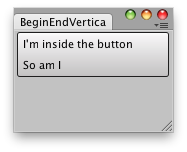
Vertical Compound group.
Examples
// Create a Vertical Compound Buttonusing UnityEngine;using UnityEditor;public class BeginVerticalExample : EditorWindow{ [MenuItem("Examples/Begin-End Vertical usage")] static void Init() { BeginVerticalExample window = (BeginVerticalExample) EditorWindow.GetWindow(typeof(BeginVerticalExample), true, "My Empty Window"); window.Show(); } void OnGUI() { Rect r = (Rect)EditorGUILayout.BeginVertical("Button"); if (GUI.Button(r, GUIContent.none)) Debug.Log("Go here"); GUILayout.Label("I'm inside the button"); GUILayout.Label("So am I"); EditorGUILayout.EndVertical(); }}
BeginVertical(GUIStyle, GUILayoutOption[])
Begin a vertical group and get its rect back.
public static Rect BeginVertical(GUIStyle style, params GUILayoutOption[] options)
Parameters
An optional list of layout options that specify extra layout properties. Any values passed in here will override settings defined by the style.
Additional Resources: GUILayout.Width, GUILayout.Height, GUILayout.MinWidth, GUILayout.MaxWidth, GUILayout.MinHeight, GUILayout.MaxHeight, GUILayout.ExpandWidth, GUILayout.ExpandHeight.
Additional Resources: GUILayout.Width, GUILayout.Height, GUILayout.MinWidth, GUILayout.MaxWidth, GUILayout.MinHeight, GUILayout.MaxHeight, GUILayout.ExpandWidth, GUILayout.ExpandHeight.
Returns
Type | Description |
|---|---|
| Rect |
Remarks
This is an extension to GUILayout.BeginVertical. It can be used for making compound controls.
Vertical Compound group.
Examples
// Create a Vertical Compound Buttonusing UnityEngine;using UnityEditor;public class BeginVerticalExample : EditorWindow{ [MenuItem("Examples/Begin-End Vertical usage")] static void Init() { BeginVerticalExample window = (BeginVerticalExample) EditorWindow.GetWindow(typeof(BeginVerticalExample), true, "My Empty Window"); window.Show(); } void OnGUI() { Rect r = (Rect)EditorGUILayout.BeginVertical("Button"); if (GUI.Button(r, GUIContent.none)) Debug.Log("Go here"); GUILayout.Label("I'm inside the button"); GUILayout.Label("So am I"); EditorGUILayout.EndVertical(); }}