GenericMenu
GenericMenu lets you create custom context menus and dropdown menus.
Read time 2 minutesLast updated 2 months ago
Definition
- Type: Class
- Namespace: UnityEditor
- Assembly: UnityEditor
public sealed class GenericMenu
Remarks
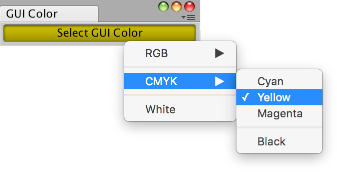
The example below opens an Editor window with a button. Clicking the button displays a context menu, which lets you change the color to apply to the GUI in the window. Copy the example's contents into a script called GenericMenuExample.cs and put it into a folder in your project called Editor.
Examples
using UnityEngine;using UnityEditor;public class GenericMenuExample : EditorWindow{ // open the window from the menu item Example -> GUI Color [MenuItem("Example/GUI Color")] static void Init() { EditorWindow window = GetWindow<GenericMenuExample>(); window.position = new Rect(50f, 50f, 200f, 24f); window.Show(); } // serialize field on window so its value will be saved when Unity recompiles [SerializeField] Color m_Color = Color.white; void OnEnable() { titleContent = new GUIContent("GUI Color"); } // a method to simplify adding menu items void AddMenuItemForColor(GenericMenu menu, string menuPath, Color color) { // the menu item is marked as selected if it matches the current value of m_Color menu.AddItem(new GUIContent(menuPath), m_Color.Equals(color), OnColorSelected, color); } // the GenericMenu.MenuFunction2 event handler for when a menu item is selected void OnColorSelected(object color) { m_Color = (Color)color; } void OnGUI() { // set the GUI to use the color stored in m_Color GUI.color = m_Color; // display the GenericMenu when pressing a button if (GUILayout.Button("Select GUI Color")) { // create the menu and add items to it GenericMenu menu = new GenericMenu(); // forward slashes nest menu items under submenus AddMenuItemForColor(menu, "RGB/Red", Color.red); AddMenuItemForColor(menu, "RGB/Green", Color.green); AddMenuItemForColor(menu, "RGB/Blue", Color.blue); // an empty string will create a separator at the top level menu.AddSeparator(""); AddMenuItemForColor(menu, "CMYK/Cyan", Color.cyan); AddMenuItemForColor(menu, "CMYK/Yellow", Color.yellow); AddMenuItemForColor(menu, "CMYK/Magenta", Color.magenta); // a trailing slash will nest a separator in a submenu menu.AddSeparator("CMYK/"); AddMenuItemForColor(menu, "CMYK/Black", Color.black); menu.AddSeparator(""); AddMenuItemForColor(menu, "White", Color.white); // display the menu menu.ShowAsContext(); } }}
Properties
Property | Description |
|---|---|
| allowDuplicateNames | Allow the menu to have multiple items with the same name. |
Methods
Method | Description |
|---|---|
| AddDisabledItem | Add a disabled item to the menu. |
| AddItem | Add an item to the menu. |
| AddSeparator | Add a seperator item to the menu. |
| DropDown | Show the menu at the given screen rect. |
| GetItemCount | Get number of items in the menu. |
| ShowAsContext | Show the menu under the mouse when right-clicked. |
Delegates
Delegate | Description |
|---|---|
| GenericMenu.MenuFunction | Callback function, called when a menu item is selected. |
| GenericMenu.MenuFunction2 | Callback function with user data, called when a menu item is selected. |