간단한 서버 시간 부정 행위 방지
Prevent timing-based exploits by using server time as the source of truth.
읽는 시간 7분최근 업데이트: 8달 전
게임을 제작할 때는 종종 일종의 타이밍 요소가 포함됩니다. 타이밍 요소의 예시는 다음과 같습니다.
- 특정 날짜에 만료되는 경매를 통해서만 구매할 수 있는 게임 내 아이템
- RTS 게임 월드에서 재사용 대기시간에 도달하기 전까지는 건설할 수 없는 건물
- 게임 시작 후 처음 며칠 동안만 나타나는 NPC(논플레이어 캐릭터)
이 로직을 구축하는 가장 간단한 방법은 디바이스 시간을 사용하는 것입니다. 하지만 디바이스 시간을 사용할 때는 여러 어려움이 따를 수 있습니다.
경매를 예로 들면 서로 다른 시간대에 속한 여러 디바이스에서 입찰의 종료 시점을 동기화하기가 매우 어렵습니다. 디바이스 시간을 사용해 경매 시간을 동기화하면 일부 플레이어가 더 많은 시간을 확보하여 다른 플레이어보다 높은 입찰가를 제시하거나 아이템을 구매하기 위한 리소스를 추가로 수집할 수 있습니다. 또한 플레이어가 디바이스의 시간을 변경하여 경매에 남은 시간을 늘리는 방식으로 게임에서 부정 행위를 할 수도 있습니다. 디바이스 시간만 사용하여 발생하는 이러한 의도치 않은 영향은 월드 건설 게임에서의 악의적인 행동(예: 재사용 대기시간 단축)으로만 국한되는 것이 아니며, 플레이어가 의도치 않게 디바이스 시간을 잘못 설정하면 NPC가 엉뚱한 시간에 등장하여 사용자 경험을 망칠 수도 있습니다.
여기서 소개하는 예시가 모든 악의적인 행동을 막는 것은 아닙니다. Cloud Code는 플레이어가 다른 Unity 서비스와 직접 상호 작용하기 위해 게임 클라이언트의 코드를 변경하는 등의 행동은 막을 수 없습니다. 완전한 서버 권한을 가지는 코드를 작성하는 기능이 차후 Cloud Code에 도입될 예정입니다.
기본 예시
Cloud Code는 게임 로직에 사용할 수 있는 중앙 ‘서버 시간’을 제공합니다. 다음 예시는 Cloud Code의 중앙 서버 시간을 사용하는 간단한 방법을 보여 줍니다.
JavaScript
/* * Return the current UNIX timestamp of the server and its UTC string representation */module.exports = async () => { // Get the current server timestamp const unixTimestamp = Date.now(); // Convert the timestamp to a JavaScript Date object const currentDate = new Date(unixTimestamp); // Create a Universal Coordinate Time (UTC) string const utcString = currentDate.toUTCString(); // Return both the timestamp and the formatted string back to the game client return { timestamp: unixTimestamp, formattedDate: utcString, };};
Cloud Save 활용
Cloud Save를 사용하면 월드 건설 게임을 한 단계 더 발전시킬 수 있습니다. 다음과 같이 건물을 다시 건설할 수 있게 되는 재사용 대기시간을 Cloud Save의 키에서 UNIX 타임스탬프로 설정할 수 있습니다.
JavaScript
/* * Set the cooldown for a building with id "MUSEUM_BUILDING" in Cloud Save */const { DataApi } = require('@unity-services/cloud-save-1.4');// The Cloud Save key for the buildingconst MUSEUM_KEY = 'MUSEUM_BUILDING';// The cooldown before the "MUSEUM_BUILDING" is allowed to be built again.const MUSEUM_COOLDOWN = 30;module.exports = async ({ context, logger }) => { // Initialize a Cloud Save API client using the player credentials const { projectId, playerId } = context; const cloudSaveApi = new DataApi(context); // Get the current server timestamp and calculate when the cooldown is finished (in milliseconds) const currentTimestamp = Date.now(); const expiresAt = currentTimestamp + MUSEUM_COOLDOWN * 1000; // Save the data in Cloud Save try { await cloudSaveApi.setItem(projectId, playerId, { key: MUSEUM_KEY, value: expiresAt }); } catch (error) { let errorMessage; if (error.response) { // If the error is from the Cloud Save server errorMessage = JSON.stringify({ response: error.response.data, status: error.response.status, headers: error.response.headers, }); } else { // If the error is from the script errorMessage = JSON.stringify(error.message); } logger.error( `Could not save the key ${MUSEUM_KEY} in Cloud Save. Got error ${errorMessage}` ); // Return an error to the game client throw Error(`An error occurred when setting the cooldown of the ${MUSEUM_KEY}`); } // Return the current server time and when the cooldown expires return { serverTimestamp: currentTimestamp, cooldown: { durationSeconds: MUSEUM_COOLDOWN, expiresAt: expiresAt, }, };};
사용자가 자신의 월드에 건물을 배치하려고 할 때 Cloud Code 스크립트를 사용하여 재사용 대기시간이 지났는지 확인할 수 있습니다.
JavaScript
/* * Validate that the cooldown for a building with id "MUSEUM_BUILDING" in Cloud Save has expired */const { DataApi } = require('@unity-services/cloud-save-1.4');// The Cloud Save key for the buildingconst MUSEUM_KEY = 'MUSEUM_BUILDING';module.exports = async ({ context, logger }) => { // Initialize a Cloud Save API client using the player credentials const { projectId, playerId } = context; const cloudSaveApi = new DataApi(context); const currentTimestamp = Date.now(); let cooldown; // Get the data from Cloud Save try { let { data: response } = await cloudSaveApi.getItems(projectId, playerId, [MUSEUM_KEY]); cooldown = response?.results?.[0]?.value ?? 0; } catch (error) { let errorMessage; if (error.response) { // If the error is from the Cloud Save server errorMessage = JSON.stringify({ response: error.response.data, status: error.response.status, headers: error.response.headers, }); } else { // If the error is from the script errorMessage = JSON.stringify(error.message); } logger.error( `Could not get the key ${MUSEUM_KEY} in Cloud Save. Got error ${errorMessage}` ); // Return an error to the game client throw Error(`An error occurred when getting the cooldown of the ${MUSEUM_KEY}`); } // Return a response to the client which indicates if the building can be built and if not, how long is left on the cooldown const timeRemaining = (cooldown - currentTimestamp) / 1000; const hasExpired = timeRemaining < 0 ? true : false; return { serverTimestamp: currentTimestamp, cooldown: { hasExpired: hasExpired, timeRemaining: hasExpired ? 0 : timeRemaining, }, };};
스크립트 파라미터화 및 Remote Config 사용
Cloud Code의 유용한 기능인 스크립트 파라미터를 사용하면 다양한 건물 유형에 대해 스크립트를 더욱 보편적이고 재사용 가능한 형태로 작성할 수 있습니다. 또한 Lodash를 사용하여 오브젝트와 배열의 반복 작업(iteration)을 더 쉽게 수행할 수 있습니다.
Remote Config를 포함하면 스크립트를 여기에서 더 세부적으로 구성할 수 있습니다. 게임 내 각 건물에 대해 키를 사용하여 정수 설정을 생성하고, 그런 다음 각 재사용 대기시간에 대한 값을 설정하고 구성을 저장할 수 있습니다.
${BUILDING_ID}_COOLDOWN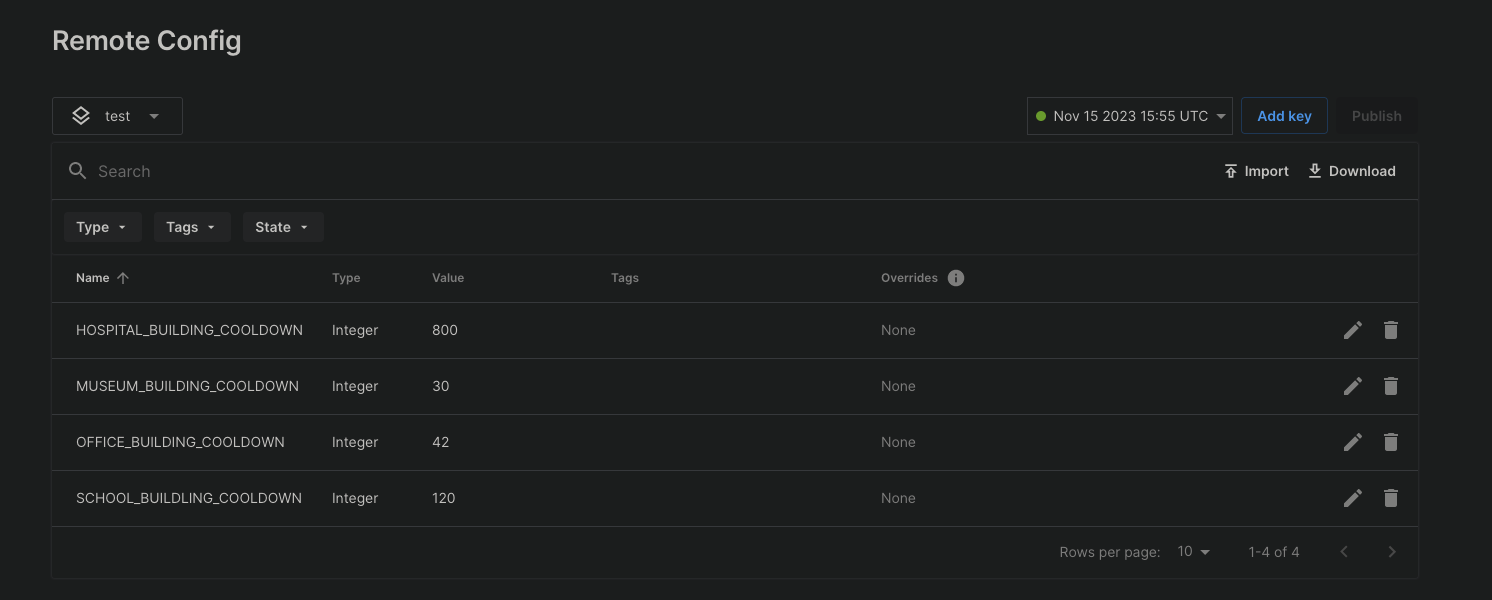
Remote Config 설정을 저장하고 나면 Cloud Code 스크립트에서 다음과 같이 건물의 재사용 대기시간을 설정할 수 있습니다.
JavaScript
/* * Use a script parameter "builidngId" for fetching the cooldown settings for a building from Remote Config. * Calculate when the cooldown for a building will expire and set the timestamp in Cloud Save. * Note: The Remote Config settings need to be saved before they become available to a Cloud Code script. */const { DataApi } = require('@unity-services/cloud-save-1.4');const { SettingsApi } = require('@unity-services/remote-config-1.1');const _ = require('lodash-4.17');module.exports = async ({ params, context, logger }) => { // Initialize Cloud Save and RemoteConfig API clients using the player credentials const { projectId, playerId, environmentId } = context; const cloudSaveApi = new DataApi(context); const remoteConfig = new SettingsApi(context); const currentTimestamp = Date.now(); let configuredCooldown; let expiresAt; try { // Get the cooldown value for the "buildingId" from RemoteConfig const remoteConfigCooldownId = `${params.buildingId}_COOLDOWN`; const remoteConfigResponse = await remoteConfig.assignSettingsGet( projectId, environmentId, 'settings', [remoteConfigCooldownId] ); // Validate the value from RemoteConfig, for example "MUSEUM_BUILDING_COOLDOWN" configuredCooldown = remoteConfigResponse?.data?.configs?.settings?.[remoteConfigCooldownId]; if (!configuredCooldown || !_.isNumber(configuredCooldown)) { throw Error(`Invalid value for ${remoteConfigCooldownId}`); } // Calculate when the cooldown expires for the "buildingId" expiresAt = currentTimestamp + configuredCooldown * 1000; // Save the data in Cloud Save await cloudSaveApi.setItem(projectId, playerId, { key: params.buildingId, value: expiresAt, }); } catch (error) { let errorMessage; if (error.response) { // If the error is from one of the API clients errorMessage = JSON.stringify({ response: error.response.data, status: error.response.status, headers: error.response.headers, }); } else { // If the error is from the script errorMessage = JSON.stringify(error.message); } logger.error( `An error occurred when trying to set the cooldown for building id ${params.buildingId}. Got error: ${errorMessage}` ); // Return an error to the game client throw Error(`An error occurred when setting the cooldown of the ${params.buildingId}`); } // Return the current server time and when the cooldown expires return { serverTimestamp: currentTimestamp, cooldown: { durationSeconds: configuredCooldown, expiresAt: expiresAt, }, };};
다음과 같이 스크립트의 buildingId 파라미터를 사용하여 재사용 대기시간을 확인할 수 있습니다.
JavaScript
/* * Validate that the cooldown for a building with id passed as a Script parameter "buildingId" in Cloud Save has expired */const { DataApi } = require('@unity-services/cloud-save-1.4');module.exports = async ({ params, context, logger }) => { // Initialize a Cloud Save API client using the player credentials const { projectId, playerId } = context; const cloudSaveApi = new DataApi(context); const currentTimestamp = Date.now(); let cooldown; // Get the data from Cloud Save try { let { data: response } = await cloudSaveApi.getItems(projectId, playerId, [ params.buildingId, ]); cooldown = response?.results?.[0]?.value ?? 0; } catch (error) { let errorMessage; if (error.response) { // If the error is from the Cloud Save server errorMessage = JSON.stringify({ response: error.response.data, status: error.response.status, headers: error.response.headers, }); } else { // If the error is from the script errorMessage = JSON.stringify(error.message); } logger.error( `Could not get the key ${params.buildingId} in Cloud Save. Got error ${errorMessage}` ); // Return an error to the game client throw Error(`An error occurred when getting the cooldown of the ${params.buildingId}`); } // Return a response to the client which indicates if the building can be built and if not, how long is left on the cooldown const timeRemaining = (cooldown - currentTimestamp) / 1000; const hasExpired = timeRemaining < 0 ? true : false; return { serverTimestamp: currentTimestamp, cooldown: { hasExpired: hasExpired, timeRemaining: hasExpired ? 0 : timeRemaining, }, };};