교환 가능한 쿠폰
Enable players to redeem coupons for rewards using Cloud Code scripts.
읽는 시간 9분최근 업데이트: 8달 전
목표 지향적이라는 게임의 특성에 따라 플레이어는 일반적으로 과제를 완료했을 때 보상을 얻기를 기대합니다. 예를 들어 플레이어는 다음을 기대할 수 있습니다.
- 보스를 물리친 후 아이템과 경험치 획득
- 부가 퀘스트를 완료하여 재화 획득
- 제작을 통해 무기 업그레이드
또한 게임에서 플레이어는 게임 내 보상을 받습니다. 프로모션 또는 시즌 이벤트의 일환으로, 게임 내에서 발생한 문제에 대한 배상으로, 또는 버그 리포트 및 베타 테스트에 대한 감사의 표시로 플레이어에게 게임 내 보상을 제공할 수 있습니다.
Cloud Code를 사용하면 다른 서비스에서 쿠폰 코드를 확인하고 보상 아이템을 제공하는 스크립트를 작성하여 풍부한 기능을 갖춘 보상 시스템을 구축할 수 있습니다. 게임을 라이브 상태로 유지하면서 게임 클라이언트 업데이트를 릴리스하지 않고도 쿠폰 로직을 수정할 수 있습니다. 변경 사항이 적용된 새 버전의 Cloud Code 스크립트를 퍼블리시하면 새 교환 규칙을 적용할 수 있습니다.
여기에서 소개하는 예시가 모든 악의적인 행동을 막는 것은 아닙니다. Cloud Code는 플레이어가 다른 Unity 서비스와 직접 상호 작용하기 위해 게임 클라이언트의 코드를 변경하는 등의 행동은 막을 수 없습니다. 완전한 서버 권한을 가지는 코드를 작성하는 기능이 차후 Cloud Code에 도입될 예정입니다.
Cloud Save를 사용한 기본 예시
쿠폰 시스템에는 쿠폰 코드 확인과 이를 교환한 플레이어 트래킹이라는 두 가지 주요 요구 사항이 있습니다. 유효한 쿠폰을 로컬에 저장하는 스크립트를 작성한 다음 Cloud Save를 사용해 쿠폰이 교환되었는지 확인하면 이러한 요구 사항을 충족할 수 있습니다. 또한 만료일을 쿠폰 메타데이터에 포함하고 Date 라이브러리를 사용하여 쿠폰이 만료되었는지 확인할 수 있습니다. 스크립트 출력은 다음과 같이 보상을 설명합니다.
JavaScript
/* * Verify that a coupon passed as a script parameter "couponId" is valid, has not expired and has not been redeemed by using Cloud Save. * Return the reward and make the coupon invalid for that user. */const { DataApi } = require('@unity-services/cloud-save-1.4');const _ = require('lodash-4.17');const CLOUD_SAVE_COUPONS_KEY = 'REDEEMED_COUPONS';const VALID_COUPONS = [ // Gift the player 10 coins { id: 'FREECOINS10', reward: { id: 'coins', amount: 10, }, expiresAt: new Date(2021, 09, 29), }, // Gift the player a rare armor { id: 'RAREARMOR1', reward: { id: 'rare-armor', amount: 1, }, expiresAt: new Date(2021, 09, 29), },];module.exports = async ({ params, context }) => { // Initialize a Cloud Save API client using the player credentials const { projectId, playerId } = context; const cloudSaveApi = new DataApi(context); // Validate that the script parameter "couponId" is one of the valid coupons and select the corresponding coupon configuration const inputCouponId = _.toUpper(params.couponId); const coupon = _.find(VALID_COUPONS, function (c) { return c.id === inputCouponId; }); if (!coupon) { throw Error(`Invalid coupon "${params.couponId}"`); } //Check that the coupon has not expired if (Date.now() > coupon.expiresAt.getTime()) { throw Error(`The coupon "${coupon.id}" has expired`); } // Get the redeemed coupons from Cloud Save const cloudSaveGetResponse = await cloudSaveApi.getItems(projectId, playerId, [ CLOUD_SAVE_COUPONS_KEY, ]); const redeemedCouponsData = _.find(cloudSaveGetResponse?.data?.results, function (r) { return r.key === CLOUD_SAVE_COUPONS_KEY; }); const redeemedCoupons = redeemedCouponsData?.value ?? []; // Check if the coupon has been redeemed if (redeemedCoupons && _.indexOf(redeemedCoupons, coupon.id) >= 0) { throw Error(`The coupon "${coupon.id}" has already been redeemed`); } // Add the coupon id to the array of redeemed coupons and save it back into Cloud Save redeemedCoupons.push(coupon.id); await cloudSaveApi.setItem(projectId, playerId, { key: CLOUD_SAVE_COUPONS_KEY, value: redeemedCoupons, }); // Return the reward for the coupon return coupon.reward;};// Uncomment the code below to enable the inline parameter definition// - Requires Cloud Code JS dev environment setup with NodeJS (https://docs.unity3d.com/Packages/com.unity.services.cloudcode@latest/index.html?subfolder=/manual/Authoring/javascript_project.html)//// module.exports.params = {// couponId: { type: "String", required: true },// };
Economy 사용
Economy 서비스를 사용하여 이 예시를 확장할 수 있습니다. Economy 서비스에서는 게임 전체에서 사용할 인벤토리 아이템과 재화를 구성할 수 있습니다. Economy 구성을 퍼블리시하면 쿠폰 확인 후 스크립트에서 바로 아이템과 재화 지급을 시작할 수 있습니다.
JavaScript
/* * Verify that a coupon passed as a script parameter "couponId" is valid, has not expired and has not been redeemed by using Cloud Save. * Gift the appropriate reward in Economy. * Note: the Economy configuration needs to be published before it is available from Cloud Code scripts * */const { DataApi } = require('@unity-services/cloud-save-1.4');const { CurrenciesApi, InventoryApi } = require('@unity-services/economy-2.4');const _ = require('lodash-4.17');const CLOUD_SAVE_COUPONS_KEY = 'REDEEMED_COUPONS';const VALID_COUPONS = [ // Gift the player 10 coins { id: 'FREECOINS10', reward: { id: 'COINS', type: 'currency', amount: 10, }, expiresAt: new Date(2021, 09, 29), }, // Gift the player a rare armor { id: 'RAREARMOR1', reward: { id: 'RARE_ARMOR', type: 'inventoryItem', amount: 1, }, expiresAt: new Date(2021, 10, 21), },];module.exports = async ({ params, context }) => { // Initialize a Cloud Save API client using the player credentials const { projectId, playerId } = context; const cloudSaveApi = new DataApi(context); // Validate that the script parameter "couponId" is one of the valid coupons and select the corresponding coupon configuration const inputCouponId = _.toUpper(params.couponId); const coupon = _.find(VALID_COUPONS, function (c) { return c.id === inputCouponId; }); if (!coupon) { throw Error(`Invalid coupon "${params.couponId}"`); } //Check that the coupon has not expired if (Date.now() > coupon.expiresAt.getTime()) { throw Error(`The coupon "${coupon.id}" has expired`); } // Get the redeemed coupons from Cloud Save const cloudSaveGetResponse = await cloudSaveApi.getItems(projectId, playerId, [ CLOUD_SAVE_COUPONS_KEY, ]); const redeemedCouponsData = _.find(cloudSaveGetResponse?.data?.results, function (r) { return r.key === CLOUD_SAVE_COUPONS_KEY; }); const redeemedCoupons = redeemedCouponsData?.value ?? []; // Check if the coupon has been redeemed if (redeemedCoupons && _.indexOf(redeemedCoupons, coupon.id) >= 0) { throw Error(`The coupon "${coupon.id}" has already been redeemed`); } // Gift the coupon reward to the player await redeemCouponReward(coupon.reward, projectId, playerId, context); // Add the coupon id to the array of redeemed coupons and save it back into Cloud Save redeemedCoupons.push(coupon.id); await cloudSaveApi.setItem(projectId, playerId, { key: CLOUD_SAVE_COUPONS_KEY, value: redeemedCoupons, }); // Return the reward for the coupon return { id: coupon.reward.id, amount: coupon.reward.amount, };};// Gift the reward to a player based on the reward.type propertyasync function redeemCouponReward(reward, projectId, playerId, context) { // Initialize a Economy API clients using the player credentials const currenciesApi = new CurrenciesApi(context); const inventoryApi = new InventoryApi(context); // Gift the reward switch (reward.type) { case 'currency': await currenciesApi.incrementPlayerCurrencyBalance(projectId, playerId, reward.id, { amount: reward.amount, }); break; case 'inventoryItem': await inventoryApi.addInventoryItem(projectId, playerId, addInventoryRequest: { inventoryItemId: reward.id, }); break; default: throw Error('Invalid reward type'); }}// Uncomment the code below to enable the inline parameter definition// - Requires Cloud Code JS dev environment setup with NodeJS (https://docs.unity3d.com/Packages/com.unity.services.cloudcode@latest/index.html?subfolder=/manual/Authoring/javascript_project.html)//// module.exports.params = {// couponId: { type: "String", required: true },// };
Remote Config 연동
이 예시의 한 가지 단점은 쿠폰의 구성 기능입니다. 새 쿠폰을 만들거나 기존 쿠폰을 무효화하려면 코드를 변경해야 하며, 이는 유연성을 저해합니다. Remote Config에서 다음과 같이 커스텀 JSON 값으로 쿠폰을 정의할 수 있습니다.
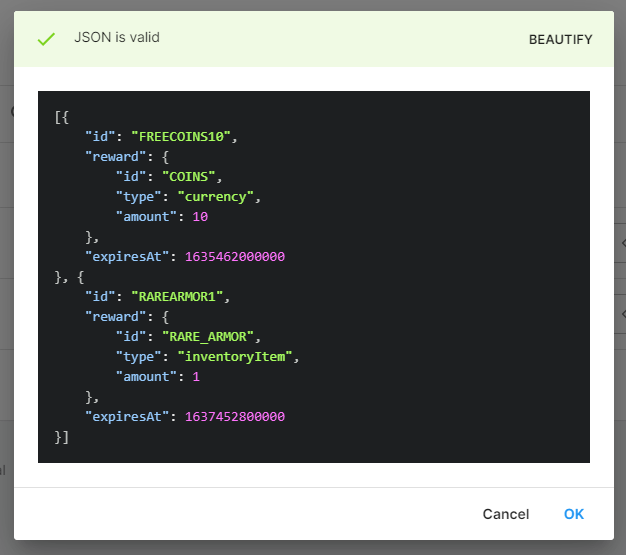
Cloud Code 스크립트에서 사용하려면 먼저 Remote Config 값을 저장해야 합니다. 더 이상 실시간 코드를 수정할 필요가 없어지므로 이 구성을 통해 엔지니어가 아닌 인력도 손쉽게 쿠폰을 관리할 수 있으며, 실시간 수정에 따르는 위험 또한 사라집니다. Remote Config와 연동하면 쿠폰 코드와 보상을 관리할 수 있으며 Remote Config 캠페인에 따라 특별 쿠폰을 정의할 수 있습니다.
JavaScript
/* * Retrieve coupon details from Remote Config. * Verify that a coupon passed as a script parameter "couponId" is valid, has not expired and has not been redeemed by using Cloud Save. * Gift the appropriate reward in Economy. * Note: the Economy configuration needs to be published and Remote Config values need to be saved before they are available in Cloud Code scripts. * */const { DataApi } = require('@unity-services/cloud-save-1.4');const { CurrenciesApi, InventoryApi } = require('@unity-services/economy-2.4');const { SettingsApi } = require('@unity-services/remote-config-1.1');const _ = require('lodash-4.17');const CLOUD_SAVE_COUPONS_KEY = 'REDEEMED_COUPONS';const REMOTE_CONFIG_COUPONS_KEY = 'COUPONS';module.exports = async ({ params, context }) => { // Initialize the Cloud Save and Remote Config API clients using the player credentials const { projectId, environmentId, playerId } = context; const cloudSaveApi = new DataApi(context); const remoteConfig = new SettingsApi(context); // Fetch the available coupons from Remote Config const remoteConfigResponse = await remoteConfig.assignSettingsGet( projectId, environmentId, 'settings', [REMOTE_CONFIG_COUPONS_KEY] ); const availableCoupons = remoteConfigResponse?.data?.configs?.settings?.[REMOTE_CONFIG_COUPONS_KEY]; // Validate that the script parameter "couponId" is one of the valid coupons and select the corresponding coupon configuration const inputCouponId = _.toUpper(params.couponId); const coupon = _.find(availableCoupons, function (c) { return c.id === inputCouponId; }); if (!coupon) { throw Error(`Invalid coupon "${params.couponId}"`); } //Check that the coupon has not expired if (Date.now() > coupon.expiresAt) { throw Error(`The coupon "${coupon.id}" has expired`); } // Get the redeemed coupons from Cloud Save const cloudSaveGetResponse = await cloudSaveApi.getItems(projectId, playerId, [ CLOUD_SAVE_COUPONS_KEY, ]); const redeemedCouponsData = _.find(cloudSaveGetResponse?.data?.results, function (r) { return r.key === CLOUD_SAVE_COUPONS_KEY; }); const redeemedCoupons = redeemedCouponsData?.value ?? []; // Check if the coupon has been redeemed if (redeemedCoupons && _.indexOf(redeemedCoupons, coupon.id) >= 0) { throw Error(`The coupon "${coupon.id}" has already been redeemed`); } // Gift the coupon reward to the player await redeemCouponReward(coupon.reward, projectId, playerId, context); // Add the coupon id to the array of redeemed coupons and save it back into Cloud Save redeemedCoupons.push(coupon.id); await cloudSaveApi.setItem(projectId, playerId, { key: CLOUD_SAVE_COUPONS_KEY, value: redeemedCoupons, }); // Return the reward for the coupon return { id: coupon.reward.id, amount: coupon.reward.amount, };};// Gift the reward to a player based on the reward.type propertyasync function redeemCouponReward(reward, projectId, playerId, context) { // Initialize a Economy API clients using the player credentials const currenciesApi = new CurrenciesApi(context); const inventoryApi = new InventoryApi(context); // Gift the reward switch (reward.type) { case 'currency': await currenciesApi.incrementPlayerCurrencyBalance(projectId, playerId, reward.id, { amount: reward.amount, }); break; case 'inventoryItem': await inventoryApi.addInventoryItem(projectId, playerId, addInventoryRequest: { inventoryItemId: reward.id, }); break; default: throw Error('Invalid reward type'); }}// Uncomment the code below to enable the inline parameter definition// - Requires Cloud Code JS dev environment setup with NodeJS (https://docs.unity3d.com/Packages/com.unity.services.cloudcode@latest/index.html?subfolder=/manual/Authoring/javascript_project.html)//// module.exports.params = {// couponId: { type: "String", required: true },// };