Serverless Multiplayer Game
Build a multiplayer game with a game lobby, without using a server to host your game.
Read time 11 minutesLast updated 7 months ago
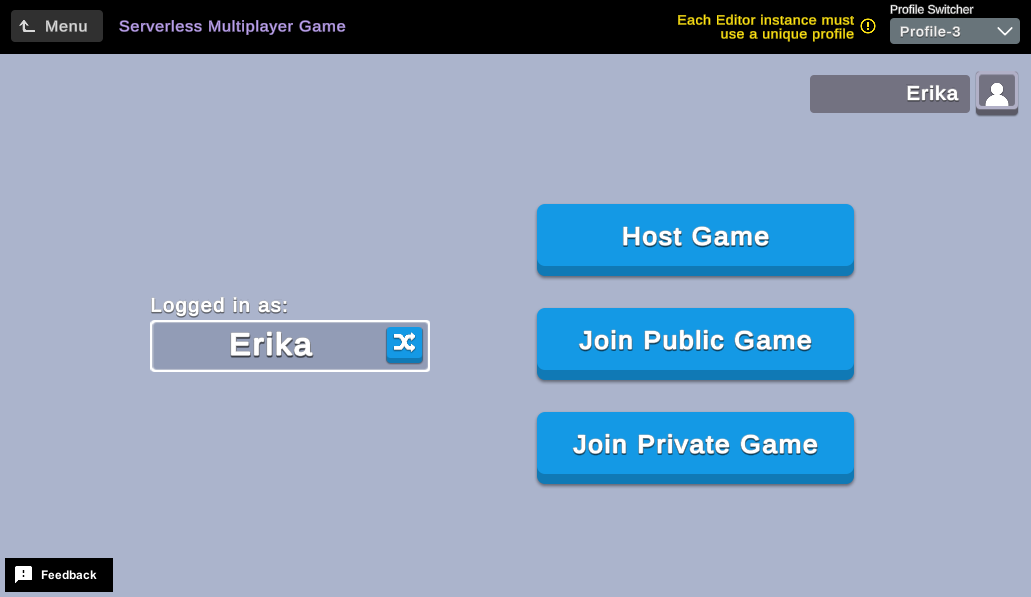
Multiplayer games are a popular game mechanic that allow multiple players to interact and play games together. This sample demonstrates how to create or join a Lobby Service game lobby and compete in a simple arena-style game where players collect coins for points.
Prerequisites
To use this sample use case, you must download and install the UGS Use Cases project in your Unity project.
Overview
During the course of the sample, players can perform the following actions:
- Randomize their names.
- Create public and private lobbies for others to join.
- Join lobbies either from a list of public lobbies or by entering a secret key to join private ones.
- View other players in the lobby.
- Signal they are ready to start the game.
- Play a multiplayer game using Relay Service and Netcode for GameObjects (NGO) to facilitate player movement and collect coins for points.
- View information such as winners, scores, and personal high stats at the end of the game.
To see this use case in action, open the samples menu and navigate to Serverless Multiplayer Game. To open this scene directly and interact with the use case:
- In the Unity Editor Project window, select Assets > Use Case Samples > Serverless Multiplayer Game, then double-click to open the sample scene.
ServerlessMultiplayerGameSample.unity - Press Play to enter Play mode.
Initialization
When the scene loads, the following initialization steps occur:
- Sample-related managers are set to DontDestroyOnLoad so they can remain intact in all scenes of the sample.
- The Profanity Manager is initialized, causing all valid player names and lobby words to be propagated to the allow list so only permitted words will be presented to the player.
- UGS is initialized and the player signed in with the correct profile name.
- Remote Config is read to configure coin spawning, game duration, etc.
- The main menu is shown so the player can choose to host or join a game, randomize his/her name, change UGS profile name to use, etc.
Functionality
Set up computer to test multiplayer
You must be able to play multiple instances of this sample to test this use case.
The following are some techniques to facilitate multiplayer testing:
- Clone the repository again (or copy the project folder) to another folder. You can then open both/all instances in the Unity Editor simultaneously and enter Play Mode in each instance to test the sample.
- Use ParrelSync to clone the project. This is the preferred method because changes made to the base project automatically propagate to all clones for testing. Note that this is not a Unity product so we recommend reviewing the documentation and license agreement before using.
Scenes
This use case contains multiple scenes to divide the sample into smaller pieces, allowing developers to only review the implementation they're interested in learning.
Note
Always begin Play Mode with the scene, which changes to the other scenes as needed.
ServerlessMultiplayerGameSampleServerlessMultiplayerGameSample scene
The sample begins with the scene where players can choose to start or join a lobby, randomize their player name, and, if creating a lobby, randomize the lobby name, and adjust setup parameters such as max players or public/private flag.
ServerlessMultiplayerGameSampleThe player remains in this scene until a lobby is either created or joined, both of which causing play to progress to the scene.
LobbyOnce a game ends or the player leaves the scene, they return to this scene.
If the player just finished playing a game, the results screen displays the outcome along with the current player's stats.
Closing the results screen returns the player to the main menu so another lobby can be created/joined to start a new game.
LobbyLobby scene
Once a lobby has been created or joined on the scene, the sample opens the scene, which shows the contents of the current lobby, and permits players to signal ready or leave.
Additionally, the host has the option to remove players from the lobby.
All players are required to signal they are ready before a game can begin.
ServerlessMultiplayerGameSampleLobbyPlayers remain in this scene until all players are ready (play proceeds to scene), or the player leaves the lobby and returns to the scene.
GameServerlessMultiplayerGameSampleGame scene
After a minimum of two players have joined the lobby and all players have signaled ready, the scene launches, where an immediate countdown from three begins.
Once complete, players can move and collect coins, which are spawned individually or in clusters (based on the Remote Config configuration).
Once players can move, the game timer begins counting down and the game ends once the game timer expires.
GameWhen the game ends due to the game timer expiring, players automatically return to the scene, where the game results as well as each player's personal stats appear.
Once that results screen closes, the main menu reappears (still in the ) and another lobby can be created or joined.
ServerlessMultiplayerGameSampleServerlessMultiplayerGameSampleNotable manager classes
This use case has a few notable manager classes that facilitate different aspects of the sample.
The class ensures that user generated strings don't contain offensive language, while the class processes requests from players, controls gameplay, and updates clients’ state based on game events.
ProfanityManagerGameManagerProfanity Manager
This sample implements a Profanity Manager to ensure that the player and lobby names created by one player, but visible to all players, do not include any offensive language.
The class uses an allowlist to validate the strings that the client receives from the Lobby Service.
This validation ensures that even if one player hacks the system to submit an offensive string, any other players who receive that lobby name or username would not be able to see the invalid string.
ProfanityManagerNote that using an allowlist for input such as usernames can be limiting, since it is difficult to make such a list exhaustive.
In this case, you could instead use a blocklist to filter out the specific words deemed inappropriate.
You can find the class in, and the strings included in the player and lobby names allowlists are in and , respectively.
If you wanted to use a refactored version of the Profanity Manager, replace the and methods with your own implementation.
ProfanityManager Serverless Multiplayer Game/Scripts/Menu/ProfanityManager.csServerless Multiplayer Game/Scripts/Menu/PlayerNameManager.csServerless Multiplayer Game/Scripts/Menu/LobbyNameManager.csProfanityManager.IsValidPlayerNameProfanityManager.IsValidLobbyNameGame Network Manager
Being a multiplayer game, this sample requires a Game Network Manager to facilitate game communication between players.
The Game Network Manager is instantiated on the host when the scene is first loaded due to the existence of a in the scene.
This Game Network Manager instantiates the Game Network Manager in its method.
GameGameSceneManagerStart()The Game Network Manager handles things such as
- Starting the host/client
- Creating player avatars for all players
- Coordinating countdowns and game timers
- Allowing players to move to collect coins once countdown is complete
- Communicating with other managers when needed, such as when scoring
- Coordinating game over by propagating the final score and waiting for all players to acknowledge receipt
- Issuing request that all players return to main menu
As mentioned above, the Game Network Manager is instantiated at runtime so it can be properly configured on the host using .
Thus, the host has control of the Game Network Manager, and all clients are able to interact with it as needed to facilitate gameplay.
NetworkObject.SpawnWithOwnershipThe class can be found at .
GameNetworkManagerServerless Multiplayer Game/Scripts/Game/GameNetworkManager.csSetup
Requirements
To replicate this use case, you'll need the following Unity packages in your project:
Package | Role |
|---|---|
| Authentication | Automatically sign in the user anonymously to keep track of their data on the server side. This sample also uses the Authentication service to switch profiles to simulate different players to facilitate multiplayer testing. |
| Cloud Save | Stores the player's name, win/games counts and high scores. |
| Deployment | Provides a cohesive interface to deploy assets for Cloud Services. |
| Lobby | Handles creating or joining lobbies so players can gather to start a game. The lobby also stores each player's ready flag, as well as the Relay Join Code, which is needed to join the Relay Service allocation to facilitate real-time gameplay. |
| Netcode for GameObjects | Spawn network objects such as player avatars and coins, synchronize movement and despawn network objects as needed. |
| Relay | Creates/joins a multiplayer allocation to facilitate real-time gameplay with the creator of the lobby acting as relay service host. |
| Remote Config | Maintain game settings such as coin spawning frequency, coin wave sizes, game duration, etc. |
To use these services in your game, activate each service for your Organization and project in the Unity Dashboard.
Cloud Save
This sample uses Cloud Save to store each player's lifetime stats, which include name, win count, total game count and high scores.
Note that using different profiles results in each having separate UGS data, so each player sees different stats.
The following is an example of a player's Cloud Save data:
{ "playerName": "Erika", "highScores": [33, 27, 17], "winCount": 14, "gameCount": 15}
Unity Cloud services configuration
To replicate this sample scene's setup in your own Unity project, configure the following items:
- Remote Config values
To configure these items you can use the Deployment package, or manually enter them using the Unity Dashboard.
The recommended best practice is to use the Deployment package as it greatly accelerates this process.
Using the Deployment package
To deploy configurations using the Deployment package:
- Open the Deployment window.
- Check in .
Serverless Multiplayer Game - Click .
Deploy Selection
This deploys all the necessary items.
Using the Unity Dashboard
You can use the Unity Dashboard to manually configure your services by project and environment.
Refer to the following sections to configure this sample.
Remote Config
Set up the following config values in the Unity Dashboard:
|
|
|
|
|---|---|---|---|
| JSON | List of game settings for all possible games, based on the number of players in the game. |
|
Additional information about the fields in the above config value:
Field | Description |
|---|---|
| Number of players in specified configuration. Valid values are 2, 3 and 4 and there must be 1 of each to specify game configuration for each count of players. |
| Length of game in seconds. All games currently last 60 seconds, but these values could be changed for longer games with more players. |
| How long to wait to spawn first set of coins. This permits players to get their bearings before the initial wave of coins appears. |
| How long do coins remain in play before despawning. This adds urgency because coins can disappear, requiring players to hurry to capture them in time. |
| How long to wait after a wave of coins is spawned before spawning the next wave. Coins spawn in waves so players have multiple options of coins to attempt to collect. |
| How many clusters of one coin (that is, individual coins) should be spawned in each wave. There is usually one cluster of one, so a player with no better option can at least try for the single coin. |
| How many clusters of two coins (that is, pairs of coins) should be spawned in each wave. There is usually at least one cluster of two coins so one of the players can have an opportunity to score two points while the other player only gets one. |
| How many clusters of three coins to spawn per wave. Two-player games don't need clusters of three, but games with more players can add three coin clusters. |