ObjectContent(Object, Type)
Return a GUIContent object with the name and icon of an Object.
Read time 1 minuteLast updated 4 days ago
Definition
- Type: Method
- Namespace: UnityEditor
- Assembly: UnityEditor
public static GUIContent ObjectContent(Object obj, Type type)
Parameters
Returns
Type | Description |
|---|---|
| GUIContent |
Remarks
If the object is null, the icon will be picked according to type.
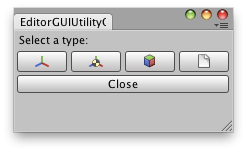
Object Content usage.
Examples
// Simple Editor Script that shows the icons of Transform,// rigidbody and GameObject in 3 buttons.using UnityEditor;using UnityEngine;public class ObjectContentExample : EditorWindow{ [MenuItem("Examples/ObjectContent usage")] static void Init() { ObjectContentExample window = (ObjectContentExample)GetWindow(typeof(ObjectContentExample)); window.Show(); } void OnGUI() { EditorGUILayout.PrefixLabel("Select a type:"); EditorGUILayout.BeginHorizontal(); if (GUILayout.Button(EditorGUIUtility.ObjectContent(null, typeof(Transform)).image)) DoSomething("Transform"); if (GUILayout.Button(EditorGUIUtility.ObjectContent(null, typeof(Rigidbody)).image)) DoSomething("RigidBody"); if (GUILayout.Button(EditorGUIUtility.ObjectContent(null, typeof(GameObject)).image)) DoSomething("GameObject"); EditorGUILayout.EndHorizontal(); if (GUILayout.Button("Close")) this.Close(); } private void DoSomething(string obj) { Debug.Log("Hello there " + obj + "!"); }}