GetFlowLayoutedRects(Rect, GUIStyle, float, float, List<string>)
Layout list of string items left to right, top to bottom in the given area.
Read time 1 minuteLast updated a month ago
Definition
- Type: Method
- Namespace: UnityEditor
- Assembly: UnityEditor
public static List<Rect> GetFlowLayoutedRects(Rect rect, GUIStyle style, float horizontalSpacing, float verticalSpacing, List<string> items)
Parameters
Area where to layout the items.
Style for the items.
Extra horizontal spacing between successive items.
Extra vertical spacing between item rows.
Strings to layout.
Returns
Type | Description |
|---|---|
| List<Rect> | List of rectangles for the passed items. |
Remarks
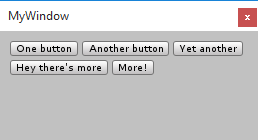
Example of buttons positioned with GetFlowLayoutedRects.
Examples
using UnityEngine;using UnityEditor;using System.Collections.Generic;public class MyWindow : EditorWindow{ [MenuItem("Window/My Window")] static void OpenMyWindow() { EditorWindow.GetWindow<MyWindow>(true); } void OnGUI() { // area to layout our items in var rect = new Rect(10, 10, position.width - 20, position.height - 20); // items to layout var items = new List<string> { "One button", "Another button", "Yet another", "Hey there's more", "More!" }; // get resulting rectangles of items var style = EditorStyles.miniButton; var boxes = EditorGUIUtility.GetFlowLayoutedRects(rect, style, 4, 4, items); // do actual UI for them for (var i = 0; i < boxes.Count; ++i) { GUI.Button(boxes[i], items[i], style); } }}