ProgressBar(Rect, float, string)
Makes a progress bar.
Read time 1 minuteLast updated 5 days ago
Definition
- Type: Method
- Namespace: UnityEditor
- Assembly: UnityEditor
public static void ProgressBar(Rect position, float value, string text)
Parameters
Remarks
Value goes from 0 to 1, where 0 means 0% of the bar filled and 1 means the bar is at 100% fully filled
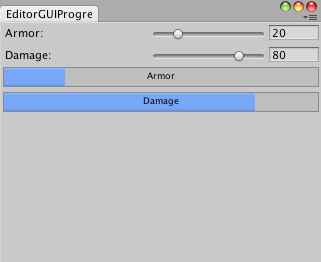
Progress bar in an Editor Window.
Examples
using UnityEngine;using System.Collections;using UnityEditor;// Draw the armor and damage with bars in an Editor Windowpublic class EditorGUIProgressBar : EditorWindow{ float armor = 20; float damage = 80; [MenuItem("Examples/Display Info")] static void Init() { EditorWindow window = GetWindow(typeof(EditorGUIProgressBar), false, "DisplayInfo"); window.Show(); } void OnGUI() { armor = EditorGUI.IntSlider(new Rect(3, 3, position.width - 6, 15), "Armor", Mathf.RoundToInt(armor), 0, 100); damage = EditorGUI.IntSlider(new Rect(3, 25, position.width - 6, 15), "Damage", Mathf.RoundToInt(damage), 0, 100); EditorGUI.ProgressBar(new Rect(3, 45, position.width - 6, 20), armor / 100, "Armor"); EditorGUI.ProgressBar(new Rect(3, 70, position.width - 6, 20), damage / 100, "Damage"); }}