Access Token Developer Guide
Learn to generate and manage Vivox Access Tokens for controlling player access.
阅读时间2 分钟最后更新于 8 个月前
Player access to Vivox resources is controlled through Vivox access tokens (VATs). Vivox access tokens contain a payload that defines the privileged operation, are signed by the game server by using a token signing key, and are delivered by the client to the Vivox system when the player wants to perform a privileged operation. A Vivox access token is similar to a JSON Web Token, but instead has an empty access token header.
Access tokens have the following characteristics:
- You can only use a token once. After you use a token for the privileged operation, it cannot be reused.
- Tokens expire even if they are never used. You cannot use a token after the expiration time that is set by the token issuer.
Game clients require access tokens to perform operations in the Vivox system.
- Game client-generated tokens: Use for prototyping or testing purposes.
- Secure game server-generated tokens: Use for the secure deployment of a production game and to avoid token errors due to user time settings.
When using Unity Authentication (UAS), Vivox access tokens can parse UASIDs from the token payload. It's mandatory to include embedded UAS IDs in your access tokens if you're using Vivox access tokens with Safe Text.
Refer to the sections titled Generate a token from the client and Generate a token on a secure sever to generate tokens.
Note that before either a client or a server can generate a token, you need a token issuer and a token signing key.
The following diagram displays a typical interaction between a game client, the game server, and the Vivox system:
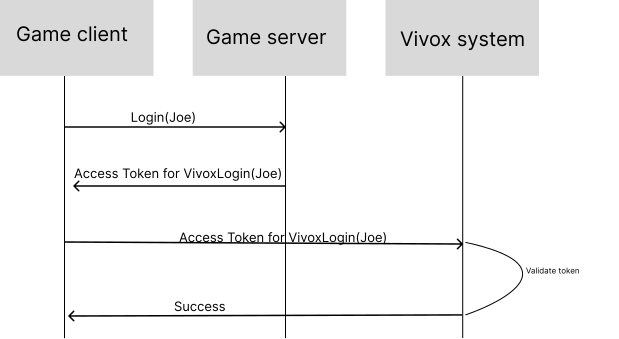
- The game client sends the login request to the game server.
- The game server sends back an access token.
- The game client sends the access token to Vivox System, which validates the token.
- The Vivox system sends back a successful login to the game client.