文档

​
​

Development

User Acquisition

Monetization

工业

Vivox Core SDK

Vivox Core SDK

此页面不支持所选语言。
Vivox
​
​
Vivox Core SDK
  • Overview
  • Before you begin
  • Get started
    • Integration guide
    • Quick start guide
      • Initializing Vivox
      • Logging in
      • Assign a unique username
      • Generate a login access token
      • Submit a login request
      • Joining and leaving channels
      • Generate and submit a join token
      • Process join responses and events
      • Handle join errors
  • Release notes
  • Developer Guide
  • Reference
  • Privacy overview
  1. Vivox Core SDK documentation

Logging in

Overview of the Vivox login workflow
阅读时间1 分钟
最后更新于 8 个月前

One of the most important steps in utilizing Vivox is to log a user into the Vivox service. Before you begin, decide on when in the game flow the user will be logged in
The following image shows the login workflow:
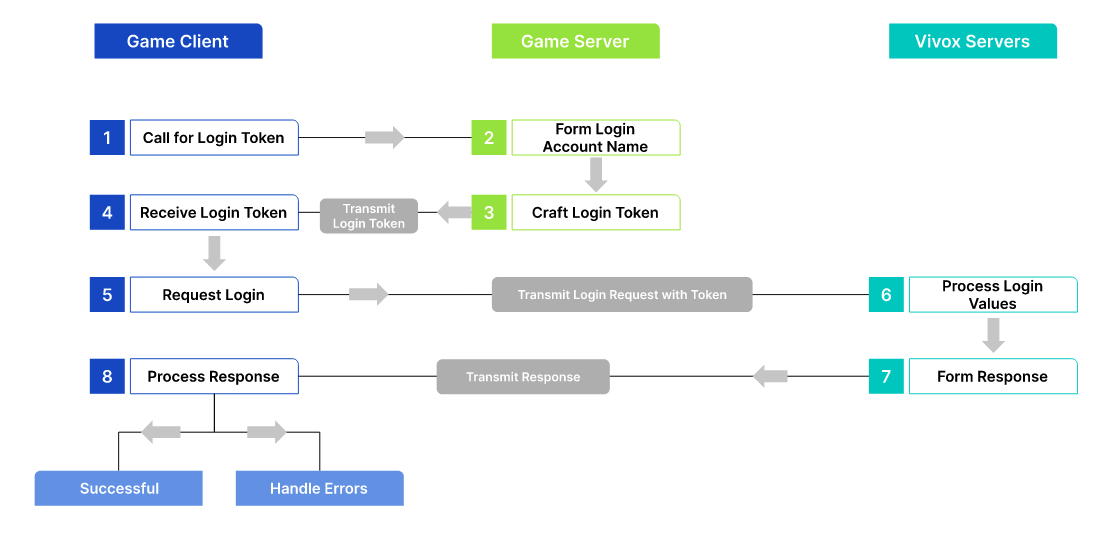
A diagram showing how the Game Client, Game Server, and Vivox Servers interact.
Before you can log a user into the Vivox service you need to:
  1. Assign them a unique username.
  2. Generate a login access token.
  3. Submit a login request.
  4. Prepare for handling responses and events.

Copyright © 2026 Unity Technologies
法律信息隐私政策CookiesDocumentation Terms of Use请勿出售或分享我的个人信息您的隐私选择(Cookie 设置)

“Unity”、Unity 徽标及其他 Unity 商标是 Unity Technologies 或其附属公司在美国和其他地方的商标或注册商标(此处查看更多信息)。其他名称或品牌是其各自所有者的商标。

为方便起见,一些页面是机器翻译的,可能包含不准确的内容。如有信息不一致的情况,以英文版本为准。


    报告此页面的问题