Selection Controls
Viewport selection controls in Asset Transformer Studio
Read time 1 minuteLast updated a day ago
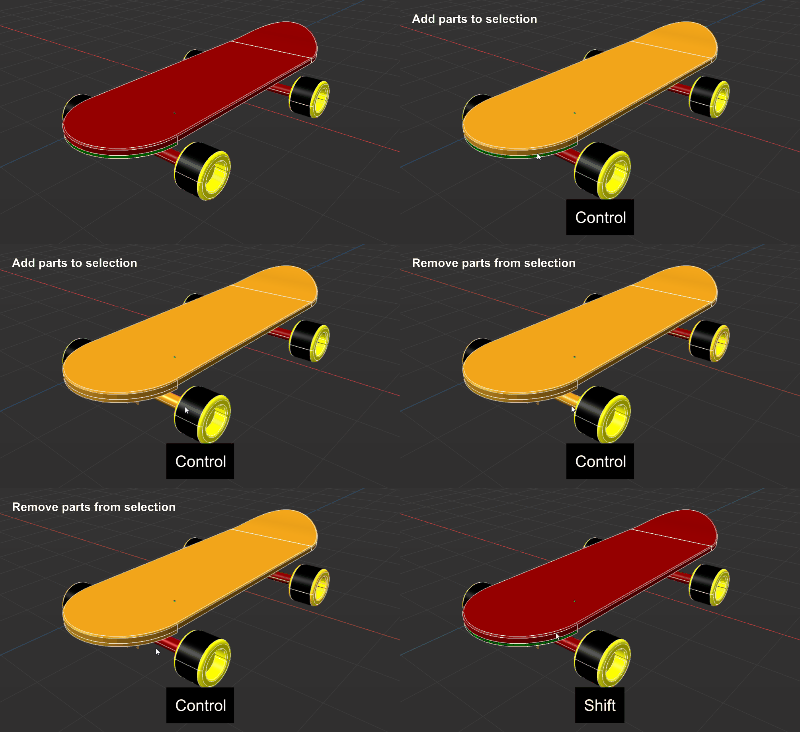
Parts present in the scene can be selected directly from the viewport.
To select parts, use the following controls:
Single-click selection
Combinations | Description | |
|---|---|---|
 | | Select / Replace occurrences |
 | | Add / Remove from the current selection |
 | | Remove from the selection |
Area selection
An Area selection is when the user draws a selection rectangle (mouse drag) in the viewport.
Use the following controls to select parts with Area selection:
Combinations | Description | |
|---|---|---|
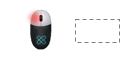 | | Select only occurrences visible from the camera view and crossed by the selection rectangle |
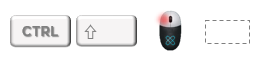 | | Add to the current selection only occurrences visible from the camera view and crossed by the selection rectangle |
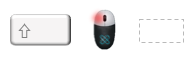 | | Remove from the current selection only occurrences visible from the camera view and crossed by the selection rectangle |
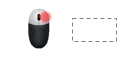 | | Select all occurrences from the scene crossed by the selection rectangle ("in-depth" selection) |
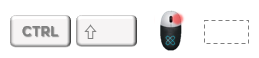 | | Add to the current selection all occurrences from the scene crossed by the selection rectangle ("in-depth" selection) |
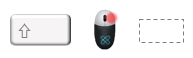 | | Remove from the current selection all occurrences from the scene crossed by the selection rectangle ("in-depth" selection) |