Documentation

​
​

Development

User Acquisition

Monetization

Industry

Asset Transformer Studio

2026.5.0

Supported
​

User Manual

Python API

Changelog

Asset Transformer Studio

2026.5.0

Supported
​

​
​
Get started
  • About Asset Transformer Studio
  • Getting started
  • Additional Resources
User Interface
  • Overview
  • Menu Bar
  • Toolbars
  • Window
    • History
    • Inspector
    • Output
    • Product Structure (Tree)
    • Scripting
    • Tools
    • Variants and PMI
    • Viewer
    • Visualization
  • Customizing the User Interface
Data Preparation Fundamentals
  • Overview
  • General Information
  • Typical Data Preparation Workflow
  • About 3D Models Types
  • About the Product Structure (Tree)
  • About Occurrences
  • About Instances & Prototypes
  • About Face and Vertex Normals
  • About UVs
  • About Tessellation
  • About Decimation
  • About Animation
  • Glossary
Working With Asset Transformer Studio
  • Overview
  • Videos and Tutorials
  • Supported File Formats
  • Importing Files
  • Exporting Files
  • Scripting With the Python API
  • Interrupting a Process
  • Plugins
  • Errors in Asset Transformer Studio
Python API Reference
  • Overview
Changelog
  • Changelog
  1. Asset Transformer Studio
  2. User Interface
  3. Window

Variants and PMI

Using the Variants and PMI panel in Asset Transformer Studio
Read time 1 minute
Last updated 10 hours ago

The Variants & PMI panel is where variants, and views inherited from PMI can be managed.

Variants

Create and display variants of the default scene, by saving the scene state regarding occurrences' position, visibility and material assignment.
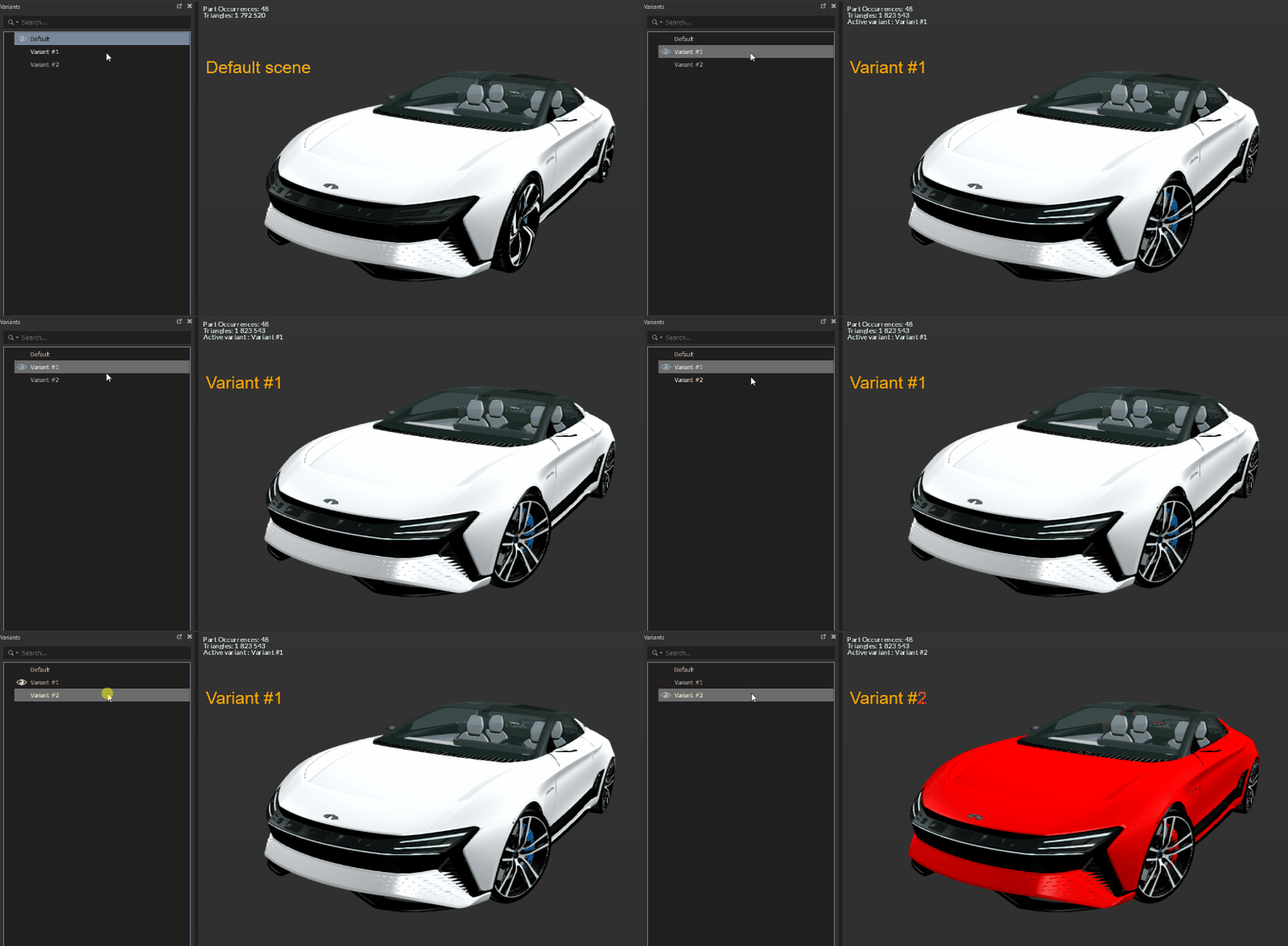
Variants

PMI

PMI included in some CAD files (see the Supported File Formats) can be imported within Asset Transformer Studio if necessary.
When PMI are imported, a
PMI
folder is available in the Variants & PMI panel, where they can be used.
Note
For PMI to be imported with a CAD file, the parameter LoadPMI needs to be enabled, from Preferences (F9) > IO > Import > PMI

Copyright © 2026 Unity Technologies
LegalPrivacy PolicyCookiesDocumentation Terms of UseDo Not Sell or Share My Personal InformationYour Privacy Choices (Cookie Settings)

"Unity", Unity logos, and other Unity trademarks are trademarks or registered trademarks of Unity Technologies or its affiliates in the U.S and elsewhere (more info here). Other names or brands are trademarks of their respective owners.

Some pages are machine-translated for convenience, and may contain inaccuracies. In the event of conflicting information, the English version is authoritative.

  • On this page
    • Variants

    • PMI