使用自定义 ID 登录
Sign in users to Vivox with custom identifiers.
阅读时间2 分钟最后更新于 6 个月前
如果您已经拥有创建玩家 ID 的现有玩家管理系统,则可以使用自定义 ID 提供商来关联身份。
先决条件:
- 设置 Unity Cloud 项目
- 确保您拥有 Project ID、环境 ID 和环境名称。
- 启用 UAS 自定义 ID 提供商确保您在此设置中拥有服务帐户凭据。
此设置的总体流程如下:
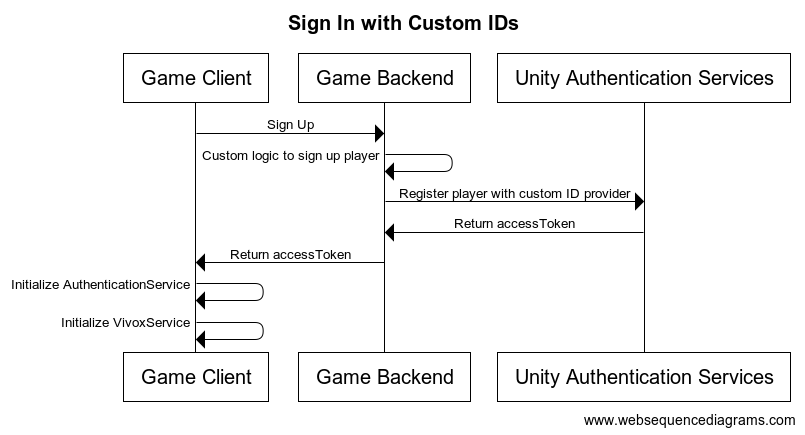
登录
- 在登录时向 UAS 自定义 ID 提供商注册所有用户,并为玩家获取 和
accessToken。sessionTokens - 使用 和
accessToken在客户端设置 AuthenticationService。sessionToken
客户端设置
除了以下进一步介绍的服务器端登录设置外,还需要从后端获取访问令牌并使用 进行处理:
AuthenticationServiceProcessAuthenticationTokensProcessAuthenticationTokensProcessAuthenticationTokensusing Unity.Services.Authentication;using Unity.Services.Vivox;void SignUserWithCustomTokenWithAutoRefresh(){ try { // Check if a cached player already exists by checking if the session token exists if (AuthenticationService.Instance.SessionTokenExists) { // This call will sign in the cached player. await AuthenticationService.Instance.SignInAnonymouslyAsync(); Debug.Log("Cached user sign in succeeded!"); } else { var userTokens = // Fetch the user tokens using your method calls AuthenticationService.Instance.ProcessAuthenticationTokens(userTokens.AccessToken, userTokens.SessionToken) } // Shows how to get the playerID Debug.Log($"PlayerID: {AuthenticationService.Instance.PlayerId}"); await VivoxService.Instance.InitializeAsync(); } catch (AuthenticationException ex) { // Compare error code to AuthenticationErrorCodes // Notify the player with the proper error message Debug.LogException(ex); } catch (RequestFailedException ex) { // Compare error code to CommonErrorCodes // Notify the player with the proper error message Debug.LogException(ex); } catch (Exception ex) { // Handle exceptions from your method call Debug.LogException(ex); }}
请注意代码样本仅描述了一种方法,而不代表一类方法。
需要从后端获取访问令牌。如需了解更多与此相关的信息,请参阅下面的服务器端设置。
服务器端设置
在玩家登录期间,确保每个玩家都已向 UAS 自定义 ID 提供商注册,并为玩家获取 和 。如果您尚未执行此操作,请参阅启用 UAS 自定义 ID 提供商以进行此设置。通过使用服务帐户凭据,您可以发送请求以在游戏服务器上注册玩家:
accessTokensessionToken- 调用 Token Exchange API 以获取无状态令牌。
- 调用使用自定义 ID 登录 API:
curl --location 'https://player-auth.services.api.unity.com/v1/projects/<PROJECT_ID>/authentication/server/custom-id' \--header 'Content-Type: application/json' \--header 'UnityEnvironment: <ENVIRONMENT_NAME>' \--header 'Authorization: Bearer <STATELESS_TOKEN' \--data '{ "externalId": "YOUR_CUSTOM_PLAYER_ID"}'
此请求的响应将包含一个 和一个 ,您必须将它们返回给客户端以初始化 。在此上下文中, 可用作 。
idTokensessionTokenAuthenticationServiceidTokenaccessToken或者,可以使用 Player Names API 为玩家设置名称。如果您正在使用 Vivox Safety 产品,这将非常有用,因为它允许在 Moderation 后台上向仲裁者显示玩家名称。如果玩家更改了名称,请务必保持玩家名称为最新名称。您还可以通过玩家名称管理直接从客户端管理玩家名称。