将 Vivox 访问令牌与 UAS 结合使用
Follow this workflow to use Vivox Access Tokens together with Unity Authentication Services.
阅读时间6 分钟最后更新于 7 个月前
为了完全控制哪些玩家可以访问哪些频道,您可以通过自己的后端生成 Vivox 访问令牌 (VAT)。
先决条件:
- 设置 Unity Cloud 项目
- 确保您拥有 Project ID、环境 ID 和环境名称。
- 启用 UAS 自定义 ID 提供商
- 确保您在此设置中拥有服务帐户凭据。
此设置的总体流程如下图所示:
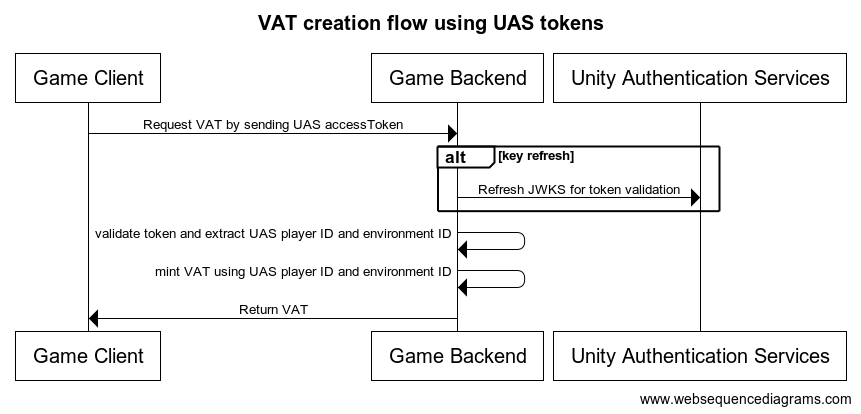
创建 VAT
- 每当需要 VAT 时,Vivox SDK 都会使用自定义令牌提供商实现从后端请求 VAT。
- 在 方法内请求 VAT 时,向后端的请求中添加
GetTokenAsync。accessToken - 在后端从令牌中验证并提取所需的信息,并创建 Vivox 访问令牌以将其发送回客户端。
客户端设置
在游戏客户端中,创建一个实现 Vivox SDK 接口的类并将其注册到 VivoxService。
IVivoxTokenProvider如果通过调用 来注册 IVivoxTokenProvider 的实现,则每当需要令牌进行登录等操作时,Vivox 都会调用您的实现中的 方法。
VivoxService.Instance.SetTokenProviderIVivoxTokenProvider.GetTokenAsync创建有效负载所需的信息作为覆盖的 方法的输入提供。此信息在制作 VAT 时使用。
IVivoxTokenProvider.GetTokenAsync您仍然必须设置服务器端令牌供应,并在覆盖的 方法中获取令牌。
IVivoxTokenProvider.GetTokenAsync订阅
在登录您的玩家之前,您必须使用以下方法注册您的 实现:
IVivoxTokenProviderVivoxService.Instance.SetTokenProvider(new CustomTokenProvider());
获取令牌
应使用覆盖的方法中提供的所有参数(即使有些参数为空)创建有效负载,并将有效负载发送到您的安全服务器以生成您的 Vivox 访问令牌。
最佳做法是发送所有参数;仅返回有效负载所需的内容。使用有效负载作为 方法中的输入。
GetTokenAsync此外,您必须在请求的有效负载中发送 UAS accessToken,以便服务器对其进行验证并根据它生成 Vivox 访问令牌。
对于某些令牌,不同的参数将为空。例如,登录令牌的 和 将为空。这是预期的行为。
targetUserUrichannelUri以下是一个令牌生成示例。
public class VoiceManager : MonoBehaviour{ async void Start() { // Must be done before any other Vivox action otherwise tokens will not be generated properly. VivoxService.Instance.SetTokenProvider(new VivoxTokenProvider()); await UnityServices.InitializeAsync(); await VivoxService.Instance.InitializeAsync(); }}class VivoxTokenProvider : IVivoxTokenProvider{ public Task<string> GetTokenAsync(string issuer = null, TimeSpan? expiration = null, string targetUserUri = null, string action = null, string channelUri = null, string fromUserUri = null, string realm = null) { if (!AuthenticationService.Instance.SessionTokenExists) { // Player not logged in! } var accessToken = AuthenticationService.Instance.AccessToken // Implement token fetching logic here. // The method parameters together with the accessToken from the AuthenticationService contain the necessary information for crafting the request payload. // This will be called whenever a token is needed for a Vivox action }}
服务器端设置
您的后端服务需要公开一个 API,让客户端可以在以上的 函数中调用该 API,以便在需要时接收 VAT。
GetTokenAsync请参阅在安全服务器上生成令牌以详细了解关于如何创建 VAT 的实现细节。
请参阅访问令牌有效负载以了解有关令牌有效负载的更多信息。
创建 VAT 时,您需要使用以下用户 SIP URI 作为主体:
sip:.issuer.unity_player_id.unity_environment_id.@domain.vivox.com
issuerunity_player_idunity_environment_id这两个值都可以从应该在 方法内从客户端发送到后端的 accessToken 中提取。
GetTokenAsync然后应按照验证令牌 ID 中描述的步骤验证 。
accessToken令牌的 声明中包含 UAS 玩家 ID。令牌的 声明中包含环境 ID。 值是一个区分大小写的字符串数组,每个字符串包含一个 StringOrURI 值。
subaudaud{ "header": { "alg": "RS256", "kid": "<id>", "typ": "JWT" }, "payload": { "aud": [ "upid:{{unity_project_id}}", "envName:{{environment_name}}", "envId:{{unity_environment_id}}" // unity environment id ], "exp": 1617677595, // expires at "iat": 1617673872, // issued at "nbf": 1617673872, // not valid before "sub": "{{unity_player_id}}", // UAS player ID "project_id": "{{unity_project_id}}" // unity project id }}
这样就可以创建 VAT 并将其返回到客户端。