SetSelectedWireframeHidden(Renderer, bool)
Sets whether the selected Renderer's wireframe will be hidden when the GameObject it is attached to is selected.
Read time 1 minuteLast updated 5 days ago
Definition
- Type: Method
- Namespace: UnityEditor
- Assembly: UnityEditor
public static void SetSelectedWireframeHidden(Renderer renderer, bool enabled)
Parameters
Remarks
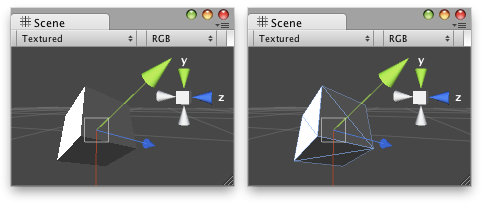
Cube with the wireframe hidden/shown.
Examples
using UnityEngine;using UnityEditor;// Shows / hides the wireframe of the objects in the Scene.class ShowHideWireFrame : Editor{ [MenuItem("Examples/Show WireFrame %s")] static void Show() { foreach (GameObject obj in Selection.gameObjects) { Renderer rend = obj.GetComponent<Renderer>(); if (rend) { EditorUtility.SetSelectedWireframeHidden(rend, false); } } } [MenuItem("Examples/Show WireFrame %s", true)] static bool CheckShow() { return Selection.activeGameObject != null; } [MenuItem("Examples/Hide WireFrame %h")] static void Hide() { foreach (GameObject obj in Selection.gameObjects) { var rend = obj.GetComponent<Renderer>(); if (rend) { EditorUtility.SetSelectedWireframeHidden(rend, true); } } } [MenuItem("Examples/Hide WireFrame %h", true)] static bool CheckHide() { return Selection.activeGameObject != null; }}