OpenFilePanel(string, string, string)
Displays the "open file" dialog and returns the selected path name.
Read time 1 minuteLast updated a month ago
Definition
- Type: Method
- Namespace: UnityEditor
- Assembly: UnityEditor
public static string OpenFilePanel(string title, string directory, string extension)
Parameters
The text to display in the toolbar of the dialog window.
The default file directory that this dialog opens. This parameter is relative to the project directory. For example, "Assets" displays the Assets directory when this dialog opens.
The file extensions to filter in this dialog. Do not precede file extension names with a period. Enter an empty string to include all file types. Separate multiple file extensions with a comma.
Returns
Type | Description |
|---|---|
| string |
Remarks
Additional Resources: EditorUtility.SaveFilePanel function.
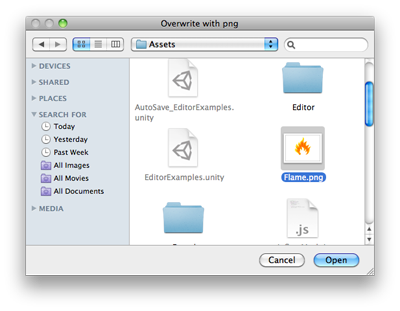
Open File Panel.
Examples
using System.IO;using UnityEngine;using UnityEditor;public class OpenFilePanelExample : EditorWindow{ [MenuItem("Example/Overwrite Texture")] static void Apply() { Texture2D texture = Selection.activeObject as Texture2D; if (texture == null) { EditorUtility.DisplayDialog("Select Texture", "You must select a texture first!", "OK"); return; } string path = EditorUtility.OpenFilePanel("Overwrite with png", "", "png"); if (path.Length != 0) { var fileContent = File.ReadAllBytes(path); texture.LoadImage(fileContent); } }}