FocusProjectWindow()
Brings the project window to the front and focuses it.
Read time 1 minuteLast updated 20 hours ago
Definition
- Type: Method
- Namespace: UnityEditor
- Assembly: UnityEditor
public static void FocusProjectWindow()
Remarks
This is commonly called after a menu item that creates and selects an asset is invoked.
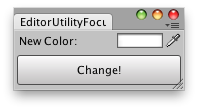
Changes the color of the selected GameObjects.
Examples
using UnityEngine;using UnityEditor;public class FocusProjectWindowExample : EditorWindow{ static Color matColor = Color.white; [MenuItem("Example/Color Change")] static void Init() { // Get existing open window or if none, make a new one: FocusProjectWindowExample window = (FocusProjectWindowExample)EditorWindow.GetWindow(typeof(FocusProjectWindowExample)); window.Show(); } void OnGUI() { matColor = EditorGUI.ColorField(new Rect(3, 3, position.width - 6, 15), "New Color:", matColor); if (GUI.Button(new Rect(3, 25, position.width - 6, 30), "Change")) ChangeColors(); } void ChangeColors() { if (Selection.activeGameObject) { foreach (GameObject t in Selection.gameObjects) { Renderer rend = t.GetComponent<Renderer>(); if (rend) rend.sharedMaterial.color = matColor; } } EditorUtility.FocusProjectWindow(); } void OnInspectorUpdate() { Repaint(); }}