Getting Started With Scripting
Learn how to use the Python API in Asset Transformer Studio
Read time 6 minutesLast updated 2 months ago
Learn how to use the Python API to automate tasks in Asset Transformer Studio.
Whether you want to script short helper functions or plugins, this document should help you get started or improve your knowledge.
Tools
In this document, we use the Script panel as scripting tool, but feel free to use your preferred IDE.
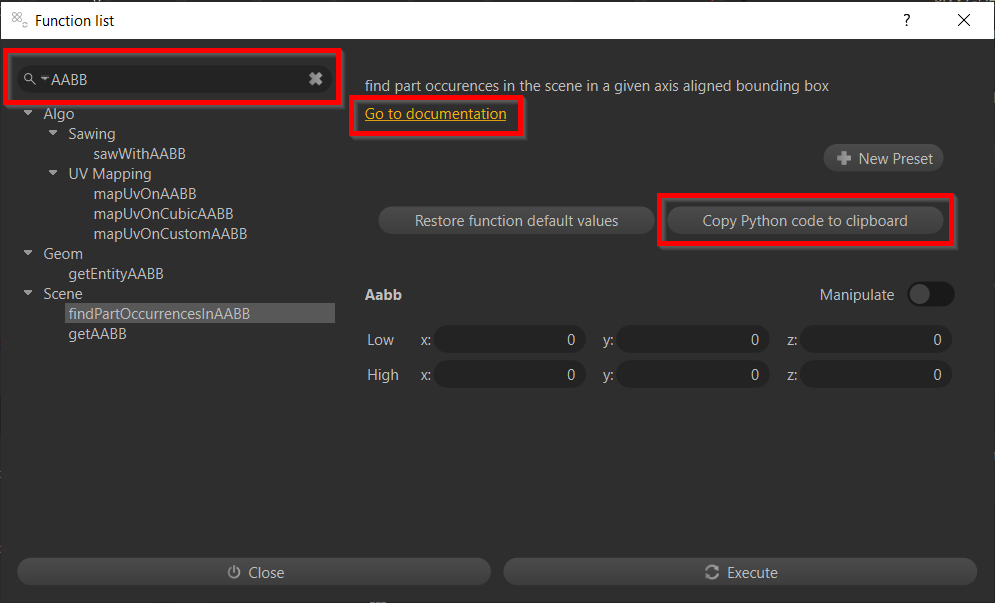
All API functions are listed in the API Reference, but also directly in Asset Transformer Studio Function List. This tool is particularly useful to find methods from keywords, go to their documentation and access parameters and returned types, but also to copy and paste Python code:
Structure
Consider that anything doable via a human interaction in Asset Transformer Studio is doable through the API.
To understand the logic of Asset Transformer Studio scripting you must understand the structure behind it:
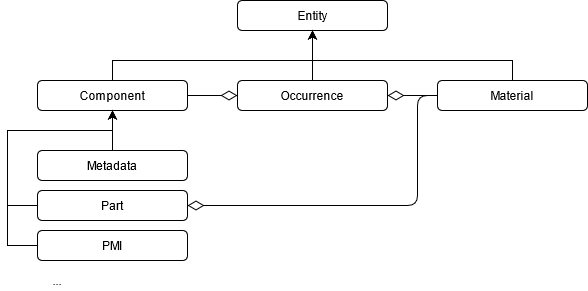
Asset Transformer Studio entity structure (simplified)
Entities
Entities are abstract objects defined by an integer ID (meaning that an occurrence, a material or a component will all have an ID). Each ID is unique and most functions take this ID or a list of IDs as input. Some functions such as , , or take all types of entities as input — meaning that you'll use the same function to access an occurrence, a material or a part property:
core.getPropertycore.setPropertycore.listProperties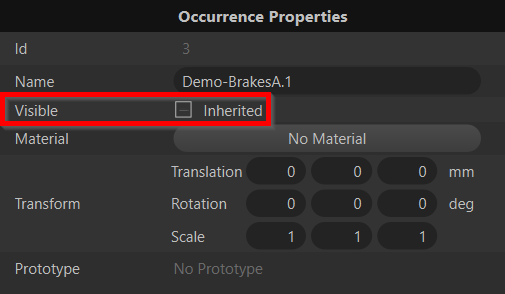
![core.getProperty(15, 'color') → '[0, 1, 1, 1]'](/api/media?file=/asset-transformer-studio/2026.5.0/media/script-in-python-2.png)
core.getProperty(15, 'color') → '[0, 1, 1, 1]'
Occurrences
Occurrences are the nodes in the product structure, they can have children and prototypes. Most of the optimization functions take an occurrence or a list of occurrences as input. For example:
- will apply on all children of
algo.tessellate([1], …).1 - To retrieve the root occurrence in your scene you can use the function.
scene.getRoot() - To find occurrences based on a property you can use the function.
scene.findOccurrencesByProperty(property, regex)
Properties defining occurrences can be visualized in the Inspector (ID, Name, Visible, Material, Transform…).
Components
Components are behaviors attached to occurrences. Their IDs can be retrieved thanks to the or the methods (value is 0 if does not exist for the second method). Component types are listed in the enum. You can visualize the components in the Inspector below the occurrence properties:
scene.getComponent(occurrence, componentType)scene.getComponentByOccurrence(listOfOccurrences, componentType)scene.ComponentType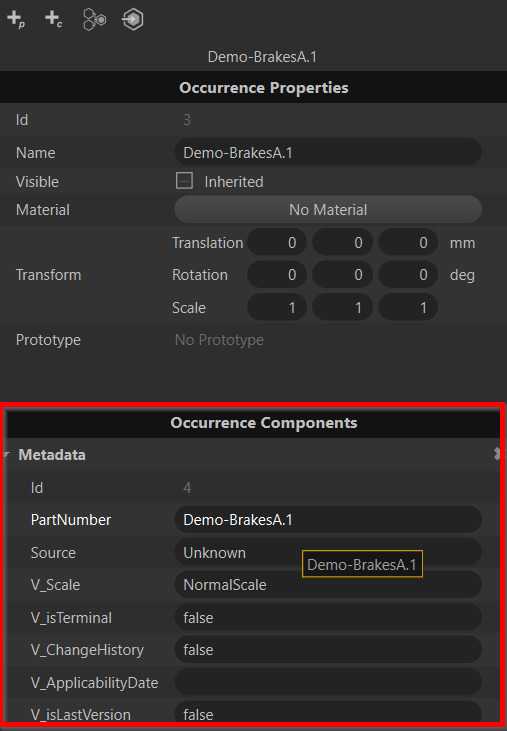
Metadata
Metadata are components storing basic key/value information retrieved in the imported files. You can add, modify, and delete metadata through the API. You can either use or to access this information or directly extract it using . You can also use to retrieve occurrences based on metadata.
core.listPropertiescore.getPropertyscene.getMetadatasDefinitions(listOfMetadataComponents)scene.findByMetadata(property, regex)occurrences = scene.findByProperty('Name', '.*') metadataComponents = scene.getComponentByOccurrence(occurrences, scene.ComponentType.Metadata) metadataDefinitions = scene.getMetadatasDefinitions(metadataComponents) for occurrence, definition in zip(occurrences, metadataDefinitions): print(f'Occurrence {occurrence} contains {len(definition)} metadata') for propValue in definition: print(f'{propValue.name}:{propValue.value}')
Part
Part components contain geometry information (CAD, mesh, lines, UVs…). For example, to retrieve mesh definitions from a list of occurrences:
partComponents = scene.getComponentByOccurrence(occurrences, scene.ComponentType.Part)
for occurrence, partComponent in zip(occurrences, partComponents):
    if partComponent != 0: # meaning the corresponding occurrence did not have any part attached
        mesh = scene.getPartMesh(partComponent)
        meshDef = polygonal.getMeshDefinition(mesh)
        vertices = meshDef.vertices # MeshDefinition is a structure, its attributes can be found in the API documentation
Materials
Materials are entities containing visual definitions. They can be interactively accessed from the Material Editor. They are defined by a pattern and properties specific to each pattern.
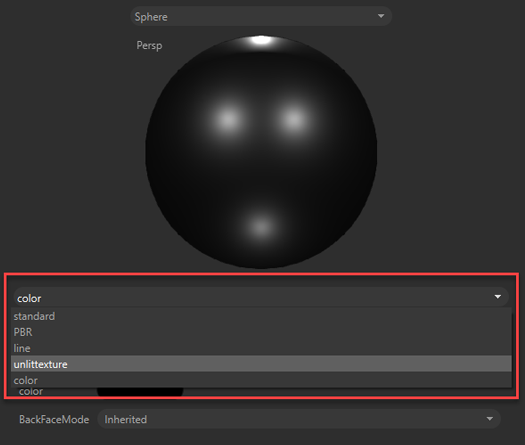
When creating a material from script, a pattern is required: fill it with one of the above ones depending on which type of material you want to create ().
material.createMaterial("Standard Material", "standard")When modifying from script a material defined by complex properties, it can be hard to understand how to fill the value parameters of . For example the diffuse value of a standard material:
core.getProperty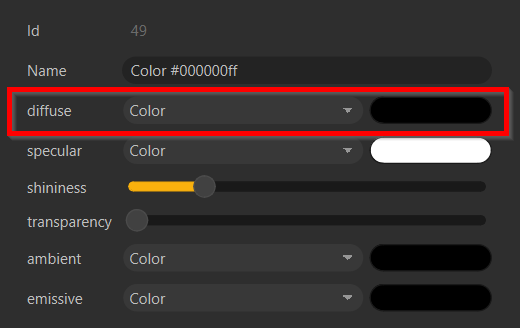
In this case you can print in the console the diffuse value of an existing material by just executing: , which will output . So to modify a diffuse texture proceed as follows: .
print(core.getProperty(49, 'diffuse'))COLOR([0.000000, 0.000000, 0.000000])core.setProperty(materialId, 'COLOR(' + str(YOUR_VALUES) + ')')For example, here is a script to assign materials based on a metadata:
def assignMaterialsFromMetadata():
    existingMaterials = {core.getProperty(mat, 'Name'):mat for mat in material.getAllMaterials()}
    filteredOccurrences = scene.findOccurrencesByMetadata('CAD_MATERIAL', '.*')
    filteredMetadata = scene.getComponentByOccurrence(filteredOccurrences, 5, True)
    for occurrence, metadata in zip(filteredOccurrences, filteredMetadata):
        materialName = scene.getMetadata(metadata, 'CAD_MATERIAL')
        if materialName in existingMaterials.keys():
            core.setProperty(occurrence, 'Material', str(existingMaterials[materialName]))
        else:
            newMaterial = material.createMaterial(materialName, 'color')
            core.setProperty(newMaterial, 'color', str([0.5, 0.5, 0.5, 1]))
            core.setProperty(occurrence, 'Material', str(newMaterial))
            existingMaterials[materialName] = newMaterial

assignMaterialsFromMetadata()
Tips
-
Sample scripts are accessible in the Asset Transformer Studio installation folder ().
doc/Sample Scripts -
To search the Python API documentation offline, use the pixyz-api-search tool. This tool supports partial matches.
-
When parsing a large number of occurrences, thousands of logs will be written in the console. It can slow down your process or even freeze Asset Transformer Studio. You can disable the logs by using thefunction. Don't forget to re-enable them at the end.
core.configureInterfaceLogger -
Generate your own progression steps by using theand
core.pushProgressionmethods:core.stepProgressionallPartOccurrences = scene.getPartOccurrences() core.pushProgression(len(allPartOccurrences)) for occurrence in allPartOccurrences: # ... core.stepProgression() core.popProgression() -
When retrieving a structure from a method (e.g.), you can check the documentation to get the attributes names (e.g. AABB.low and AABB.high):
scene.getAABB(occurrences)aabb = scene.getAABB([scene.getRoot()]) print(f'Higher x values: {aabb.high.x}') -
To import custom modules: Import custom Python modules in Studio
-
Most preferences are shared between Asset Transformer products. To change them from script, use themethod:
core.setModulePropertycore.setModuleProperty('IO', 'PreferLoadMesh', 'True')