Product Structure Management
How to handle Product Structure entities with Python scripting in Asset Transformer Studio
Read time 1 minuteLast updated 10 hours ago
Check the following examples to learn how to handle entities of the Product Structure (or Scene tree) with Python scripting.
Parsing scene tree
scene.getRoot()
scene.getChildren(occurrence)
scene.getParent(occurrence)
scene.hasComponent(occurrence, scene.ComponentType.Part)
scene.getComponent(occurrence, scene.ComponentType.Part)
Example
def traverseTree(occurrence):
    print("Occurrence " + str(occurrence))
    if scene.hasComponent(occurrence, scene.ComponentType.Part):
        print("-> has part")
    for child in scene.getChildren(occurrence):
        traverseTree(child)

traverseTree(scene.getRoot())
Node creation
scene.createOccurrence()
scene.addComponent(occurrence, componentType)
scene.prototypeSubTree(occurrence)
scene.setParent(occurrence, parent)
scene.setLocalMatrix(occurrence, matrix)
Example
part = scene.createOccurrence("Part1")
scene.addComponent(part, scene.ComponentType.Part)
instance1 = scene.prototypeSubTree(part)
instance2 = scene.prototypeSubTree(part)
assembly = scene.createOccurrence("Assembly")
scene.setParent(instance1, assembly)
scene.setParent(instance2, assembly)
scene.setParent(assembly, scene.getRoot())
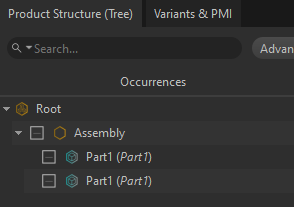
Accessing part geometry
scene.getPartActiveShape(part)
For TessellatedShape type:
tessellation = scene.getPartMesh(shape)
polygonal.getMeshDefinitions(tessellation)
polygonal.createMeshFromDefinition(meshDefinition)
For BRepShape type:
scene.getPartModel(shape)
Simple CAD geometry example
torus = pxz.cad.createBRepTorus(100,10)
model = cad.createModel()
cad.addBodyToModel(torus, model)
occurrence = scene.createOccurrence("Torus")
part = scene.addComponent(occurrence, scene.ComponentType.Part)
scene.setPartModel(part, model)
scene.setParent(occurrence, scene.getRoot())
algo.tessellate([occurrence], 0.200000, -1, -1)
Properties
Not all entity types support custom properties.
core.supportCustomProperties(entity)
core.addCustomProperty(node, "propertyName", "propertyValue")
core.getProperty(node, "property") # like any other built-in property
scene.getMetadata(occurrence, propertyName)
Find nodes by properties
scene.findPartOccurrencesByActiveMaterial()
scene.findOccurrencesByProperty("propertyName", "regex")
scene.findMaterialsByProperty("propertyName", "regex")
scene.findOccurrencesByMetadata("propertyName", "regex")
# ECMAScript type regex