Transform Pivot Point Menu
How to manage occurrence pivot points in Asset Transformer Studio
Read time 1 minuteLast updated 9 hours ago
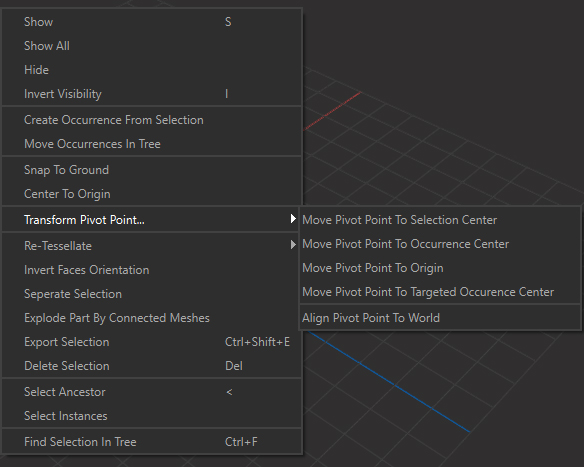
The Transform Pivot Points menu lists the functions used to move the pivot point position of occurrences.
By default, the pivot point of an occurrence is defined by how it was set in the original 3D file. At import, Asset Transformer Studio retrieves the pivot point for each occurrence.
Menu option | Description |
|---|---|
| Move Pivot Point To Selection Center | For a selection of occurrences, moves the pivot point of each occurrence to the center of all selected occurrences. |
| Move Pivot Point To Occurrence Center | For a selection of occurrences, moves the pivot point of each occurrence to the center of its bounding box. Also applies to its children (recursively) if the |
| Move Pivot Point To Scene Origin | For a selection of occurrences, moves the pivot point of each occurrence to the scene origin (0,0,0). Also applies to its children (recursively) if the |
| Move Pivot Point To Targeted Occurrence Center | Moves the pivot point of each occurrence in the function input to the center of the targeted occurrence. Also applies to its children (recursively) if the |
| Align Pivot Point To World | Aligns the pivot point of each occurrence to the world's orientation (Y-up, orthogonal to the scene grid). Also applies to its children (recursively) if the |