GetOriginalSourceRootWhereGameObjectIsAdded(GameObject)
Use this method to find the Prefab Asset root where a Prefab instance or Prefab Asset object was added originally.
Read time 2 minutesLast updated a month ago
Definition
- Type: Method
- Namespace: UnityEditor
- Assembly: UnityEditor
public static GameObject GetOriginalSourceRootWhereGameObjectIsAdded(GameObject gameObject)
Parameters
GameObject from a Prefab instance or from a Prefab Asset.
Returns
Type | Description |
|---|---|
| GameObject | The Prefab Asset root where the input GameObject was added. |
Remarks
Use this method to find the "original source" where the input object was added. This is useful in situations where you are working with nested prefabs, and you need to in which prefab your instance of a nested prefab was originally added.
For example, in the diagram shown below, prefab asset "A" contains a child nested prefab "B", which contains a child nested prefab "C".
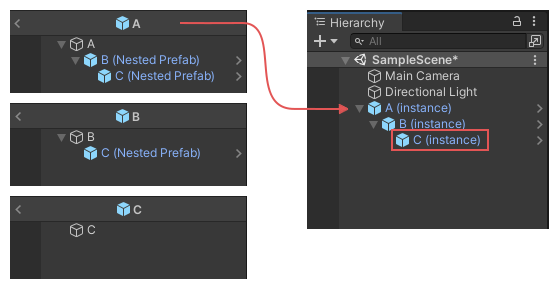
Due to this structure, prefab "C" exists in both "A" and "B", however it was originally added in "B".
Therefore in this example scenario, when the GameObject "C (Instance)" is passed in as the source to this method, this method returns the asset "B".
In this example scenario, if you call and supply the instance of GameObject C as the , then the method returns the asset B.
GetOriginalSourceRootWhereGameObjectIsAddedgameObjectThe Open Prefab button in the Restructure Dialog uses this method to determine the correct prefab asset to open in prefab editing mode.
using UnityEditor;using UnityEngine;public class AssetSourceTestWizard : ScriptableWizard{ public GameObject instance; [MenuItem("Test/Asset Source Test Wizard")] static void CreateWizard() { ScriptableWizard.DisplayWizard<AssetSourceTestWizard>("Asset Source Test Wizard", "Do Test"); } void OnWizardCreate() { var o1 = PrefabUtility.GetOriginalSourceRootWhereGameObjectIsAdded(instance); Debug.Log("Original source root where GameObject is added: " + o1.name + " from: " + AssetDatabase.GetAssetPath(o1)); }}
If you need to know the original source for a given GameObject or Component (not where it is added) then use PrefabUtility.GetCorrespondingObjectFromOriginalSource.