APS インテグレーション
LevelPlay SDKを使用して、ReactネイティブアプリケーションにAmazonパブリッシャーサービス(APS)をメディエーションネットワークとして統合します。
読み終わるまでの所要時間 5 分最終更新 1ヶ月前
前提条件
Amazonパブリッシャー サービス(APS)は招待制のプログラムです。APS を統合するには、LevelPlay SDK と APS SDK の両方を統合および初期化する必要があります。LevelPlay の動画リワード広告、インタースティシャル広告、またはバナー広告がアプリケーションに正しく統合されていることを確認します。
APS アカウントの作成
- APS に連絡してアプリケーションのアカウントを設定します。APS アカウントを作成するには、APS Web サイトに移動し、接触を選択してリクエストを開きます。
- APS リクエストが承認されると、サインアップして APS でアカウントを作成するための招待リンクが送られてきます。
- LevelPlay で APS を設定する前に、上記の手順を完了する必要があります。
APS ネットワークでのスロットの設定
- apps メニューから適切なアプリケーションを選択し、設定を選択します。
- Monetizationサービスの設定メニューでLevelPlayを選択します。
- スロットを追加し、スロットごとに定義します。
- 名前
- 広告サイズ
- 価格設定(自動/手動)
- すべてのスロットの追加を完了し、認証情報を取得します。
- App ID の取得
- 価格CSVファイルのダウンロード
APS ネットワークワークのアクティベート
- 上記の認証情報を取得したら、LevelPlay アカウントにログインし、Monetize> 設定> SDK Networks に移動します。
- Available Networks のテーブルから APS を選択し、アクティベートを選択します。
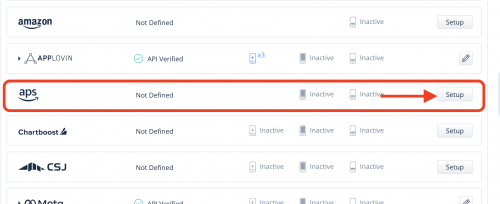
- 広告ネットワークのリストから APS を選択し、設定 を選択します。
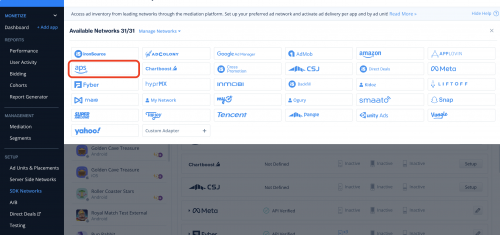
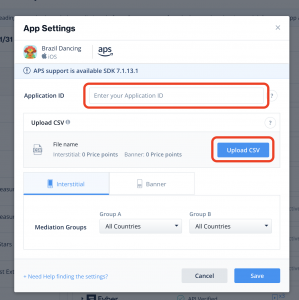
- APS App ID を入力し、CSV ファイルをそのままアップロード
広告ごとの LevelPlay Mediation による APS 入札情報の共有
各広告をロードする前に、APS API を呼び出して LevelPlay SDK が広告をロードするために必要なロード情報を取得します。
必要な手順は以下のとおりです。
- 各 LevelPlay 広告単位ロード前に APS 広告リクエストをロード。
- SetNetworkData を呼び出して、APS 入札情報を LevelPlay と共有します。
- LevelPlay メディエーション API を使用して、関連する広告単位をロードします。
これで、アプリケーション内でAPSの需要を満たす準備が整いました。
次のステップ
LevelPlay を通じて追加の広告ネットワークを活用するには、ネットワークアダプタを統合し、インテグレーションガイドに従ってください。