Tencent integration
Integrate Tencent as a mediation network in your React Native app using the LevelPlay SDK.
読み終わるまでの所要時間 1 分最終更新 3ヶ月前
This guide will instruct you step-by-step on how to set Tencent Network live as an ad network on LevelPlay Mediation platform.
Prerequisites
- Make sure you have correctly integrated LevelPlay's Rewarded Video, Interstitial, or Banner ads into your application.
- Tencent supports iOS and CN traffic only. Min iOS version required is 10.0.
Create a Tencent Network Account
To access Tencent's ad inventory through LevelPlay's mediation platform, you must create an account with Tencent. You can do so here.
Create an Application in Tencent Network
In order to create an application and placements in your Tencent account – use the Tencent help center
Activate Tencent Network
Inside LevelPlay platform, access the SDK Networks setup to configure Tencent's parameters into your LevelPlay account.
- When you have the App ID and Slot ID, log in to your LevelPlay account and go to Monetize > Setup > SDK Networks
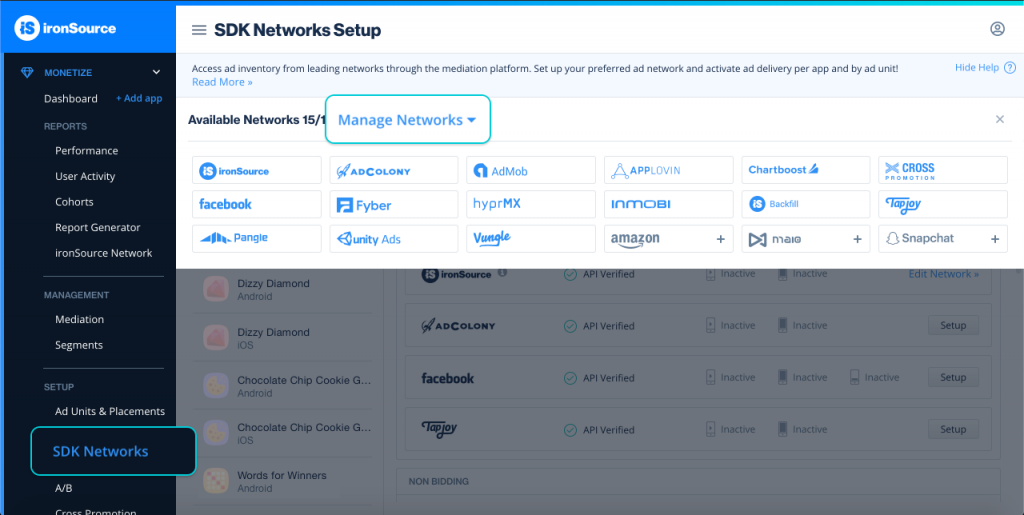
- Select Tencent from the table of Available Networks and select Activate. Then select Save.
- Select Tencent from the list of ad networks and select Setup.
- Enter your Tencent App ID and Placement ID. Set the status to Active and select Save.
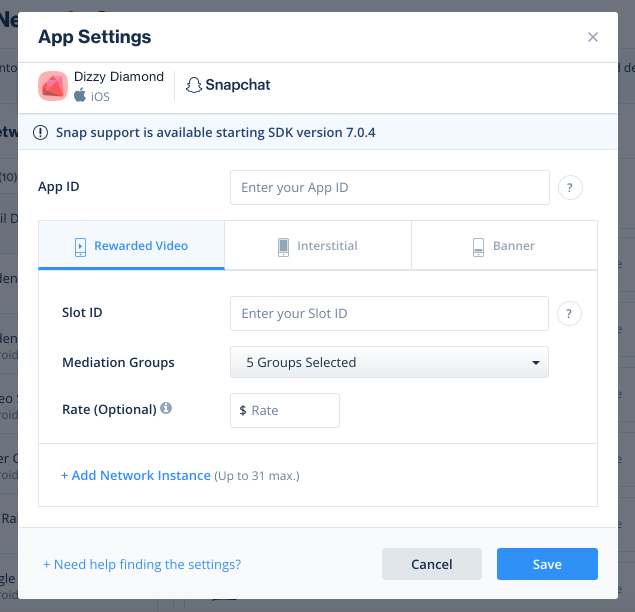
You'll see Tencent listed as Active for Mediation on your Setup dashboard.
Add the Tencent Adapter to Your Build
Verify Your Ad Network Integration
The LevelPlay SDK provides an easy way to verify that your mediation integration was completed successfully. To verify your LevelPlay and additional ad networks' integration, follow this document.
You are now all set to deliver Tencent within your application!