使用 Blueprint 集成
Use the Matchmaker Blueprint API to add matchmaking functionality to your Unreal Engine game without writing code.
阅读时间11 分钟最后更新于 9 个月前
以下部分展示如何使用 Unreal Engine 中的 Blueprint 与 Matchmaker SDK 集成。
您可以在 Unity Gaming Services SDK 中进行交互的两个 Matchmaker 接口是:
安装 Matchmaker SDK 插件
继续下一步前,请将 添加为模块的公共依赖项,然后将插件头文件包含到您的类中,如下所示。
MatchmakerSDK将 和 作为模块的依赖项添加到您的 Unreal 项目版本文件 ():
MatchmakerServerMatchmakerClientYourProjectName.Build.csPublicDependencyModuleNames.AddRange(new string[] { "Core", "CoreUObject", "Engine", "InputCore" });PublicDependencyModuleNames.AddRange(new string[] { "MatchmakerClient", "MatchmakerServer" });PublicDependencyModuleNames.AddRange(new string[] { "Json", "JsonUtilities" });
Matchmaker Client Blueprint API
Matchmaker Client Subsystem 控制关于匹配和寻找匹配玩家的客户端部分。此部分包括创建、删除和轮询匹配工单。
使用 中的静态函数通过以下 Blueprint 与 Matchmaker Client Subsystem 交互:
UMatchmakerClientBlueprintApiCreateTicket
要使用 ,请在 Blueprint 中放置一个 Create Ticket 节点。填充输入的 **Players(玩家)**和 **Options(选项)**字段以创建工单。
CreateTicket以下示例展示了如何传入单个玩家和队列名称来创建工单。此外,还展示了一个事件,这个事件处理响应以获取 的 输出。
TicketIdFString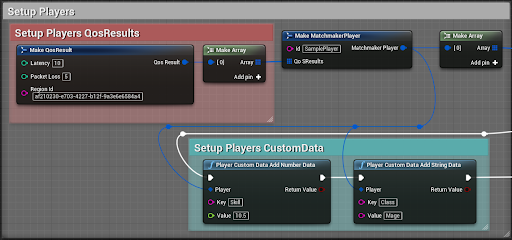
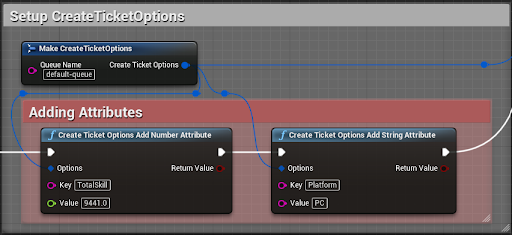
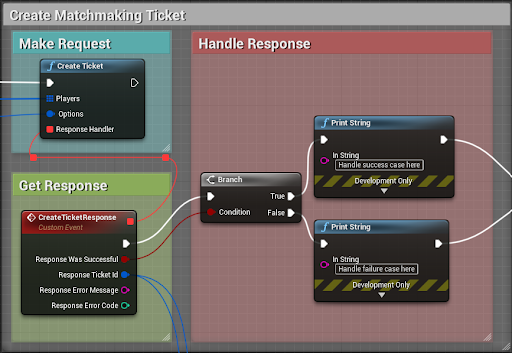
您可以为响应处理程序设置一个自定义事件,然后右键单击该事件的 结构引脚,并选择 以访问 中所有单独的值。
ResponseSplit Struct PinCreateTicketResponseDeleteTicket
使用 Blueprint 发出删除工单调用,传入要删除的 TicketId。
DeleteTicket下面是一个简单的示例,演示了如何使用 Delete Ticket 以及如何处理响应。
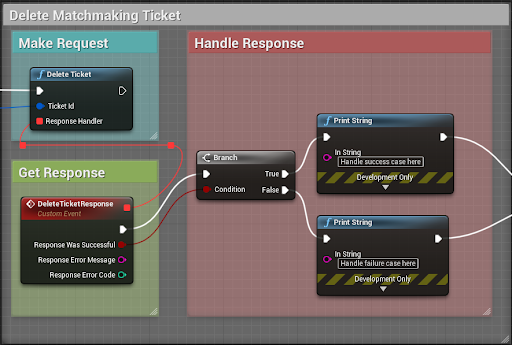
您可以为响应处理程序设置一个自定义事件,然后右键单击该事件的 结构引脚,并选择 以访问 中所有单独的值。
ResponseSplit Struct PinDeleteTicketResponseGetTicketStatus
使用 可以轮询 Matchmaker,以便使用从 CreateTicket Blueprint 中检索到的 获取匹配。
GetTicketStatusTicketId轮询完成后无论成功还是失败,或者用户希望手动取消匹配,请使用 Blueprint 停止在匹配中考虑相应玩家。
DeleteTicket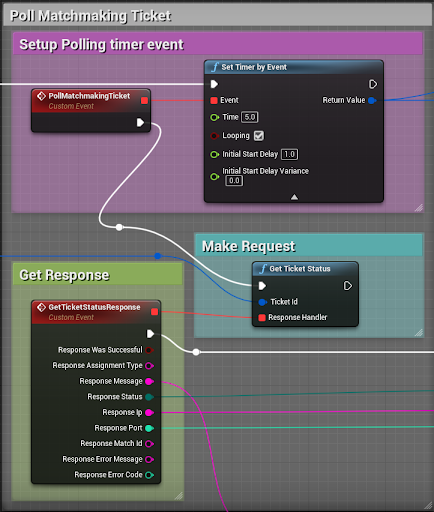
您可以为响应处理程序设置一个自定义事件,然后右键单击该事件的 结构引脚,并选择 以访问 中所有单独的值。
ResponseSplit Struct PinGetTicketStatusResponse]上图显示了使用 节点来轮询匹配工单的示例。当循环条件成立时,该节点将按照 Time 变量中设置的频率来持续触发其事件。在本例中,Time 设置为 5;因此该事件每五秒发生一次,直到计时器处理程序被取消。返回值是计时器处理程序,您可以在其中使用 来取消计时器。
Set Timer by EventClear and Invalidate Timer by Handle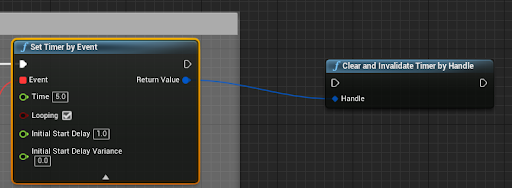
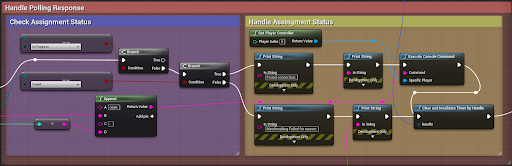
Timer 句柄从 Set Timer by Event 节点传递到 Clear and Invalidate Timer by Handle 节点。您应该设置一些条件逻辑来触发 Clear and Invalidate Timer by Handle。在返回匹配结果之前,必须对 进行大多数连续调用。当状态不再返回为 InProgress 后,便可以安全地停止轮询并删除工单了。
GetTicketStatus下图显示了如何处理轮询响应并触发 Clear and Invalidate Timer 的基本示例。
Matchmaker Server Blueprint API
Matchmaker Server Subsystem 控制关于匹配的服务器部分。此部分包括创建、审批、删除和更新回填工单。
您可以使用 执行以下操作:
UMatchmakerServerBlueprintApiCreateBackfillTicket
当一名(或多名)玩家离开完整匹配,因此服务器需要填补空缺时,您需要创建新的回填工单。可以使用 Create Backfill Ticket Blueprint 为服务器创建新的回填工单。
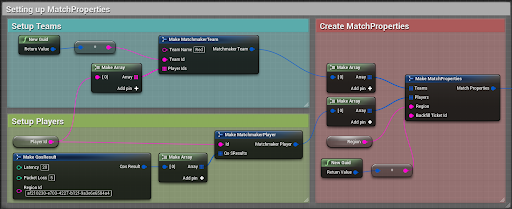
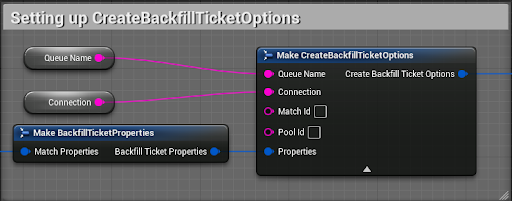
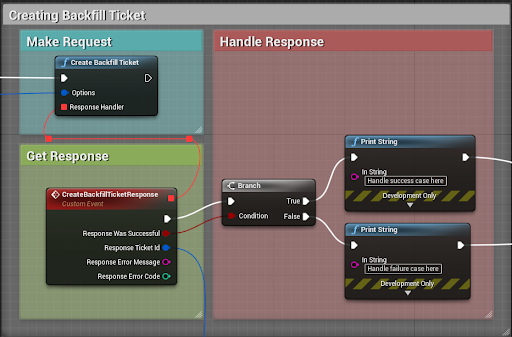
您可以为响应处理程序设置一个自定义事件,然后右键单击该事件的 结构引脚,并选择 以访问 中所有单独的值。
ResponseSplit Struct PinCreateBackfillTicketResponseApproveBackfillTicket
使用 Approve Backfill Ticket Blueprint 定期审批您的回填工单,让新玩家进入服务器。
建议审批回填工单的速度不要超过每秒一次。如果 20 秒内未审批工单,Matchmaker Service 就会将工单删除。
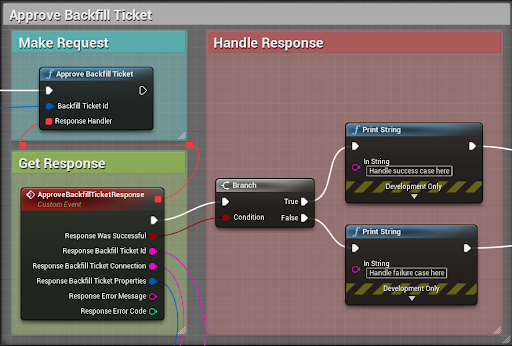
在上面的示例中,每秒循环运行一次审批。删除回填工单后,请务必使用 Clear and Invalidate Timer by Handle 节点。
您可以为响应处理程序设置一个自定义事件,然后右键单击该事件的 结构引脚,并选择 以访问 中所有单独的值。
ResponseSplit Struct PinApproveBackfillTicketResponseUnity 建议缓存响应中的值,并使用这些值在 中构建 。
UpdateBackfillTicketBackfillTicketUpdateBackfillTicket
每当发生以下情况时,请更新回填工单:
- 一名玩家离开服务器
- 一名玩家从匹配逻辑之外加入服务器
这些情况可能包括但不限于派对邀请、直接连接和好友邀请。
可以使用 Update Backfill Ticket Blueprint 来更新服务器当前的回填工单。
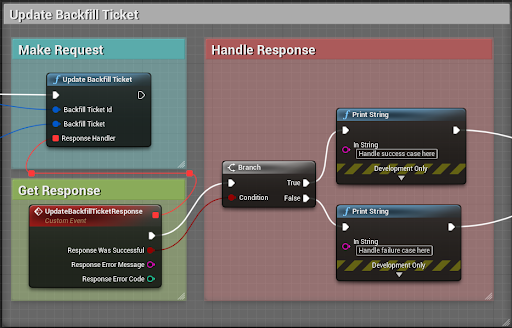
您可以为响应处理程序设置一个自定义事件,然后右键单击该事件的 结构引脚,并选择 以访问 中所有单独的值。
ResponseSplit Struct PinUpdateBackfillTicketResponse此调用的频率应该不超过每三秒一次,或者在 看到回填工单发生变化后进行调用,以保证至少经过一个匹配周期。
ApproveBackfillTicketUnity 建议先调用 ,然后根据需要使用从 返回的 进行修改并传递到 中。
ApproveBackfillTicketApproveBackfillTicketBackfillTicketUpdateBackfillTicketDeleteBackfillTicket
当匹配人数已满之后,服务器不再需要接受新玩家时,您可以删除回填工单。匹配结束后,也应该执行此操作。
可以使用 Delete Backfill Ticket Blueprint 停止服务器上的回填。
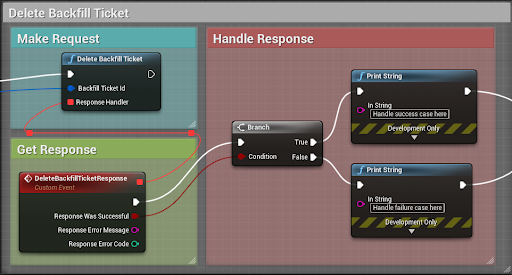
您可以为响应处理程序设置一个自定义事件,然后右键单击该事件的 结构引脚,并选择 以访问 中所有单独的值。
ResponseSplit Struct PinDeleteBackfillTicketResponseBlueprint 实用函数
由于 Blueprint 的限制,JSON 数据类型(例如 和 )本身不兼容,也不支持直接操作。SDK 实现了一组实用函数,允许您在 API 中管理 JSON 数据:
FJsonObjectFJsonValue- 作为
MatchmakerServerBlueprintUtil的一部分MatchmakerServer - 作为
MatchmakerClientBlueprintUtil的一部分MatchmakerClient
添加 或 时, 作为依赖项包含在其中。
MatchmakerClientMatchmakerServerMatchmakerCoreMatchmakerClient
玩家自定义数据
在 模块中具有 ,其中包含
MatchmakerClientMatchmakerClientBlueprintUtilPlayerCustomDataAddStringData(FMatchmakerPlayer& Player, FString Key, FString Value)
您可以使用此 Blueprint 向玩家的 CustomData 对象添加字符串数据字段。
如果成功设置数据,返回 true;否则,返回 false。
PlayerCustomDataAddNumberData(FMatchmakerPlayer& Player, FString Key, float Value)
您可以使用此 Blueprint 向玩家的 CustomData 对象添加数字数据字段。
如果成功设置数据,返回 true;否则,返回 false。
PlayerCustomDataRemoveData(FMatchmakerPlayer& Player, FString Key)
您可以使用此 Blueprint 从玩家的 CustomData 对象移除数据字段。
如果玩家的 CustomData 包含 并且已被移除,返回 true。如果未找到 ,返回 false。
KeyKey属性
在 模块中具有 ,其中包含
MatchmakerClientMatchmakerClientBlueprintUtilCreateTicketOptionsAddStringAttribute(FCreateTicketOptions& Options, FString Key, FString Value)
可以使用此 Blueprint 向 对象添加基于字符串的属性。如果成功设置该属性,返回 true;否则,返回 false。
CreateTicketOptionsCreateTicketOptionsAddNumberAttribute(FCreateTicketOptions& Options, FString Key, float Value)
可以使用此 Blueprint 向 对象添加基于数字的属性。如果成功设置该属性,返回 true;否则,返回 false。
CreateTicketOptionsCreateTicketOptionsRemoveAttribute(FCreateTicketOptions& Options, FString Key)
可以使用此 Blueprint 从 对象中移除属性。
CreateTicketOptions如果 包含该属性并且该属性已被移除,返回 true。如果未找到该属性,返回 false。
CreateTicketOptionsMatchmakerServer
在 模块中具有 ,其中包含
MatchmakerServerMatchmakerServerBlueprintUtilCreateBackfillTicketOptionsAddStringAttribute(FCreateBackfillTicketOptions Options, FString Key, FString Value)
您可以使用此 Blueprint 向 对象添加基于字符串的属性。如果成功设置该属性,返回 true;否则,返回 false。
CreateBackfillTicketOptionsCreateBackfillTicketOptionsAddNumberAttribute(FCreateBackfillTicketOptions& Options, FString Key, float Value)
此 Blueprint 用于向 对象添加基于数字的属性。
CreateBackfillTicketOptions如果成功设置该属性,返回 true;否则,返回 false。
CreateBackfillTicketOptionsRemoveAttribute(FCreateBackfillTicketOptions Options, FString Key)
可以使用此 Blueprint 从 对象中移除属性。如果 包含该属性并且该属性已被移除,返回 true;如果未找到该属性,返回 false。
CreateBackfillTicketOptionsCreateBackfillTicketOptions